Windows Vista SP1 File Removal Tool (Vsp1cln.exe) Reclaims Disk Space
After installing Windows Vista Service Pack 1 (SP1), you probably will notice that the free disk space of your system hard drive will reduce significantly. The additional space used and occupied by Windows Vista SP1 is used to store Windows Vista RTM files so that system can be reverted to old RTM version when users decide to uninstall the service pack. If you have installed SP1 and decided to keep it, Microsoft has packaged SP1 with Vsp1cln.exe File Removal Tool to reclaim disk space.
Windows Vista SP1 Deployment Guide describes that vsp1cln.exe File Removal Tool as following:
Windows Vista SP1 File Removal Tool Vsp1cln.exe is an optional tool that you can run after you install SP1. This tool removes older versions of components that have been updated in SP1, which are stored during the installation in case you need to uninstall SP1 later. Saving these older components increases the amount of disk space used.. Typically, you should run Vsp1cln.exe if you want to reclaim this disk space after applying SP1 and if you will not need to uninstall SP1. You can use this tool both online and offline, but you must have SP1 installed. You cannot uninstall SP1 after you run this tool on an image.
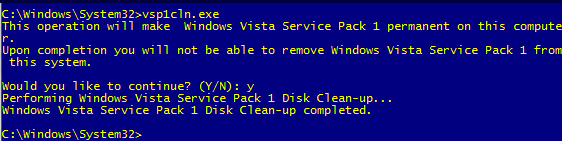
To run Windows Vista SP1 File Removal Tool, open a command prompt (Cmd) or simply press “Winkey + R” keyboard shortcut. Then enter the following command:
Vsp1cln.exe
Once cleaning process completed, several hundreds megabytes of disk space will be freed, with reports saying around 800 MB, depending on edition of Windows Vista installed. For advanced users,there are plenty of switches and options available to Vsp1cln.exe:
VSP1CLN.exe [/h] | [/o: offline Windows files folder path] [/quiet]
/? or /h: display Vsp1cln commands list. /o:[offline windows files folder path]: location of Windows Vista offline image that wants to remove RTM files /quiet: silent execution, no display. /verbose: display extra details.
There is no download needed, as Vsp1cln.exe comes included with SP1. Note that once ran, SP1 cannot be uninstalled. For those who really run out of disk space, Windows Vista Junk Cleaner script can also be used to delete unwanted files and reclaim more space.
LK is a technology writer for Tech Journey with background of system and network administrator. He has be documenting his experiences in digital and technology world for over 15 years.Connect with LK through Tech Journey on Facebook, Twitter or Google+.