Where is Thumbs.db in Vista?
Thumbs.db is a file existed and used in Windows XP, Windows Server 2003, and Mac OS X to store thumbnails cache of various graphics, pictures, photos or some documents and files such as those with JPEG, BMP, GIF, TIF, PDF and HTM extension when these files are viewed in Windows Explorer’s Thumbnail or Filmstrip view. Thumbnail preview of video files are also supported in Windows XP Media Center Edition, but the previews are stored in ehThumbs.db file. Thumbs.db database files are stored in each directory where thumbnails are created.
In Windows Vista, users will be unable to find Thumbs.db or ehThumbs.db files scatter around and place in many directories or folders again. Instead, Vista system will store all thumbnails and previews generated in a centralized thumbnail database. The centralized thumbnail database is located in the following folder:
\Users\[User Account Name]\AppData\Local\Microsoft\Windows\Explorer
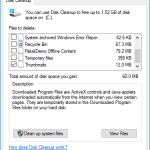
Inside the above folder, there are a few files with prefix thumbcache with filename has the format similar to thumbcache_xxxx.db. So you can no longer delete thumbs.db. To remove the thumbnail cache, simply use Disk Cleanup.
Related posts:
- How to Turn Off and Disable Thumbnail Preview in Vista
- Play and Test Drive Windows Vista Flip 3D Feature at Showusyourwow.msn.com
- Alternative to Use Windows Vista Flip 3D Feature in Windows XP with TopDesk
- Show, List Out and Identify All Shared Files and Folders in Windows Vista
- Vista IE7 Cache & Cookies Folder, Temp Directory and History Location


Vista writes thumbs.db files to network drives, and there's no option to disable it. The option that's supposed to disable it in Group Policy settings doesn't work. The generation of thumbs.db, desktop.ini, and album art is THE MOST IRRITATING SHIT EVER. If this doesn't disappear in Windows 7, there's no way in hell I'm going to pay anything for it.
CCleaner will clean the thumbcache
Yes I do know what I'm talking about, just as the author of this article said, thumbs.db files exist in Windows XP, they are not generated by windows Vista, but if you copy folders from a Windows XP machine to a Windows Vista machine any thumbs.db files in those folders will also be copied to the Vista machine, and although Vista does not normaly use thumbs.db files it does have the capacity to see them and use them if they are there, and it will do so if you inadvertantly copied them across from your XP machine.
Totaly Wrong About Mac os X. Thumbs.db are crap generated only by windows, not OS X.
Mac OS is unix based.
Have a look at /home/user/.thumbnails
“Please God help me keep my mouth shut till I know what I’m talking about”.
It is probably worth mentioning, if you copy folders over from a XP machine or if you upgraded from XP to Vista you may well find thumbs.db files in those folders.
Windows Vista will see these and use the images contained in them as folder icons in music album folders.
Under normal circumstances, when you update album art in Windows Media Player's library, Windows Vista will also update the folder icons on the folder containing that album, to match the WMP library. If you have any of these old thumbs.db files in the album folders, they will prevent the folder icons changing to match the new album art you applied in the WMP Library.