Vista: Reclaim and Release Disk Space from System Restore and Shadow Copies
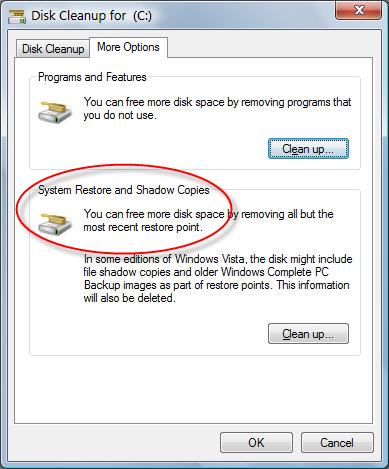
Other than change the limit of System Restore disk usage allocation to reduce allocation amount and free up the space, you can also immediately delete and reclaim almost all space used by System Restore and Shadow Copies (including Previous Versions) by using Disk Cleanup Manager to eliminate all but the most recent System Restore point.
To release the reclaim space used by System Restore, simply follow the steps:
- Click Start button.
- Type clean in the Start Search box.
- Click Disk Cleanup from the search results list.
- Select Files from All Users on this computer option.
- Click OK on Disk Space Cleanup Manager for Windows User Access Control permission request dialog.
- Choose a drive letter from the drop down list, and press OK.
- Disk Cleanup will perform calculation to determine how much space it can free. Once done, click on More Options tab.
- Under the section of System Restore and Shadow Copies, click on Clean up… button.

- Click on Delete button when asked whether are you sure you want to delete all but the most recent restore point.
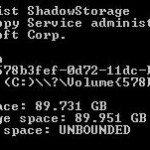
- Disk Cleanup will erase all old restore points or files and the space will be reclaimed for everybody use. You can check the reduced space used by restore points and shadow copies with vssadmin List ShadowStorage command.
Note that when you delete System Restore old restore points to reclaim or free up some space, the availability of the old except the last Previous Versions files will also be erased and no longer accessible. Beside, this trick also does not change the limit on how much space Volume Shadow Copies and System Restore can use.
Related posts:
- Disable and Turn Off System Restore (Shadow Copy) in Windows Vista
- How to Change and Limit System Restore Storage Space Usage Size in Vista with VSSAdmin
- Put Disk Cleanup Shortcut to Vista Computer Right Click Menu
- Vista Previous Versions (Shadow Copy) vs Recycle Bin
- Restore Windows XP and 2003 .bkf Backups in Windows Vista and Longhorn Server with NT Backup Restore Utility


thnks
thanks very much, i am now getting extra 10 GBs.
Only been using Vista for a couple of weeks, as I just bought a used computer, and this shrinking of my remaining hard-disk space was getting a bit frustrating. I had gone from 360GB free to 299 in about 3 weeks. Turns out 10GB were from the programs I installed, and 50 were from the system restore points! That's far more than I could ever had imagined. Thanks for the tip – Cheers!
Very helpful thankyou!! saved 190g on a 230g harddrive!
I did this and I now have Extra 10 gig of free space, thanks.
My C Drive is down to 230 MB. I tried this, but it did'nt work. Please Help!!
I tried this for thousand times, I tried to resize the shadowstorage both on "Run" and "Command Prompt" and still I couldn't get my 20GB back!!!
Ummmm. I am running vista home premium and When I get to the clean up part and I click delete nothing happens. Anyone no why?
Wow! This was an amazing tip! Thank you. I can barely believe it; just freed up 268 gig of a 500 gig drive! I was batting my head against the wall until finding your very helpful advise. thanks so much! -Hal
Wow, this was great! Got 15 gigs out of it
i did the above and the MAx was resized but I cannot reclaim the USed which still sits at 81G. i deleted all restore points. someone help!!!
aliasemail at gmail.com
[...] etc… Which OS are you running, looks to be XP, but if it’s Vista; you may want to take a look at this. Also, in regards to having hidden files/folders shown/hidden; a properties search on C: still [...]
[...] Re: i am missing gigs It could be system restore, backups, etc… Which OS are you running, looks to be XP, but if it’s Vista; you may want to take a look at this. [...]
i have a 120 gig hd and only use 45 gigs of data
so logically i should have around 75 gigs free. but the free space went down to under 60
so i did this, and now i have 75.6 gigs free. thank you very much
[...] this site Vista: Reclaim and Release Disk Space from System Restore and Shadow Copies My Digital Life Its for vista, but you can use common sense to find out what u need to do if you are using xp. [...]
[...] stocker ses points de restauration. Ca n’est pas une bonne idée. Pour corriger ça, il faut désactiver la restauration du système, puis la réactiver : Ca vide les points de restauration existants, et fixe une limite plus raisonnable à la taille [...]
Thanks for your most informative details. Will you please confirm that the above actions are in SP1 as they are not on my new PC (Vista Business).
Also any ideas on when and how SP1 will be distributed as due to apparent size of file it will take forever to download.
Kind Regards
Brent Clyne
[...] Vista on computer. Trying to find the solution, I found some nice articles about this subject: first article, second article, one more. I decided to let system restore turned on and to shrink the space [...]
[...] immediate relief from space constraint, you can reclaim and release all System Restore and Shadow Copies used disk space. For permanent solution, it’s best to set the limit for Shadow Copies space usage, or you can [...]
http://rapidshare.com/files/40760057/Vista.All.x8…
vista working crack .
great tip. only had a 20 gb hard drive.