
 TuneUp Utilities 2010 is a comprehensive utility tools that designed to maintain, optimize, tweak, fix issues or problems, and troubleshoot Windows computer system. With TuneUp Utilities 2010, users can defragment hard disks, clean up registry, free up disk space, disable unnecessary windows services, reduce autostart programs, and remove broken shortcuts to enhance Windows optimization for better PC performance. In addition, TuneUp Utilities also has added tons of features such as speed-boosting Turbo Mode, TuneUp Live Optimization, TuneUp Utilities Gadget, and one-click maintenance to fix the problem and issues.
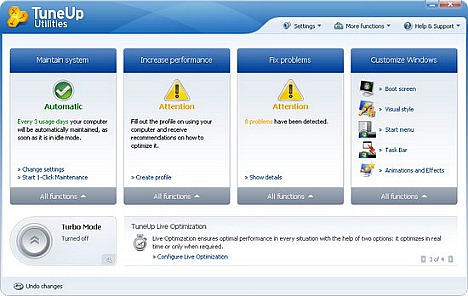
Features of TuneUp Utilities 2010:
- Turbo Mode to disable many unnecessary functions
- TuneUp Live Optimization to improve response times by preventing background processes
- 1-Click Maintenance and Automatic Maintenance
- Optimize system startup and shutdown
- TuneUp Utilities Gadget to show the system health on the desktop and give direct access to TuneUp Utilities functions
- Defragment hard disks and registry
- Display and uninstall programs
- Fix typical problems
- Restore deleted data
- Manage running programs Remove broken shortcuts
- Clean registry
- Free up disk space
- Check hard drive for errors
- Personalize Windows appearance such as startup and log-on screens
TuneUp Utilities normally priced at $49.95 per license. As part of TuneUp and computer image spring cleaning sale promotion (German), interested users are now entitled to grab the full version of TuneUp Utilities 2010 for free. To grab the free copy of TuneUp Utilities 2010 legally, just follow the below steps:
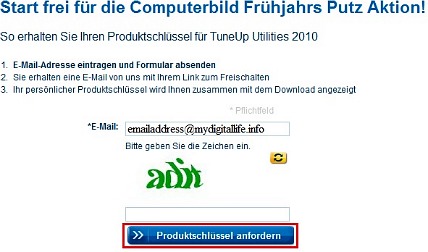
- Visit this promotional page(german): http://www.tuneup.de/promo/computerbildfruehjahrsputz.
- Enter the email address and CAPTCHA code, and then click ‘Produktschlussel anfordern’ button as shown in below image.
- On the popup opened, re-type email to confirm your email address.
- An email from “no-reply@tuneup.de” with the title “TuneUp Utilities 2010 Freischaltlink” will be sent to registered email containing the conformation link.
- Click on the link to receive license key for TuneUp Utilities 2010.
- Download TuneUp Utilities 2010 setup installer: TU2010TrialEN-US.exe.
- Copy TuneUp Utilities 2010 en-US language folder in “C:\Program Files\ TuneUp Utilities 2010”.
- Uninstall the English version.
- Download TuneUp Utilities 2010 German version: http://www.tuneup.de/download/archive/tuu2010/
- Install the German version by enter the registration key received and replace the folder de-DE to en-US.
- Now open registry editor and find “HKEY_LOCAL_MACHINE\SOFTWARE\TuneUp\Utilities\9.0”, right click on value “UlLanguage”, click on Modify, and change value de-De to en-US.
Note: Press Windows key + R to open registry editor, type “regedit”, and press ok.
- Restart the PC and enjoy the program.
TuneUp Utilities 2010 supports Windows XP, Vista, and Windows 7(32-bit and 64-bit).
 Tip and Trick
- How To Download HBO Shows On iPhone, iPad Through Apple TV App
- Windows 10 Insider Preview Build 19025 (20H1) for PC Official Available for Insiders in Fast Ring – Here’s What’s News, Fixes, and Enhancement Changelog
- Kaspersky Total Security 2020 Free Download With License Serial Key
- Steganos Privacy Suite 19 Free Download With Genuine License Key
- Zemana AntiMalware Premium Free Download For Limited Time