
Everybody sure has a bad experience of getting application crash out of sudden and didn’t restart automatically. You may not notice that the application has been stopped running until periodically go and check it, which is not effective at all as you may not able to detect the downtime in real time and restart it immediately, that eventually causes a significant system down time and bad consequence to end users. Now there is a freeware utility named as Application Monitor which will help to monitor and auto restart the application immediately if a system crash is detected.
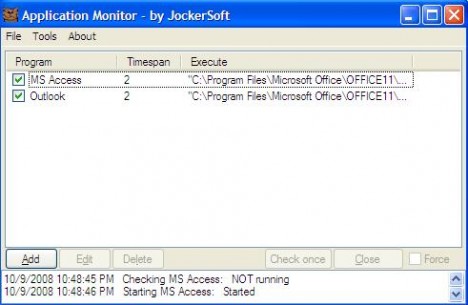
Application Monitor is a program that will periodically monitor any running applications. You may add as many applications as you like to monitor into the monitoring list. Only two things that need to be highlighted here in order to run this utility correctly:
1) In order to start monitoring for applications you have added, you must tick the checkbox. Otherwise it is just added to the list without monitoring.
2) The application you add to the monitoring list must be ended with *.exe, *.bat, *.scr and the extension must be in small letter.
The check time (with default setting of 2 minutes) is the monitoring interval which is used to configure how frequent you would like Application Monitor to monitor the pre-defined running applications. To make more powerful, it allows you to key in an email address so that an auto notification will be sent to you if there is any error to auto restart the monitored applications. All events happen during the monitoring period are output to log file, so you can view the log file to analyze how many times the application has been crashed and auto restarted.
Application Monitor is very helpful especially for those critical applications such as mail server, web server, database, client applications that resided in factory environment. It will definitely help you to auto restart any crash application without delay and thus ensure minimal or transparent down time to end users. The utility is compatible to run in Windows 98, Windows ME, Windows NT4 (service pack5), Windows 2000, Windows XP and Windows Vista. The only prerequisite here is you must have Microsoft .NET Framework 1.1 or higher installed in your system.
 Tip and Trick
- How To Download HBO Shows On iPhone, iPad Through Apple TV App
- Windows 10 Insider Preview Build 19025 (20H1) for PC Official Available for Insiders in Fast Ring – Here’s What’s News, Fixes, and Enhancement Changelog
- Kaspersky Total Security 2020 Free Download With License Serial Key
- Steganos Privacy Suite 19 Free Download With Genuine License Key
- Zemana AntiMalware Premium Free Download For Limited Time