
Take and Capture Screenshot Image on iPhone 3G or iPhone and iPod Touch 2.0 Without Screen Shot Utility
The original iPhone and iPod Touch with firmware OS version 1.x does not has a built-in utility to take or capture screenshot or screen snapshot image on iPhone or iPod Touch, unless user hacks or jailbreaks the iPhone or iPod to run third-party screenshot capture utility.
This is no longer the case in the new iPhone firmware OS software version 2.0. iPhone and iPod Touch user who upgrades and updates to firmware operating system v2.0, which among other features is support of App Store, together with iPhone 3G can enjoy the built-in screenshot capture feature newly added, making the taking screenshot images a very easy process, without the need to download and install any third party or additional applications.
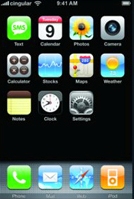
To capture the screen image or take a screenshot in iPhone 2.0, iPhone 3G (by default is using firmware software v 2.0), and iPod Touch 2.0, just press the Home button and Sleep/Wake (On/Off) key at the top of the mobile device simultaneously at the same time.
The Apple device screen will flash and an image will be automatically saved and stored in the iPhone or iPod Touch Camera Roll or photo album.
Update: The trick to take screen capture works also in iPhone 3G, 3Gs and 4.
Related posts:


tried it and worked right away. thanks. this has been helpful.
(tried it on 3gs)
i have iphone3gs with the update before the ios4 firmware and i can take screen shots. i dont have the ios4 firmware because i was told it made iphone 3's slow n crappy.
great thanks! this also works with iPhone 3GS
when i try to do that with my i phone 3gs it tells me to turn it off
thanks this is useful
[...] iPhone and iPod touch users can take screenshots without any third-party app by just simultaneously pressing the Home button and Sleep/Wake (On/Off) buttons, Android OS does [...]
Works on iPad as well. You beauty.
Thankyyyooouuuu sexxxxy
It's not Stupid Nicole .. I just took a snapshot of my Calendar List and emailed it to someone … You'll find lots of uses, and take that bubble gum out of your mouth. You'll think better
this is stupid! it jus takes pics of the ipod screen
Did it for 2 seconds and it worked!
Thanks for this useful tip. I was looking for a program to make screenshots. I was not aware of this trick. (even though it is there for over 2 years….)
Works perfectly. Thank you for the info!
I am figuring how can this be done on Ipod Touch 3. Would it be the same?
It works on iPhone 3.1.2 as well. Thanks
It works on the original iPhone as well. I got mine the very first day they came out and it does that too.
"…at the top of the mobile device simultaneously at the same time."
Just curious, doesn't that sound a bit redundant? Simultaneously means at the same time. Haha
this is easy.
i do this 2 times in a row to make sure it takes the picture, and it works every time!
uhhhhhhhhh……u guys r sooo stupid i cud smak u on the hed and u wudnt no!!
Wow. Seems like a lot of people have found out about this. Saw this funky trick on this website if you're feeling mischievous:
once taking an image of a friend's homepage on his iphone, hand the iphone back to him. he'll think it's hung or something like that. one of those cheap thrills.
great txs works fine
"Simultaneously" and "at the same time" both mean the exact same thing, so you're being very redundant by saying both phrases back-to-back.
It works. The trick is to release the buttons after 1-2 seconds.
If you continue holding down the buttons, it will shutdown. Keep hold down the buttons while it shutsdown and it will restart. Once you see the Apple logo you can release the buttons.
your reply helped. i was holding it down way to long and it kept wanting to shut off.
i did that on my itouch and it shut it off
Thankyou. I didnt know how I was doing that
[...] calendars, etc up-to-date, GPS tracking, contact searching, Powerpoint and iView viewing support, direct screenshot capturing, MobileMe support, among other things. Sadly, current owners (i.e. not 3G owners) have to buy the [...]
[...] for specified content, PowerPoint format viewing support, iWork format viewing support, direct screenshot capturing, MobileMe support, save images directly from a web page or email them to your iPhone and easily [...]