In addition, corporate customers with volume licensing agreement now also have to activate each of the computers in their network under Volume Activation with either Multiple Activation Keys (MAK) or on-premise volume license key-management service (KMS) host or server for networked environments with 25 or more machines.
Besides, OEM computer products preinstalled in factory is protected with System Locked Preinstallation (SLP 2.0) where BIOS is included with signed Windows Marker and SLIC table for instant activation. All these activation processes make use of Software Licensing Manager (SLMgr) module, also known as Windows Software Licensing Management Tool in Windows, a VBScript called slmgr.vbs that keeps track of licensing details.
SLMgr script allows users to query the current installation and see details about Windows installation and its activation and licensing status. SLMgr.vbs can also be used to input or change 25-character product key that determines which Windows OS edition allowed to install and activate, and which also tells the Setup program whether you’ve purchased a full or upgrade license. To activate online or against KMS server, users or Windows GUI need to make use of the SLMgr module too.
Most of the licensing operation in Windows can be done via graphical user interface. If you’re power user, you can access to all options, flags and settings of the SLMgr.vbs command script. To run the script, logon with an user account with administrator rights, and open an elevated Administrator Command Prompt window.
The syntax and options that are available for slmgr.vbs command:
Syntax of SLMgr
slmgr [machinename [username password]] [option]
machinename is local or remote computer or PC that wants to administer. By default, if no machine name, user name and password is specified, current local machine is assumed.
username is administrator equivalent user account to login into the computer.
password is password for the user account.
Example:
slmgr remote_computer administrator password -dli
Options of SLMgr
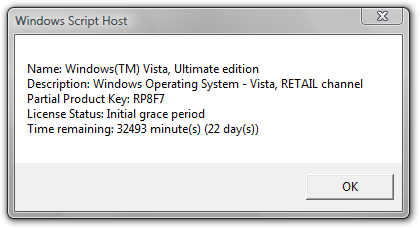
slmgr /dli (display the current license information of Windows with activation status and last 5 characters of partial product key)
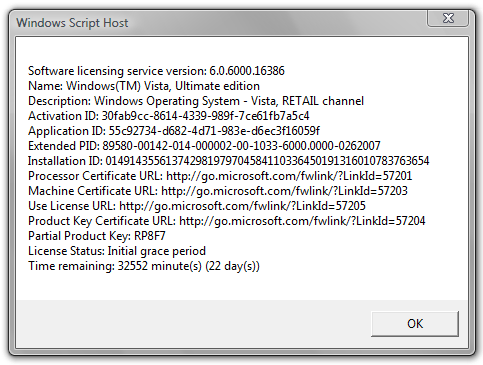
slmgr /dlv (stands for display license information, verbose, similar to -dli switch but with more detailed information)
slmgr /ipk <xxxxx-xxxxx-xxxxx-xxxxx-xxxxx> (enter a new or replace and change the current product key with the new product key supplied at xxxxx-xxxxx-xxxxx-xxxxx-xxxxx)
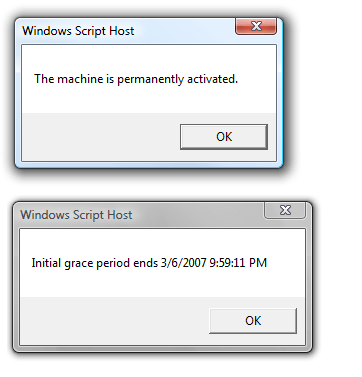
slmgr /xpr (shows expiration date of current license state if Windows Vista is not permanently activated)
slmgr /ato (activate Windows Vista license and product key against Microsoft’s server)
slmgr /upk (uninstall current installed product key and return license status back to trial state)
slgmr /cpky (clear the product key from the registry to prevent disclosure attacks)
slmgr /ilc <license file> (install license)
slmgr /rilc (re-install system license files)
slmgr /rearm (reset the licensing status and activation state of the machine)
slmgr /rearm-app (reset the licensing status of the given app)
slmgr /rearm-sku (reset the licensing status of the given SKU)
The following options used with offline activation such as through phone:
slmgr /dti (display installation ID for offline activation)
slmgr /atp <confirmation ID> (activate product with user-provided Confirmation ID)
SLMgr options for Volume Licensing Activation Using KMS (Key Management Service):
slmgr /skms activationservername
slmgr /sprt <port>
slmgr /skms activationservername:port (set the KMS server and the port used for KMS activation for Windows Vista Business edition and Windows Vista Enterprise edition)
For example:
slmgr /skms 192.168.1.1:8888
Or:
slmgr /skms KMSHost:8090
slmgr /ckms (clear the name of KMS server used to default and port to default)
slmgr /skms-domain <FQDN> (set the specific DNS domain in which all KMS SRV records can be found)
slmgr /ckms-domain (clear the specific DNS domain in which all KMS SRV records can be found)
slmgr /skhc (enable KMS host caching)
slmgr /ckhc (disable KMS host caching)
slmgr /sai <activation interval> (sets the interval in minutes for unactivated clients to attempt KMS connection.)
slmgr /sri <activation interval> (sets the renewal interval in minutes for activated clients to attempt KMS connection)
slmgr /sdns (enable DNS publishing by the KMS host)
slmgr /cdns (disable DNS publishing by the KMS host)
slmgr /spri (set the KMS priority to normal)
slmgr /cpri (set the KMS priority to low)
slmgr /act-type (set a value in the registry that limits volume activation to a single type: 1 for Active Directory; 2 for KMS activation; 3 for token-based activation; 0 for any activation type)
SLMgr Options for Active Directory-based Activation:
slmgr /ad-activation-online <Product Key> (collect Active Directory data and initiates Active Directory forest activation using the credentials that the command prompt is running)
slmgr /ad-activation-get-IID <Product Key> (start Active Directory forest activation in phone mode)
slmgr /ao-list (display all of the activation objects that are available to the local computer)
slmgr /del-ao <AO_DN> (delete the specified activation object from the forest)
Note: If when you enter slmgr command and an error returns that ‘SLMgr’ is not a recognized internal or external command, the cause is due to \Windows\System32 directory is not inside your environment’s path. Simply type the full path of (assuming C: is Windows volume) C:\Windows\System32\slmgr, or change directory to %WinDir%\System32 before issuing the SLMgr command.
LK is a technology writer for Tech Journey with background of system and network administrator. He has be documenting his experiences in digital and technology world for over 15 years.Connect with LK through Tech Journey on Facebook, Twitter or Google+.