
Previously we mentioned about FoxArc, Greenshot and Lightscreen that are able to capture screen shots in simple way, but in case you are looking for more feature-rich screen capturing tool, here is a good alternative that you can consider. Named as Screenpresso, it is a free utility that being enhanced with multiple capturing effects and history functions to be able retain all previous snapshots suitable for various applications.
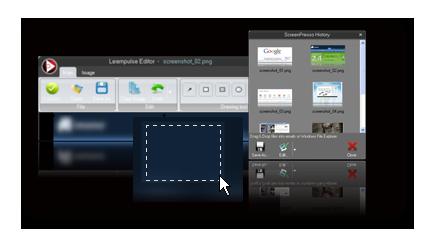
Once download the tool, there are options to either install it or run it directly. Similarly to other utilities, it will stay at system tray ready to be used and right clicking on the icon will allow users to configure initial settings such as default captured image format (in jpg, bmp, gif or png), filename (with numbering or date), image resizing and effect customization and many more. Besides, it enables screenshot region to be defined by hotkey combination, for instances: Ctrl + Shift + Print will turn on autoscroll to fit all the contents without being limited by display screen, Ctrl + Print will capture full screen and etc. One great feature that worth to be highlighted here is the ability to retain all the previous snapshots without the need to intentionally save them for reference or retrieval. Furthermore, it has built-in editor that can further add text, highlight, modify or add effect to the images before dragging and dropping them directly into email clients or sent to twitter for sharing.
Consumed around 2.8MB of your hard disk space, Screenpresso is compatible with Windows 2003, XP, Vista and even Windows 7 in both 32 and 64-bit version.
 Tip and Trick
- How To Download HBO Shows On iPhone, iPad Through Apple TV App
- Windows 10 Insider Preview Build 19025 (20H1) for PC Official Available for Insiders in Fast Ring – Here’s What’s News, Fixes, and Enhancement Changelog
- Kaspersky Total Security 2020 Free Download With License Serial Key
- Steganos Privacy Suite 19 Free Download With Genuine License Key
- Zemana AntiMalware Premium Free Download For Limited Time