
Moderator is a WordPress plugin with associated desktop application that is built by using Adobe AIR. The main function of Moderator is to allow the user to manage the blog comments from their desktop without to go to moderation page as it is at the user desktop.
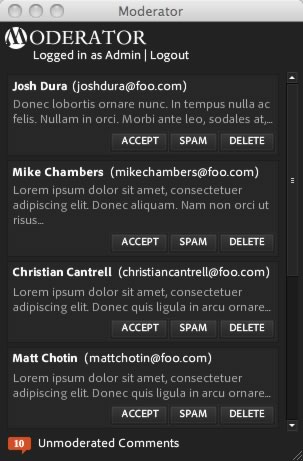
Some of the features of Moderators includes as below:
- Viewing unmoderated comments.
- Dock and system tray notifications of the number of unmoderated comments.
- Accept, delete or spam comments from within the desktop client.
- Close application window or minimize it to the system tray while running.
- Shows the Gravatar icons for the user who posted the comment.
Currently, Moderator supports Mac and Windows while support for Linux is in beta. To run it, WordPress version 2.6+ is required as well as Adobe AIR 1.1.
The installation of Moderator as below:
- Download the current plugin bundle moderator_plugin.zip.
- Unzip the contents of the archive and place them in WordPress install directory under {wordpress install}/wp-content/plugins. After that, a directory called ‘moderator’ will be created in the plugins folder.
- Login to administration panel, and go to the Plugins page. Activate the Moderator plugin by clicking on the ‘Activate’ link in the entry for this plugin.
- Now that the plugin is activated, go to the Settings tab and select the Moderator admin page. Follow the instructions on that page to install the desktop client.
 Tip and Trick
- How To Download HBO Shows On iPhone, iPad Through Apple TV App
- Windows 10 Insider Preview Build 19025 (20H1) for PC Official Available for Insiders in Fast Ring – Here’s What’s News, Fixes, and Enhancement Changelog
- Kaspersky Total Security 2020 Free Download With License Serial Key
- Steganos Privacy Suite 19 Free Download With Genuine License Key
- Zemana AntiMalware Premium Free Download For Limited Time