Dec 14, 2006
MDL Editorial Team

KMS Crack Method to Activate Windows Vista Business or Enterprise Edition with Local Spoof KMS Server

If you intend to activate Windows Vista against a KMS server (Enterprise or Business edition only), but having a hard time to find a working KMS (Key Management Service) server that is public available on the Internet, it’s possible to install and set up a spoofed KMS host. This tutorial is a complete guide to properly activate your Windows Vista with your own local KMS server with pre-built and pre-installed activated Windows Vista KMS as VMWare virtual appliance image, without the need to install a KMS yourself.

The following trick instructions incorporate hack that will prevent the time from changing on the spoofed kms server virtual machine image (the KMS inside the image has n count of 41, more than exceed the required limit of 25 for the KMS to start activating the connected Vista PCs), thus ensuring that there will be always 41 activated computers registered in the KMS whenever your copy of Windows Vista try to activate and reactivate. Else the KMS will reduce the n count (the connected Vista clients) by 1 with a Vista computer doesn’t contact or call back to the KMS after 30 days, render the KMS useless as the n count will fall below 25 which means no activation will be done, unless you share out the KMS to the public via Internet.

Update: Now there is downsize and streamline version of mini Vista KMS VM image with smaller download size.

  1. Install Windows Vista Business edition using the valid product key such as 0UNW0-XXXXX-XXXXX-XXXXX-XXXXX or K2T8M-XXXXX-XXXXX-XXXXX-XXXXX or KTNP5-XXXXX-XXXXX-XXXXX-XXXXX.
  2. Once Windows Vista is installed, install VMWare Player or VMware Workstation.
  3. Download Microsoft.Windows.Vista.Local.Activation.Server-MelindaGates torrent which contains a spoofed KMS server VM image that are activated and has 41 clients connected on the KMS already to bypass the minimum clients limit (Microsoft.Windows.Vista.Local.Activation.Server-MelindaGates.3572011.TPB.torrent). You will need BT client to download the VMWare image from the torrent.
  4. Extract the Windows Vista KMS image downloaded.
  5. Open to edit the file “Windows Vista (experimental).vmx” located in the extracted folder in any text editor. Add the following few lines to the configuration file:tools.synchronize.continue=FALSE
    tools.synchronize.restore=FALSE
    tools.synchronize.resume.disk=FALSE
    tools.synchronize.shrink=FALSE
    rtc.startTime = “1164286430″

    tools.syncTime = “FALSE”
    tools.synchronize.continue=FALSE
    tools.synchronize.restore=FALSE
    tools.synchronize.resume.disk=FALSE
    tools.synchronize.shrink=FALSE
    rtc.startTime=1165659600

    Or, you can download a already modified and patched Windows Vista (experimental).vmx with required settings to replace the original VMX file.

  6. Save the edit .vxm file and exit the text editor.
  7. Disconnect from Internet or unplug from the router.
  8. Reboot and restart the computer.
  9. Once computer boot up, open VMWare software you installed, and choose to open (not run) the Vista KMS server image downloaded.
  10. On the right side of the screen, locate the word ‘Ethernet’, and then double click on it. In the option, choose Host only. (You can select Bridged mode if you like to share the KMS server with other computers in the network for activation purpose).
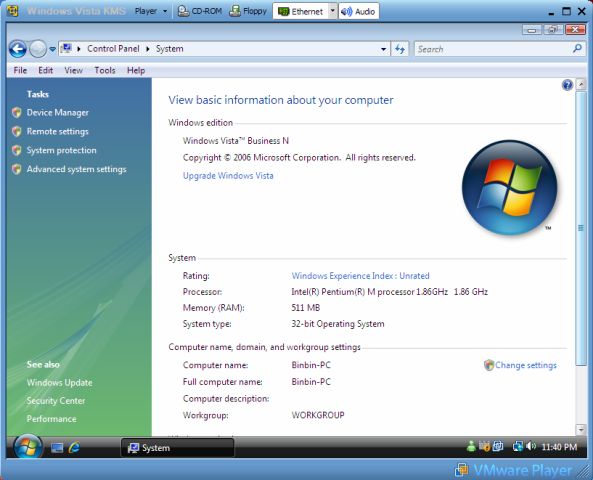
  11. Then start the VMWare server to load the Vista KMS server.Vista KM VMWare image
    VMWare Player loading spoofed KMS server.
  12. Optionally, disable Windows Firewall in Windows Vista client (your own Vista installation that need to be activated) if you facing any problem.
  13. In the VMWare virtual server environment, disable the KMS server firewall too, and then reboot the VMWare KMS server.
  14. Determine the IP address of the KMS server in VMware virtual machine, by opening command prompt and execute ‘ipconfig’. Note that the IP addresses of your Windows Vista computer and Vista KMS server have to be located on the same subnet allowed by both subnet masks (e.g 192.168.1.1 ad 192.168.1.2 with subnet mask set to 255.255.255.0). You can check if your computer is able to communicate with KMS server by pinging the IP address of the KMS server. If server is unreachable (ping lost), change the IP address of the KMS server or your Vista computer to be in the same subnet.
  15. Right click on Command Prompt icon and choose “Run as Admin” to open elevated command prompt.
  16. Key in the following command:slmgr -skms <replaced with kms server IP address>

    slmgr -ato

    or (if above have problem)

    cscript c:\windows\system32\slmgr.vbs -skms <replaced with kms server IP address>

    cscript c:\windows\system32\slmgr.vbs -ato

  17. Windows Vista should be activated with visual confirmation.
  18. You can verify the activation with the following command at Command Prompt.slmgr -dlv

    or

    cscript c:\windows\system32\slmgr.vbs -dlv

    or

    slmgr -xpr (will show permanently activated)

    or

    cscript c:\windows\system32\slmgr.vbs -xpr (will show permanently activated)

  19. Stop the VMWare image if you like, but remember to start the KMS server again after 6 months for re-activation.

Related posts:

  1. Create and Setup Your Own Windows Vista KMS Server for Local Self Activation
  2. Hack to Activate Windows Vista with VLK Product Key with Patched KMS Server
  3. Try Out and Install Windows Vista in Virtual Machine with Virtual PC 2007 and VMWare Server
  4. Windows Vista and Longhorn Server Genuine Windows Product Activation and Validation Tough to Crack with Software Protection Platform
  5. Permanent Method to Crack WGA and Patch Windows XP (inc MCE) or 2003 as Genuine

40 Comments

  • Hey i think iv solved da problem

    simply GO 2 SAFE MODE THEN 4RM THERE GO 2 SYSTEM RESTORE

  • NOTICE: USEFUL INFORMATION FOR THOSE WHO USE THIS FOR EDUCATIONAL PURPOSES:

    First and foremost, we'd like to report one of our important findings to this.

    If you load any kind of image onto the *free* version of VMWare (ie the VMWare Player), the various "syncTime" commands listed in the article will not work.

    What happens is that the player or something will synchronize the time and date with the one on your computer, irregardless of whether the "syncTime" commands are being placed there or not.

    Probably as a result in many of you guys' part in trying to activate, the KMS server drops its computer count to Zero upon seeing that the date was advanced to 2009, and when you guys tried to activate, it gave the resulting "license count insufficient" error or thereof.

    We finally installed the paid version of VMWare Workstation, included the "syncTime" coding, and the clock on our Vista guest OS didn't go back.

    (but alas, the damage has been done on our side and we have to purchase new CALs to add on to our KMS. Whoops in part to this poor administrator here)

    P.S.: We ensured everything was legit.

    Cheers,

    Dave

  • [...] format your hard drive and install fresh Windows Vista again, activate it with various crack or workaround, and then remember the point 1 [...]

  • i have vista installed already with the activation code put in. Is there any work around it so that i can crack mny vista product as the timer keeps poping up.

  • Windows Vista Ativação Automática / Windows Vista Automatic Activation:

    Esqueça toda complicação de ter que mudar as datas e o Setup do seu PC.

    Com apenas 3 MB de tamanho, este programa ativa o Windows Vista automaticamente.

    Não precisa ser um hack nem ter experiencia, o programa faz tudo sozinho!

    Simples, rápido e fácil.

  • Windows Vista Ativa

  • Thanx Its really cooool.

  • Paradox Vista Activation is most easy

    Go to nilland.com and search ODO4Nigmae

  • Linux Linux Linux forget about that shit.

  • Perfect but where can i download this files(vista RTM crack.exe) and (Timestop.sys)

  • The time won't freeze!!!!11!

  • The vista keys are to short, wiil some body put full keys up thanks

  • Windows Vista Business Edition

    Crack Instructions

    requires (vista RTM crack.exe) and (Timestop.sys) files

    STEP 1: Ensure that you are disconnected from the internet

    Set BIOS date to year 2099

    STEP 2: Install Vista Business Edition with no product key entered.

    STEP 3: Change date back to Today and disconnect the syncronization with Internet Time

    STEP 4: Right click "Vista RTM Crack.exe" and run as Administrator

    Allow Computer to Restart.

    STEP 5: A message should appear, click Finish. Connect to Internet.

    STEP 6: Run "Command Prompt" as Adminstrator

    type "slmgr.vbs -ipk YFKBB-PQJJV-G996G-VWGXY-2V3X8

    Message Appears "Installed product key…"

    click OK

    type "slmgr.vbs -skms kms.vbs.net.cn"

    Message Appears "Key Management Service machine …"

    type "slmgr.vbs -ato"

    Message Appears "Activation was successfull"

  • Hi!

    The command slmgr.vbs -ato give the following error: 0xC004F041. Means that the KMS server isn't activated, how can I solve this? I used a Vm Jacked-KMS-Serv with the dat on 24/11/06…

  • According to http://www.mydigitallife.info/2006/12/25/streamli…

    1. Users need an administrator account to log on to Windows Vista KMS. The administrator account in BinBin with password as 123. The password is for remote control or remote desktop access, and disable automatic logon in Windows Vista can further save resources.

  • At me like as for shawn KMS server asked for password when it launches. KMS server wil be downloaded from arhive named as

    12.09.06.Vista.KMS.Server.MyDigitalLife.rar

    p.s. sorry for my bad english

  • Shawn, the KMS is your self-installed or downloaded?

  • My KMS server is asking for a password when it launches. i.e. like the login screen for vista itself.

    please help !

  • For some reason, entering the IP address here:

    -skms

    doesn't work

    -skms (KMS server's IP)

    gives me a syntax error that I can't seem to resolve.

  • My laptop when into "limited" mode, so I couldn't open a cmd window to change my mks server address. WHat I ended up doing is rebooted into safe mode. Opened regedit and went to HEY_LOCAL_MACHINESOFTWARE|MicrosoftWindows NTCurrentVersionSL

    I created a new string value under SL called – KeyManagementServerName

    For the Value data: I entered my KMS server IP.

    Rebooted the laptop and selected the activate online. A few mins later everything was working good again.

    Hope this helps some.

  • disable internet sync in vista then run the vmware image

    I activated enterprise on two machines fine

    also make sure you add the lines with a text editor mentioned above

  • disable internet sync in vista then try running the vmware image if you are having trouble

    I used the melinda gates on two machines and it works perfect

  • [...] KMS Crack Method to Activate Windows Vista Business or Enterprise Edition with Local Spoof KMS Server ยป My Digital Life [...]

  • Try disabling the firewall on both machines it should work. OR change ports

  • This sucks…can't get the activation to work using the Melindagates method. Both the guest os and host os can exchange files etc but for some reason I get a "RPC not found" error…wtf.

  • [...] The hack to use Windows Vista KMS activation method, including running a local KMS as a workaround to bypass and crack Windows Vista activation is one of the most reliable, popular and nearly perfect crack method with higher chance of success and minimal failure rate against any Windows Vista validation. Hackers have released a streamlined, downsized and miniature version of mini KMS server virtual machine or VMWare appliance image where the download size is only about 300 MB, compared with 1.5 GB of Microsoft.Windows.Vista.Local.Activation.Server-MelindaGates VMWare image. The main advantage and benefit of the mini KMS server is the minimal consumption of system resources such as memory and hard disk space, thus enable the KMS service to be ran at a machine with lower system specifications. So you can keep this KMS virtual image and boot it in any VMWare virtual machine as and when activation or reactivation is required. [...]

  • If VMWare machine won't reset back the time to original time, try to use following settings:

    tools.syncTime = "FALSE"

    tools.synchronize.continue=FALSE

    tools.synchronize.restore=FALSE

    tools.synchronize.resume.disk=FALSE

    tools.synchronize.shrink=FALSE

    rtc.startTime=1165659600

  • new kms server

    VBS.NET.CN:7199

  • [...] Hackers are going all out to crack Windows Vista activation procedure which is enhanced by Software Protection Platform (SPP). Until now, Microsoft has an upper hand, with no permanent or foolproof ways to crack or bypass Windows Vista activation request emerged. Instead, various workarounds and tricks to bypass, skip, delay, disable or spoof Vista activation has been suggestion, to various degree of success, such as extend evaluation period, rearm method, install Vista in future year, ‘frankenbuild’ Vista by replacing RTM build WPA files with RC build files, activate against spoofed KMS server, or run and activate Vista with own local KMS server and etc. Now, there is new crack method that able to permanently stop the countdown timer of time left to activate Windows Vista, effectively running Vista OS in full functionality evaluation mode forever. [...]

  • hey here are my settings, it worked for me :

    add these to vmware config file

    rtc.startTime = "1164286430"

    tools.syncTime = false

    time.synchronize.continue = false

    time.synchronize.restore = false

    time.synchronize.resume.disk = false

    time.synchronize.resume.memory = false

    time.synchronize.shrink = false

    then open the file in vmware but dont start it yet and edit the settings of your vmware and remove the ethernet and start your vmware os

    then enter the bios (by pressing F2) and set the date to "23/11/2006" (dd/mm/yyyy) then save changes and restart the virtual os after that, login to the virtual pc and disable "internet time syncronization" and also the firewall of the vmware OS(virtual pc) after you did this again goto the settings of your vmware os and add ethernet to your pc and enjoy the free activations for the rest of your life

  • Yeah, using the wrong parameters in the vmx-file of course can't work. Within 30 days all is good.(with or without vmx config).Now it's over – or not? A question: Why are you try to de-synchronize (vmware)tools? Didn't you think it's better de-sync the TIME? If you agree with that you should use this variables:

    time.synchronize.continue = "FALSE"

    time.synchronize.restore = "FALSE"

    time.synchronize.resume.disk = "FALSE"

    time.synchronize.resume.memory = "FALSE"

    time.synchronize.shrink = "FALSE"

    greetz from Shadowchaser

  • [...] Reinstall Windows Vista. Straight forward method, format your hard drive and install fresh Windows Vista again, activate it with various crack or workaround, and then remember the point 1 above. [...]

  • uu, try to use the following:

    tools.syncTime = "FALSE"

    tools.synchronize.continue=FALSE

    tools.synchronize.restore=FALSE

    tools.synchronize.resume.disk=FALSE

    tools.synchronize.shrink=FALSE

    rtc.startTime=1164450000

    Let us know if it works so that I can update accordingly. Also please make sure the "" is type correctly, as WordPress will modify it to another character, delete and type " yourself.

  • Returned count is insufficient…i copy pasted the lines in the file correctly, anything else not written?

  • [...] As mentioned previously that Microsoft intends to roll out and install a new validation update on Windows Vista via Windows Update, Microsoft is indeed very fast and has started to release Windows Vista Validation Update (KB929391) via not only Windows Update or Microsoft Update, but also through Automatic Updates feature of Windows Vista, in the category of Critical Updates. So if you enable Automatic Updates to automatically download and install all critical updates for you, the Windows Genuine Advantage (WGA) validation update would have been installed, and will most likely validated and detected your copy of Windows Vista is not genuine, if you using known activation workarounds of ‘frankenbuild’ activated Vista system or spoofed KMS server. If you’re using pirated Windows Vista that has been hacked or cracked or bypassed activation, this update will detect that the Vista is not genuine, and de-activate or un-activate any ‘activation’ been done. You will get a warning message of “Windows Validation: Your copy of windows is not valid, Windows vista will be running in limited mode with less features.” The Windows Vista will also lose some nice features with Windows Aero disabled, so do the Aero theme, and the user is required to activate the Windows Vista again within 30 days grace period (some users reported they only have 3 days!) [...]

  • Follow the above step to freeze the time of virtual machine. Else it will reduce the n count when time passed.

  • Hi…i always get the error not enought count i have the image of melinda what can i do?

  • [...] For tutorial and step-by-step guide on how to using the Vista KMS VMware image file to activate your copy of Windows Vista, visit this article. [...]

Leave a comment

Notify me of followup comments via e-mail. You can also subscribe without commenting.

Subscribe

Free email subscriptions
Get latest updates in email for free:

Translate This Page