
Microsoft has released an update to Windows 7 Activation Technologies (KB971033), which improves its effectiveness and success rate to detect more than 70 known and potentially dangerous activation bypasses, cracks or exploits.
For Windows 7 users who are using counterfeit or pirated copies of Windows 7 on the machine, the KB971033 can potentially causing havoc to the computer system, including frequent and persistent nag message on screen to remind users to go genuine.
If you’re afraid that your system may be wrongly labeled as non-genuine and illegitmate, the best and recommended approach is not to install KB970133 update, which delivers that WATu (WAT update). For user who has installed the KB970133, here’s the guide to remove and uninstall the KB970133 update package, as the KB970133 is not an mandatory update. The procedure is similar to how any updates and hotfixes can be removed.
- Go to Control Panel -> Programs -> Programs and Features -> Uninstall a program.
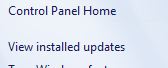
- Click on the View Installed Updates on the left pane.
- Select and highlight the Update for Microsoft Windows (KB971033).
- Click on Uninstall.
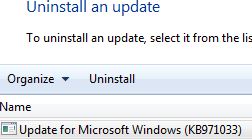
- The K971033 will be deleted from the system.
The package can also be uninstalled through elevated command prompt with administrator privileges:
x86 (32-bit) system:
dism /online /remove-package /PackageName:Microsoft-Windows-Security-WindowsActivationTechnologies-Package~31bf3856ad364e35~x86~~7.1.7600.16395
x64 (64-bit) system:
dism /online /remove-package /PackageName:Microsoft-Windows-Security-WindowsActivationTechnologies-Package~31bf3856ad364e35~amd64~~7.1.7600.16395
Note that even your system has been flagged as non-genuine, removing the KB971033 WAT update won’t make the system genuine again. The best workaround for non-genuine system is to remove any crack, hack or loader that been the source of being flagged by WATu, then perform a rearm (reset the remaining rearm count if all rearms allowed is been used up or depleted). If you have a valid and legitimate product key, change the product key. Then, perform a force validation re-check to validate the system again by running the following command in elevated command prompt with administrator rights:
%SystemRoot%\system32\Wat\WatAdminSvc.exe /run
Validation takes 2-5 minutes to complete, and you may have to log out or reboot for all nags to disappear.
Other alternative is to do a system restore to a restore point prior to KB971033 been installed. Or, simply remove the failed crack or loader, and install a new crack or OEM BIOS loader for Windows 7 which works, and then re-validate the system with command above.
Anyway, Windows 7 SP1 is going to include KB971033 by default. By then, KB971033 WAT update is unlikely to be separable nor uninstallable. However, users can choose to disable WATu files without uninstalling with the following command (run in elevated command prompt with administrator privileges):
takeown /f "%windir%\System32\Wat\*" && icacls "%windir%\System32\Wat\*" /deny *S-1-1-0:F
And, delete the scheduled tasks used by WAT to run validation checks. WATu uses Task Shedualer to validate the system right after reboot when first installed and again every 90 days. To disable the associated tasks, run the following commands in elevated command prompt with administrator rights:
schtasks /change /disable /tn "\Microsoft\Windows\Windows Activation Technologies\ValidationTask" && schtasks /change /disable /tn "\Microsoft\Windows\Windows Activation Technologies\ValidationTaskDeadline"
 Tip and Trick
- How To Download HBO Shows On iPhone, iPad Through Apple TV App
- Windows 10 Insider Preview Build 19025 (20H1) for PC Official Available for Insiders in Fast Ring – Here’s What’s News, Fixes, and Enhancement Changelog
- Kaspersky Total Security 2020 Free Download With License Serial Key
- Steganos Privacy Suite 19 Free Download With Genuine License Key
- Zemana AntiMalware Premium Free Download For Limited Time