
How to Turn On and Enable Aero in Windows 7 (Enable Aero Peek)
Windows Aero features in Windows 7 has been greatly enhanced and improved with new features such as Aero Peek. Without Windows Aero Glass Transparency effect, the many premium user interface (UI) goodies and extravaganza visual experience such as windows with translucent glass design and new windows colors in Windows 7 won’t be enjoyed by the system users.
In most circumstance, if the PC’s display card satisfy the minimum requirement to run Windows Aero, which appears to be not much different to what’s required in Windows Vista – 1 GHz 32-bit (x86) or 64-bit (x64) processor, 1 GB (gigabyte) of RAM memory and a DirectX 9 compatible GPU with a minimum of 128 MB of Video RAM, installed with Windows Display Driver Model (WDDM) driver – Windows 7 will automatically enable and turn on Aero upon installation.
However, in some scenarios, Windows Aero may not be turned on, or is having problem to enable. The scenarios include no supported video driver been found during installation, and after updating the VGA graphic display card driver, Windows 7 does not automatically enable Aero Glass effect. Or, Windows 7 is installed on a computer which barely meets the minimum requirement, and Windows 7 has a hard time deciding that it’s indeed able to run Windows 7 Aero without problem.
Tip: Another way to know if your Windows 7 system supports Aero or not is to look at Windows Experience Index score. The score (both base score and subscore for graphics component) should be equal or higher than 3.0 for Aero to work. To view your Windows Experience Index, go to Control Panel -> System and Security -> System, then click on “Windows Experience Index”.
Whatever the cause, here is the easy way to fix all issues, bugs or problems related to Windows Aero, and then turn on and enable the Windows Aero feature in Windows 7, thanks to a new troubleshooting task tool added in Windows 7.
To display Aero effects such as transparency in Windows 7, follow these steps:
- Make sure that Windows Experience Index has been calculated and computed.
- Click on Start menu.
- Type the following text into the Start Search box:
Aero
- Click on a search result listing under Control Panel group that named as the following:
Find and fix problems with transparency and other visual effects
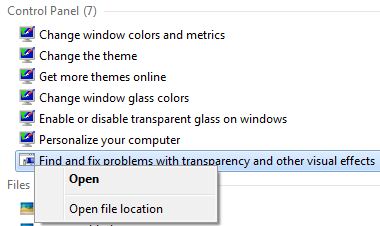
Trick: If you don’t see “Find and fix problems with transparency and other visual effects” in the search results, click on Control Panel to see all Aero related items in Control Panel.
- An “Aero – Troubleshoot computer problems” wizard dialog will appear. Click on Next button.
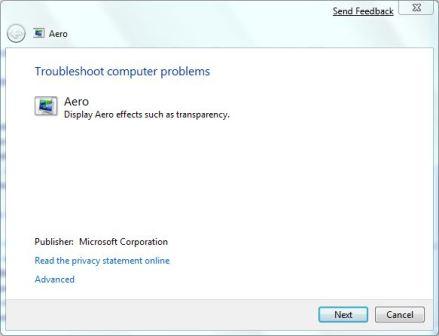
- The troubleshooting wizard will try to detect any problem by running a series of checks against various components required to make Aero works and running, such as video memory, Desktop Windows Manager (DWM) service, color depth, theme, power settings and etc. At the end of the analysis, the wizard will attempt to fix the issues related to Aero service and restart the Aero feature.
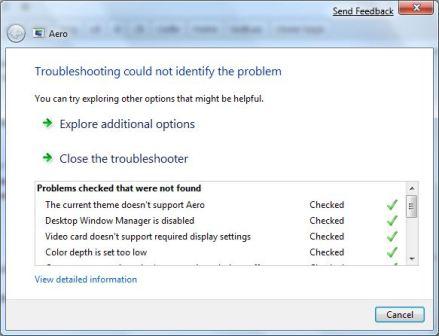
Tip: If there is still items that are marked with red cross which indicates is the problems that prevent Aero from working properly, fix the issues and then rerun the “Find and fix problems with transparency and other visual effects” troubleshooting wizard again.
Tip: To create a shortcut to ‘Find and fix problems with transparency and other visual effects’, right click on it on search results, and then click on Open file location. On the “All Tasks” window opened, right click on Find and fix problems with transparency and other visual effects again, and select Create Shortcut to place the shortcut on desktop.
If everything fails, try the hack to force enable Windows Aero in Windows 7.
Related posts:
- Hack to Force Enable Aero in Windows 7
- Shortcuts to Enable and Disable Vista Aero Theme
- Aero Shake and Aero Peek Features in Windows 7
- Get and Enable Windows Vista Aero Glass Transparency Effect and Desktop Windows Manager (DWM)
- Force Enable Windows Aero Glass or WDM on Unsupported and WDDM-Incomptible Graphics Card
145 Comments
Pages: « Previous 1 2 3


i have follow your instruction.when i trobleshoot the problem it say,,,upgrade to window edition that includes the aero dekstop experience……what should i doo.this problem start after i reformat my pc.window 7 starter.i also cant change my dekstop themes.quick respons for this.dineshsanther@live.com
toink! as easy as that? thanks a lot!
Awesome it worked !
[...] 1: Disable Aero Peek (Englisch) 2: Turn on or enable Aero Peek (Englisch) 3: Forendiskussion Aero Peek gesperrt (Englisch) 4: Forendiskussion Aero Peek geht nicht [...]
YOU ARE ALL COMPLICATED, YUST TURN ON 2 SERVICES !
GO TO RUN, TYPE IN SERVICES.MSC
GO TO Desktop Window Manager Session Manager RIGHT CLICK ON IT AND THEN PROPERTIES, THEN AUTOMATIC, THEN START SERVICE, THEN APPLY
SAME THING IS WITH Theme SERVICE, AND THAT’S ALL
Thank you very much..it worked. Windows Desktop Manager was disabled. I restarted that and it worked.
Thanks again
Thanks a lot,
Very useful information, i have updated my “aero 3d” setting again thanks for every one working for information…….
hit start button
type aero
click on enable transparent glass
choose your glass color and transparency
that should enable most aero features.
right click “my computer”
click “properties”
click on “advanced system settings” in the left pane
click on “settings” under “performance” in the “advanced” tab
under “visual effects” click “adjust for best performance”
then you need to have the boxes checked to enable aero peek, enable desktop composition, enable transparent glass, enable use visual styles on windows and buttons.
all the other functions are just a waste of video memory. you can click “adjust for best appearance” if you think your computer has the power to do it.
hey thats is cool it really work thanks a loot realy thank you
))
it keepps trouble shotting that the mirror driver doesnt support aero and when i turned off the mirror driver and restarted my computer it didnt work this has happened before and i fixed it but i forgot how
awesome much. finally i can get it solve. thanks a million!
I’m with you! Finally a tutorial that works!
i have transparency in windows 7 home basic
It doesn't work on my windows.
when I try to detect my problem, In view information box doesn't show "check"
it shows "issue not present".
How can i fix this problem?
Now my com has superbar but it cann't pin other program except default program.
thanks
hai,
i am using windows 7 OS in my system. once by mistakenly i downloaded and appliyed windows XP theme at the time i loss my areo display and then i can't to change the XP theme and can't to get areo display.
-video card driver is upto date abdated.
-after troubleshooting i got two reasons
1.The current theme doesn't support Areo
2.Windows Desktop Manager is disabled
*i can't change the current theme
*I can't enable the WDM
pls advice me…………
thank you sooooooo much!!!!! i was getting worried that i had done somethign wrong and stuffed up my computer settings or something because the aero peek wasnt working and the minimise, maximise and close buttons were looking weird. but your solution fixed everythign automatically! thanks!!!
Thank you so much…. budy….
its really very helpfull information……
best regards,
this was so helpful!!
Thanks sooo much for this! ♥
HI, I'VE GOT A PROBLEM WITH "AERO PEEK"
LAPTOP INFO:
DELL CORE 2 DUO
RAM 4 GB
WIN 7 HOME PREMIUM 64 BITS
1st. I TRY THE TROUBLESHOOTING DETECTION WITH AERO & NO ONE'S PROBLEM DETECTED, MY GLASS EFECT ARE ENABLE, THE FLIP 3D WORKS (WIN key + TAB), ANIMATIONS IN TASK BAR WORKS & SIDE BAR GADGETS; BUT THE "AERO PEEK" NOT ENABLE.
PLEASE HELP.
ANOTHER WAY TO ENABLE THE PEEK? THANKS =D ¡¡¡¡
snxxxx
thx much appreciated everythings good now
If someone would tell me how to turn OFF all the annoying features of Aero (e.g., popup taskbar context menus), but still leave the transparent windows, I'd be so grateful…
it really worked
thanks microsoft team
THANKS YOU……………………
SO MUCH…………..
IT REALY WORK ON MY PC.
I LIKE IT………..
thanks this worked
thanks! it really worked!
Worked for me after having to do a repair install and Aero wasn't working. Thank you!
areo does not work,
please solved my prob…
video card does not work….
I have to do this every time I unplug my computer and I don't know how to make it so that it just stays transparent. It says that the only problem is "The current theme does not support Aero." When I change it to an Aero theme, it still disables the transparency when I unplug it from the battery. Do you know how I can fix that?
it worked…
thanks very much
i like it…
Thank you
Thank you very much for this fix…somehow, visiting a particular website with a Java applet managed to break my Aero settings. The troubleshooter was able to fix them easily.
It works ! Thanks a lot !
okay here are the steps:
1) Click on your Start Menu
2) Put in the Search Button and Type the word Aero and click Find and fix problems with transparency and other visual effects
3) Click on that and Click the button Next
4) There you have it! Your Welcome!!!
Sincereley, Nicky
I would also suggest changing your theme AFTER you do the windows experience index. 95% of the time when Aero wont enable automatically,it's because the theme you have doesn't support it. Choose an Aero theme and you should have Aero without hacking registry. The path is Start/control panel/appearance and personalization. good luck!
my says
the current theme does'nt support aero not fixed
desktop window manager is disabled detection
please help!!!!!!!!!!!
oh fucking thank you…. thank you so much!!!! i was frekaing out for a few minutes then
I am currently having trouble with windows 7 freezing up on start up on occasion and whild running games that take a lot of graphics power. The card is a 1 GB card so I know the card is more than powerful enough to do what I need it to do. My question is could the transperancy in Windows 7 play any roll init having trouble while it's starting up. I know it's a problem with the graphics card because the computer works fine untill I update my drivers for the graphics card.
Thanks you so much saved me man Thanks
thnx bro it's working dear
Dude, it worked great, i was scared as hell , and u saved my life bro (:
it didn't work
the problem started after changing my hard disk :S
is there any thing I can do? or should I take my PC to the Maintenance Center?
it worked great