
Gmail has added support for send mail through custom domain SMTP servers feature, which allows Gmail to send mail using custom “From:” of another email address as sender instead of default Gmail e-mail address (which include in Sender field and may be displayed as delivery on behalf of actual email address) that been used to send the message. With Send Mail As custom “From:” sender feature, recipients will not notice that the mail is sent from Gmail, but will be actual true identity of the external email address.
When configuring Gmail to send mail through Windows Live Hotmail outbound SMTP server using the recommended Hotmail SMTP settings as listed below, the settings doesn’t work and cannot pass Gmail verification.
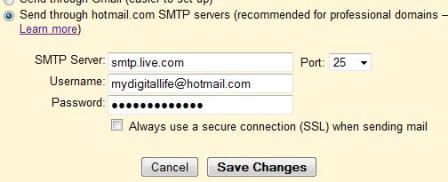
SMTP server: smtp.live.com
Port: 25
Username: [username]@hotmail.com
Password: [password]
Always use a secure connection (SSL) when sending mail: Yes (Check)
After adding above SMTP configuration settings for Hotmail in Gmail, the following error message is returned by Gmail:
Couldn’t reach server. Please double-check the server and port number.
Change the SMTP port to 587 also yields the same error result. When connecting at port 465, Gmail hangs a while when checking credentials, and then return the following error:
Your other email provider is responding too slowly. Please try again later, or contact the administrator of your other domain for further information.
It seems that there is problem or issue with Gmail, which cannot access and connect to smtp.live.com using SSL. Thus, in order to send mail as Hotmail identify in Gmail, user has to fallback to unsecured connection to port 25 of Windows Live Hotmail SMTP server.
Thus, the solution is to uncheck and untick the Always use a secure connection (SSL) when sending mail setting and make sure SMTP port is 25.
Of course, the insecure connection without SSL potentially opens a security vulnerability and leaves much to be desired.
 Tip and Trick
- How To Download HBO Shows On iPhone, iPad Through Apple TV App
- Windows 10 Insider Preview Build 19025 (20H1) for PC Official Available for Insiders in Fast Ring – Here’s What’s News, Fixes, and Enhancement Changelog
- Kaspersky Total Security 2020 Free Download With License Serial Key
- Steganos Privacy Suite 19 Free Download With Genuine License Key
- Zemana AntiMalware Premium Free Download For Limited Time