
May 4, 2009
SY Wong

How to Move the Menu Bar Above the Address Bar in IE8

Have you ever noticed that the menu bar in IE8 is placed below the address bar when comparing to IE6 or Firefox? If you would like to move IE8 menu bar to be appeared on top of address bar, you can do it with simple registry hack.
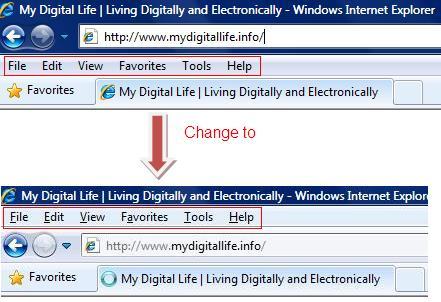
ie8menuabove

1. Open notepad.

2. Copy below string and paste it into notepad.

Windows Registry Editor Version 5.00
[HKEY_CURRENT_USER\Software\Microsoft\Internet Explorer\Toolbar\WebBrowser\]
"ITBar7Position"=dword:00000001

3. Save the file as” ie8_menuabove.reg” with Save as type is All Files.

4. Double click the registry file, continue with UAC prompt and click OK to confirm you wish to perform the action.

Once you completed the above steps, launch the new instance of IE and you will notice that the menu bar is now appeared above the address bar.

If you would like to revert the above change, follow below steps:

1. Copy below string and paste it into notepad

Windows Registry Editor Version 5.00
[HKEY_CURRENT_USER\Software\Microsoft\Internet Explorer\Toolbar\WebBrowser\]
"ITBar7Position"=dword:00000000

2. Save the file as “ie_belowmenu.reg” with Save as type is All Files

3. Double click the registry file, continue with UAC prompt and click OK to confirm that you wish to perform the action.

Related posts:

  1. How To Add Move or Copy To in Windows Explorer Right Click Context Menu in Windows Vista
  2. Unhide, Display and Show Classic Menus or Menu Bar in Internet Explorer 7
  3. Show Encrypt and Decrypt Files in Right Click Shortcut Menu in Windows Vista
  4. Put Disk Cleanup Shortcut to Vista Computer Right Click Menu
  5. Add Event Viewer Item to Computer’s Right Click Menu in Windows Vista/XP

14 Comments

  • [...] Force the Menu Bar to Display On Top of Navigation Bar and Address (URL) Bar [...]

  • Thx!

    Totally agree with bry, now I would nee the same to move the favorite in the same toolbar as the menu..

    Don't understand why MS keeps removing useful features at each "update/grade"..

  • hello nie ni I want to ask why I downloaded internet explorer 8 fitted in fitting my win xp kok kok dah donlod slesai cut no menubar and toolbar address bar y y knp bs love penjelasnny
    and returned in the mail y sha! maksaih

  • Ok guys this is a huge help for you.

    If you have followed this guide all you have to do is Click on start

    Then Run

    type in REGEDIT and hit enter

    Go to this location on the right hand side :

    HKEY_CURRENT_USERSoftwareMicrosoftInternet ExplorerToolbarWebBrowser

    Find itbar7position and right click change the value to 1

    There you go good as new

  • This is great for those workplaces that havent upgraded away from IE just yet.

    Speaking of web-area space, nothing beats

    Iron (Iron=Chrome without Google-spyware. And with adblock.ini).

  • now, if only we can get all the toolbars on one line…

    Why Microsoft wants you to view toolbars instead of the web is beyond me.

    If you use IE8 on a netbook, all you see is toolbars and now web!!!

  • hey thanks..worked great!!!

  • Thank you to the Admin, who has fixed the problem with the quotes, and posted an updated version of the string … so now the tweak works okay when you copy and paste.

  • I copied and pasted the code into notebook, but it did not work for me.

    Even though the message box said that the info had been merged successfully into the registry, no entry was written into the registry.

    So I entered the info manually into the registry, and it worked.

    I then exported the key from the registry, and studied both reg files carefully, loooking for maybe a typo or extra space.

    Lo and behold, the difference was the style of the quotes around ITBar7Position.

    Your quotes did not work, but mine were okay !

  • It didn't work here either. I'm using IE 8 with Windows XP x64 (using the 32-bit version of IE 8).

  • IT guy won't be denied, so I went and downloaded IE8 and tried again still doesn't work. I still don't have the "ITBar7Position" option in regedit, only ITBar7Layout I did notice a new line but one big thing I remember in Tech school was NEVER mess with the registry unless you know exactly what you are doing.

    Luckily I know what I am doing (most of the time LOL)

    I revert back to my original post, maybe this is a vista only trick.

  • I am assuming this only works on vista or you have to be sure to have IE 8 , I only have IE7 the registry patch doesn't work in my version . I tried to do it thru regedit and I do not have the “ITBar7Position” I only have ITbar7layout

    Oh well

  • If you use regedit and put it in manually it works.

  • hi

    i did what you explained above regarding the menu bar above the address bar but nothing happened.

    It said the file has been added to the rgistry but when i open IE 8 it is still the same

    please advise

Leave a comment

Notify me of followup comments via e-mail. You can also subscribe without commenting.

Subscribe

Free email subscriptions
Get latest updates in email for free:

Translate This Page