
Apr 17, 2010
My Digital Life Editorial Team

How to Get Rid Of (Turn Off or Disable) Google New “Always On” Everything Search Options Sidebar

Google is quietly conducting an experiment where the search options side-bar is automatically opened every time search results is shown. In current Google search results interface, which in fact has already been enhanced with the search options, the sidebar opens the left only when clicked.

The new Google interface with “always on” and always visible search options sidebar also features a new Google logo with more vibrant and more saturated colors. There are changes to the fonts, buttons, borders, size, spacing and styles too. Prominent icons now accompany each possible search options. In the sidebar, there may be options for Everything, Images, Video, News and More, which expands to more services. It also allows direct access to search tools such as filter by time, filter by visited or not visited pages, change the view to standard, wonder wheel or timeline, and change the search results to reflect page images, more or less shopping sites, page reviews or translated search, etc.
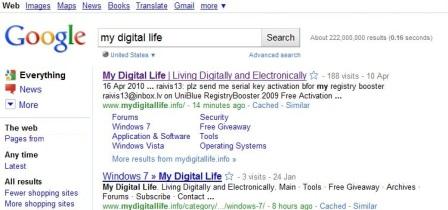
Google Search with Always On Search Options Sidebar
New “experimental” Google search results page with always-on permanently shown search options sidebar
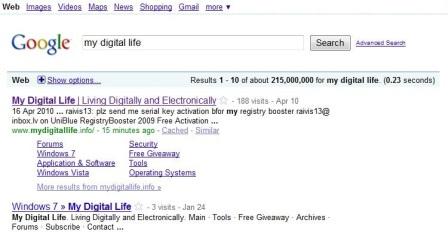
Google Classic Interface
Classic existing Google search results user interface, with Search Options hiding, shown only when clicked

Depending on “luck”, not all Google users may see the new UI though, and even on the same computer, different web browsers may use the different Google search results interface. For example, IE may show the new Google page with always-on sidebar automatically showing, while Firefox, Google Chrome or Safari continue to display classic Google page, where the ‘Show options…’ link in the blue bar is display before results are listed for user to click to expand the search options sidebar. Even different Google domains, e.g. google.com vs google.co.uk, may return different styles.

Not all Google users like the new always visible sidebar interface with its new styles though. Some may even found the new layout designs to be too much cluttering, awful and deviate from Google motto of “clean”. In one word, the new layout sucks.

Unfortunately, Google does not provide a single switch or option that can turn off and disable the always-on sidebar layout on its search results page. However, Google is using cookies to determine if a specific web browser is to display search results using the new layout interface with search options sidebar automatically opens or not. When a user is lucky enough, one or more of the web browsers used to surf the web is planted with a special preference cookies which tells Google’s servers to serve search results in UI with sidebar always opens, without any option to close the sidebar.

Note: Google has made the Search Options sidebar permanent, so the clearing of cookie does not work anymore to revert back to old Google. Make use of various user scripts or add-ons instead to modify the searching experience:

Chrome: https://chrome.google.com/extensions/detail/jcacnmibccjjonfihgnieefkingolocb

Firefox: http://www.seotoolset.com/googleoptions.xpi

Greasemonkey: http://userscripts.org/scripts/show/76060

So, in order to get rid of the always permanently shown search options sidebar in Google search results page, delete the cookies related to Google.

Firefox

In Firefox, go to Tools -> Options -> Privacy tab. Click on remove individual cookies link. Expand the Google domain which display the new “always-on” sidebar (such as google.com), highlight the cookie named PREF and click on Remove Cookie button to delete the cookie.
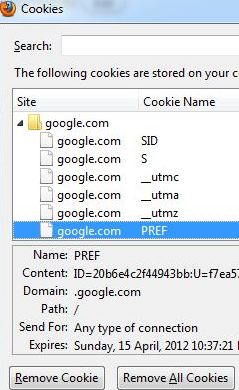
Remove Google PREF Cookie

Alternatively, just go to Tools -> Clear Recent History. Choose Everything as time range to clear, and Cookies as item to delete, then press Clear Now button.
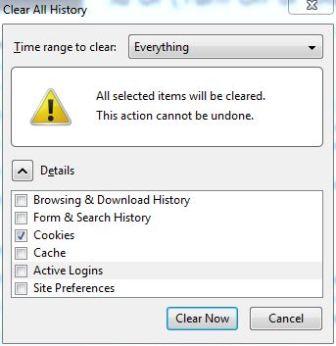
Clear Firefox Cookies

Internet Explorer

In IE, go to Tools -> Internet Options -> General tab, and click on Delete… button under “Browsing history”. Select Cookies, and click Delete button.
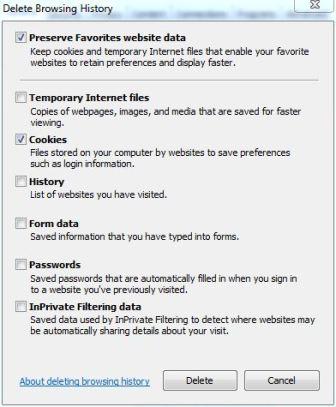
Delete Cookies in IE

Google Chrome

In Chrome, go to Wrench -> Under the Hood tab. Click on Clear browsing data button, and select Cookies as item to obliterate, and Everything as the period to clear. Then, clock on Clear browsing data button.
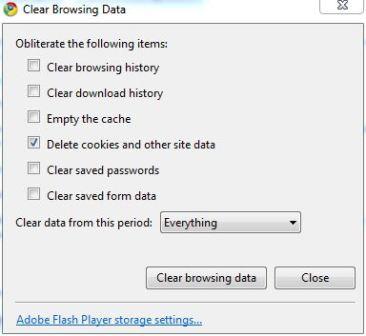
Delete Chrome Cookies

For Apple Safari and Opera users, try the same workaround to clear and delete off all cookies to turn off the Everything sidebar in Google. A warning though, clearing all cookies will also remove preferences and authenticated login sessions for all websites.

Immediately after clearing the Google cookie (or after browser restart), Google should revert back to its old clean user interface, with search options expandable and not automatically opens. However, there is no option or setting available that prevents Google from tagging the system’s web browser to serve experimental layout and its user as guinea pig again.

Related posts:

  1. Display Search Results From Multiple Search Engines Via Google Unified Search Firefox Add-On
  2. New Way to Search with Future Google Search User Interface and Technology on SearchMash
  3. How to Disable and Turn Off Windows 7 Gadget Platform (Sidebar)
  4. Enable Google’s New Search Results Interface
  5. Integrate and Display Google AdSense for Search and Co-Op Custom Search Engine Results in WordPress Blog Page Template

26 Comments

  • "Pretty low for a company whose mission statement is all about the user experience."

    Yeah, it seemed pretty low more than a year ago when this was first introduced.

    Now we know – I know – that nothing is too low for Google.

    What a despicable bunch they are.

  • The largest software companies are setting the WORST examples of UI customization, flexibility and preserving familiarity. No options. It's like going backward 20 years.

  • The only possible reason for Google NOT offering the option to collapse the sidebar is the hope that they will generate a few more ad-clicks by drawing the user's eye away from the relevant search results. Pretty low for a company whose mission statement is all about the user experience.

  • If you use Firefox, the newest and best remedy is the "Googlesidebarremover" add-on. It's a tiny app, takes about 5 seconds to download and instal. Re-start Firefox and the goddamn sidebar is gone. Hopefully forever

  • If you use Firefox, the newest and best remedy is the "Googlesidebarremover" add-on. It's a tumy app, takes about 5 seconds to download and instal. Re-start Firefox and the goddamn sidebar is gone. Hopefully forever

  • http://www.ipetitions.com/petition/googlenewinter
    This petition is to change google back to what it used to be.

  • I discovered this Firefox add-on NO it's not Grease Monkey!

    This add-on rids that Google side panel it's only 7kb

    https://addons.mozilla.org/en-US/firefox/addons/p

    It's harder shelling peas!

    Whilst moanin' bookmark this link as Google, it rids Google search suggetions

    http://www.google.co.uk/webhp?complete=0

    These WILL work with cookies switched off.

    Sorry folks these are only for Firefox users…. I don't use Internet Exploder.

  • Ya know what Google are up to don't you?

    'Click on this n' that un ern em cash', I hate the Googling darn thing too.

    Why fight it? Lets get something going where we all stop using Google… then they might listen!

    Can't help mentioning that Phorm, they gone quiet haven't they…. can't help wondering where Double Click and all that garbage is that I used to see, better get back on topic here.

    Obviously Google stop us using [http://www.google.com/webhp?hl=all]... and others.

    Looks like it's here to stay folks cos it's 'click n'cash' so lets all give THEM something to think about – a Google boycot!

  • Using your suggestions for Firefox does not work!!!

    I tried disabling Cookies all n' warts, restarteng Firefix… the darn things still there AND when going into cookies – there ain't non cos theyv'e been disabled.

    Whats going on here?

  • To get rid of Google Sidebar the easy way is to use 'http://start.ubuntu.com/10.04/Google/' as your homepage. Clean, efficient layout w/o sidebar in results.

  • Another option is to simply use:
    http://www.google.com/webhp?esrch=papsy

    Instead of just http://www.google.com/

    The first link uses an experimental version that doesn't actually exist, so functionality remains the same and (aside from the irrelevant notice at the top) the search results more closely resemble classic search.

    As a side note, I stumbled across this blog by mistake and came up with that workaround in a couple of seconds. If I find a better one, I'll be sure to post it here.

  • You bet I'll sign it, John!

    Thanks!

    And thanks to the rest of you.

  • The Google Everything Sidebar has been made permanent today. If you prefered how it was before, sign the petition

    http://www.petitiononline.com/123ges/petition.htm

  • Currently, the only way seams to be adding hl=all as param:
    http://www.google.com/search?hl=all

  • Thank you so much, "me" – the "Hide Google Options" addon works for my Firefox. I was pulling my hair out over that ridiculous sidebar garbage!

    BTW, the add-on apparently only removes the sidebar from google.com search results, but if google's your homepage you can change the URL to:

    http://www.google.com/ncr

    then it won't redirect to a country-specific google.co.uk or google.ca, or whatever…

    —–
    me
    May 7th, 2010 11:42

    There are firefox and chrome add-ons to get rid of it:

    Chrome: https://chrome.google.com/extensions/detail/jcacn

    Firefox: http://www.seotoolset.com/googleoptions.xpi

    Greasemonkey: http://userscripts.org/scripts/show/76060

    Clearing the PREF cookie didn’t help."

    —–

  • The Google sidebar is the stupidest, most annoying thing they've thought of yet. They know perfectly well how many people hate it, but they're ignoring the complaints and forcing it on us anyway… What a bunch of arrogant jerks.

  • I hate this, I thought it was a virus and did a system restore to an earlier date to fix, obviously didn't work, I will give it a couple days, and then I will swith search providers….

    THIS IS AWFUL!!!

  • Oh Gad, this is worse than a VIRUS .. Please,. Please google, remove this worthless sidebar …

  • horrible, horrible change. what were they thinking? when you have been so relient on google for many years and use it because of its simplicity and cleanness, the last thing you want is distracting visual clutter. and i cannot stand when sites underestimate what an important part of user experience familiarity is. we are used to viewing a google search results page with our eyes going to the left and scanning down. it is confusing to the eye to have some new info there after so many years of habit. i really hope they figure out they need to change it back and that this is not what people want from google.

  • Same for me. I keep trying to clear cookies and it won't work. This is so frustrating. I think I'll start looking for a new web browser.

  • Google should give us an option to remove the left bar.

  • "Google should revert back to its old clean user interface"

    It SHOULD, but it doesn't.

    They are reinstalled every single time.

  • I'm not sure if it will continue to work or not, but in IE8, I simply went in to Tools | Internet Options | Privacy | Sites and added http://www.google.com to the "Block Cookies" list. Since I use Gmail, I had to manually add https://www.google.com to "Allow Cookies"…and I expect this may hamper some of the other things I've come to know and love about Google, but it's better than the awful new search page with "Everything" sidebar! :(

  • Thanks SoyMasterActaeon, Changed to Bork and all seems to be back!!! I'm feeling lucky!!!:)

  • Yeah, clearing the cookies seems like an inelegant and temporary solution to me, but I’ve found another way that doesn’t affect other Google services and works across browsers: Go to Search Settings and change the Interface Language. You can still use English variants like Pirate, Elmer Fudd, or my favorite Bork, Bork, Bork! Once in another language the Google searches return to their old layout.

  • doesn't work. the cookie just comes right back when you go back to google.com.

Leave a comment

Notify me of followup comments via e-mail. You can also subscribe without commenting.

Subscribe

Free email subscriptions
Get latest updates in email for free:

Translate This Page