
How to Fix Folder Options Missing in Windows Explorer
Are your Folder Options not visible under Tool menu in Windows Explorer? It is quite common to see this problem and if you are one of the unfortunate one, don’t panic! You can restore it back by following a few simple steps.
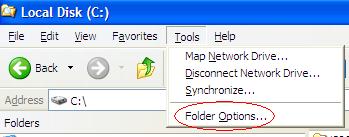
There are 2 solutions provided as below, you can choose either one of them to get this problem resolved:
Solution 1: Edit registry
1. Go to Run, type regedit then press enter.
2. Navigate to [HKEY_CURRENT_USER\Software\Microsoft\Windows\CurrentVersion\Policies\Explorer].
3. At right panel, look for a value called NoFolderOptions. Right click on it then choose Delete.
4. Navigate to [HKEY_LOCAL_MACHINE\Software\Microsoft\Windows\CurrentVersion\Policies\Explorer].
5. Repeat step 3 to delete NoFolderOptions entry.
Solution 2: Change setting in Group Policy
1. Go to Run, type gpedit.msc then press enter.
2. Navigate to User Configuration -> Administrative Templates -> Windows Components -> Windows Explorer.
3. At the right panel, look for “Removes the Folder Options menu item from the Tools menu”, right click on it then choose Properties.
4. Change the setting from Enabled to Not Configured or Disabled.
Hope this simple workaround will help you save some time for other value added tasks.
Related posts:
- Restore, Enable and Display the Missing Internet Explorer (IE or IE7) Icon on Windows Vista Desktop
- Missing File and Folder Names in Windows Vista Explorer Large Icon and Details View Easter Egg (or Bug?)
- Fix Network, Clock, Volume and Power (Battery) System Icons Missing with Disabled or Grayed Out Check Box Options
- How to Change Windows Explorer Default Folder
- Tips of How to Delete Folder Contents While Maintaining Folder Tree Structure in Windows XP PC


Greetings,
Removing the NoFolderOptions value from the registry did not work for me. What did work was using the WinBubbles tweak utility. Under the Security tab I checked the 2nd box from the top which was already unchecked, next to "Remove "Folder Options" in Windows Explorer Tools Menu", clicked on apply, unchecked the same box, clicked on apply, and to my pleasant surprise the problem was instantly fixed without the need to log off or restart. Thanks anyways…
Hi All,
In your system registry check right side panel, if the value is not created, then create new value one.
HKEY_LOCAL_MACHINESOFTWAREMicrosoftWindowsCurrentVersionpoliciesExplorer
create a New DWORD value with value of 0,
then check it’s work fine. No need to restart
Regards
Genuine Windows Admin
good yaar….it works, par ye gayab kaise ho jata hai??? due to virus??
Wel………
Thanks a lot for this Post…
I have got rid from this problem by this solution.
sulotion 2 is really workable tttthhhhaaaaannnnnkkkksssss
I like solution 2 because it's more workable and easier to understand
Thanks for your info, you really helped me
thanks man its rellay help ful…. 2nd option solve my problem
THanx a ton man
when i put regedit on run program my pc going 2 restart. even same problem happen when i try to open system restore. i try to the 2nd option but nothing happen. would u plz help to solve this problem?
this is awesome!
thank's a lot
Thanx alot this probles is one of the worse reults of virus atacking
Thanks a lot.I have resolved this issue using your registry trick.
Awesome Buddy
looks well that method work..thanks alot bro for all tips.
Merci!!! it helped
Many Thankss!!! my problem was really bad. RVHOST.EXE. VIRUS disable my folder option so that i wont be able to track it. guess it was smart after all.
cheers
Thank You Dear
I took the second solution and it worked well
Roy
Thanks a lot.First solution is Ok for my pc.
When I'm there I don't have a "nofolderoption" it just shows:
ab(default) REG_SZ (value not set)
what I;m trying to do is move files, applications & browsers to my external hard drive, w/o creating a short cut.
thanks
Lisa
Wow finally i save my pc, thankq and its work for my pc
it's not worked,.
when I'm enter, it's appear notepad
Well this is pretty useful.
A friend of mine was bugging me about this problem for a while.
Thanks, it worked.
Thanks alot.
thank you so much ..
awesome!!!!
Thanks a lot. With the first solution, my problem is solved. In fact i have moved to teach others. you are wonderful. REGEDIT is the SOUL of WINDOWS…
hey thank u SOOOOOOOO much man, i really appreciate it.
thanks a lot ………..
u r d best………….
maza aa gaya!!!!!!!
So many thanks and first solution solved my problem.
but in second step I could not find "Windows Explorer". do you have any recommendation?
hi, is there any other options to restore ny Folder options? because when i try to use gpedit.msc it says Access is denied
thanks
thank you that was awesome…..one should try it….its easy
[...] problem in Windows is disappearance and missing of Folder Options under Tools menu in Explorer. My Digital Life has given a solution for this problem which is as [...]