
How to Enable Equalizer, SRS WOW, Play Speed, Dolby Digital and Other Enhancements in WMP 12
Windows Media Player 12 (WMP12) is the next version of Windows Media Player software that comes bundled with Windows 7, the next version of Windows operating system from Microsoft. WMP 12 features additional built-in codecs and lots of graphical user interface (GUI) improvement, which makes WMP12 more elegant. With the redesign, some common controls and settings in WMP has also been repositioned.
For example, the enhacements setting in Windows Media Player 12 such as crossfading and auto volume leveling, graphic equalizer, play speed settings, quiet mode, SRS WOW effects, video settings and Dolby Digital settings have been removed menu and preference in WMP12 Library view, and only available hidden in Now Playing view or Skin mode.
So, in order to access Windows Media Player Enhancements configuration, user has to switch to WMP 12 Now Playing mode or Skin view. To do so, follow the step-by-step guide.
Switch to WMP12 Now Playing or Skin View
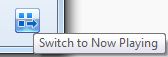
In Windows Media Player 12 Library view, click on Switch to Now Playing shortcut icon to instantly change to Now Playing view.
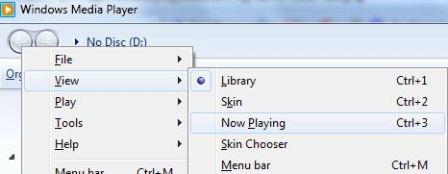
Alternatively, press Alt key to display the menu bar, and then go to View menu, and click on Now Playing or Skin to switch to Now Playing or Skin view respectively. For keyboard shortcut, press Ctrl+2 to switch to Skin view, or Ctrl+3 to switch to Now Playing mode.
How to Access Graphic Equalizer, SRS WOW Effects, Crossfading and Auto Volume Leveling, Play Speed Settings, Quiet Mode, Video Settings and Dolby Digital Settings
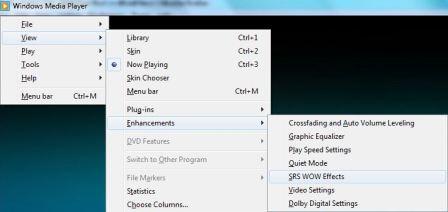
Press Alt key to display the menu bar, and then go to View menu to select Enhancements in the pull down menu. The following enhancement options can be found:
Crossfading and auto volume leveling
Graphic equalizer
Play speed settings
Quiet mode
SRS WOW effects
Video settings
Dolby Digital settings
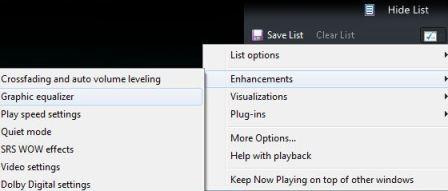
An alternative method to display Enhancements menu in WMP12 is to click on Show List on the top right corner to display the playlist, and then click on the button on the end of the Playlist pane, and then go to Enhancements menu item to display all options available.

Related posts:
- Hack to Change Windows Media Player 12 (WMP12) Library View Background Image
- How to Enable Full Screen as Default Display Mode for VLC Media Player
- Open and Play Windows Media Audio and Video Files (WMA and WMV) on Mac OS
- QuickTime Lite – Alternative to Play Streaming Quicktime HD Movie and Video Contents
- Software to Play DVDs


WMP 12: to access enhancements
Hit ALT button
(do not choose “show menu bar” or you’ll be screwed and you can’t access the “enhancements” option listed below)
click “View” drop-down menu
choose “now playing” mode
2click if needed to get into full screen mode
hit “ALT” button
Select “enhancements” menu, it should be the only one selected in the list
make your selection
thanks much! I spent like 40 min trying to figure it out on my own!! you saved me a lot of time
I was able to find a menu with enhancements,but when I click on any of its options nothing happened,nothing at all…Any suggestions?
thanks a lot…it really helps me a lot….i was frustrated to listen the audio of my wmp 12 without such enhancements. now i am relieved.
thx u soo much.. v.usefull for me..
Thanks for the map. And to microsoft, F*#% YOU!!! Every time the media player is updated they screw it up worse. This Christmas I will be going to Apple. I hope to see MS bankrupt soon.
Amen to that! Those F*%& UP’s at Msoft!!! Can you make that sh&@ harder to find?
hi thanks friend u were great help
Thanks guys, i found it with your help…
Microsoft always likes to add worthless feature crap & fluff to their newer programs, while hiding things you really need.
Great job! Sure, that gives MS job security, cause they are the only ones that know how things work, because they hid the blooming things so well!
Sure, we believe you! Just like right now, people are tearing their hair out because they bought windows & have to have nanny MS breathing down their back every time their system crashes & have to report back to MS
nice thx
Thanks for the info, it's been awhile since I used WMP, and I couldn't figure it out. Oh, and thanks to dolp (July 6th, 2010 tip) you were right about having the menu bar enabled.
thanks a lot!!!! very helpful!
Which idiot approved the WMP 12 release? It's 100 times worse than WMP 11.
In some cases if you have the "Show Menu Bar" option enabled, sometimes the Enhancements still wouldn't show. Try unchecking the "Show Menu Bar" and then try going back to the Now Playing view.
* This is just dumb and 10 steps backward, for a feature that has been easily accessible since WMP9.
nvm i just found it haha thanks
sooo…. i must be a retard or something, but i dont see any enhancement button on my wmp 12, so i odnt know what to do..
Awesome little tut my man, i was ripping my hair out looking for these settings. Leave it to Microsoft to make it even more difficult to use simple controls where they've been for ages.
Signed – :: Just Another Microsufferer ::
Cheers guys I been having trouble getting wmp12 playing anything for 3 days now and this sorted it! Whoop whoop!!
[...] Additional Info: http://www.mydigitallife.info/2009/01/27/how-to-enable-equalizer-srs-wow-play-speed-dolby-digital-an… [...]
Wow, great "enhancement" Microsoft. Make me have to search on the internet to find out how to enable crossfading instead of providing an intuative interface. Jeeez.
BY THE WAY
To improve your WMP12, i suggest donwloading the DFX Audio Enh. 9.
Avaliable "where you know"
It Works!
Simply change go now playing mode, right click, and there´re the hidden option.
This tip rocks!
Fuch you microsoft for hiding these options.
[...] How to Enable Equalizer, SRS WOW, Play Speed, Dolby Digital and Other Enhancements in WMP 12 [...]
i can send a screenshot if you want
plz help im stupid and and American.
A bad combo.
i understand that you may be dumb but being AMERICAN does NOT make you dumb. Dumb is something you decided to become
see title!!!!!!!!!!!!
help
thank you so much! i was having a problem in windows 7 media player where certain songs sounded distorted, and changing a few of the SRS,dolby sound settings fixed it and it now sounds perfect! thought it was my sound card. thank you!
Thank you so very much for this – I just couldn't get WMP 12 to sound right without turning the SRS WOW TruBass effect down!
Thanks.
Damn they hid it well! Like in that mode you can't even see the menus (not even by right click) and when you can see the menus in full mode it's not there!
thanxxxxxxxxxxxx a bunch