Jun 26, 2008
My Digital Life Editorial Team

How to Disable Write Access to USB Hard Disk and Flash Key Drives

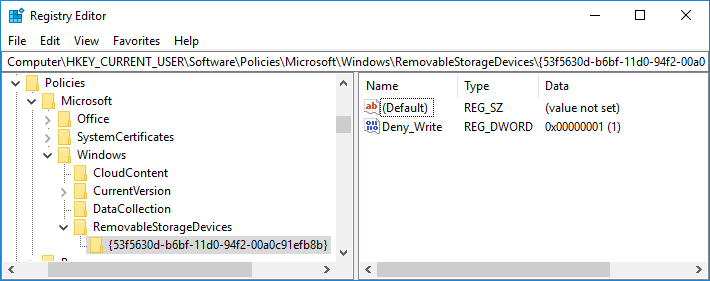
There is a registry hack that able to disable the USB drive access to USB mass storage device such as flash drive, USB key, thumb drive, pendrive and portable hard disk while keeping the USB hardware device such as webcam, mouse, keyboard, printer and scanner connected to USB ports working as usual. However, the hack disable the USB access to disk drive completely. User cannot copy data to the USB disk storage, nor able to read any files and documents from the USB drive.

For user who just want to disable write access to the external removable USB mass storage disk drive, there is another registry hack of WriteProtect in StorageDevicePolicies registry key that able to restrict Windows system from writing to the USB disk drive, and hence effectively user to copy any sensitive or private data from the PC to USB key stick. The trick works in a similar way to write-protect feature used in floppy disk and backup tape which make the disk read-only, only that in this case, it’s system wide implementation that block any writing and recording of data to USB mass storage device.

To disable writing access to USB drives and make all USB drives has only read-only access, follow these steps:

  1. Run Registry Editor (regedit).
  2. Navigate to the following registry key:

    HKEY_LOCAL_MACHINE\SYSTEM\CurrentControlSet\Control

  3. Create a New Key named as StorageDevicePolicies.
  4. Highlight StorageDevicePolicies, and then create a New DWORD (32-bit) Value named as WriteProtect.
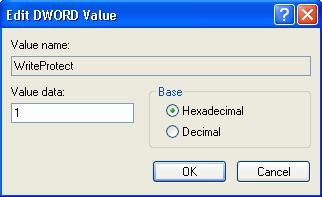
  5. Double click on WriteProtect, and set its value data to 1.

    Write Protect Removable USB Drives

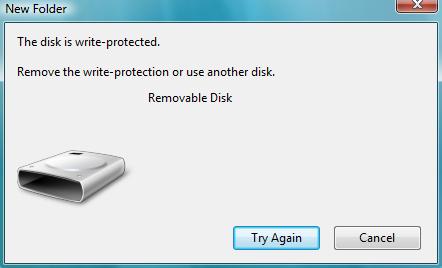
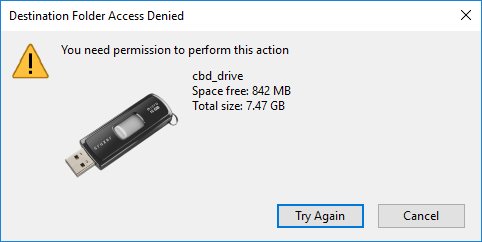
Once set, all users on the computer is now blocked and prevented from copying, transferring or writing any files, documents and data to the USB disk drives, without the need to restart or reboot computer. Any attempt to download or copy files to USB drive will return the following error message:

The disk is write protected.
The media is write-protected.
Remove the write protection or use another disk.

Block Write Access to USB Removable Disk

To revert and remove the blocked write access to USB drivers, just delete the StorageDevicePolicies registry key, or delete the WriteProtect registry entry, or change the value data for WriteProtect to 0.

For user who doesn’t want to manually editing the registry, simply download the following registry registration files to enable or disable the write protection (block writing attempt) to USB removable drive. Double click the .reg file unpacked from the .zip archive to merge the registry key entries.

Download DisableWriteToUSB.reg
Download EnableWriteToUSB.reg

The trick works in Windows XP SP2 and SP3, Windows Vista, Windows Server 2003 and 2008.

Related posts:

  1. Disable Hard Disk Drive Turns Off or Hibernates/Sleeps into Power Saving Mode in Vista
  2. Burn and Write ISO to Disk or Make Image of CD/DVD in XP and Vista with ISO Recorder PowerToy (v1, v2, v3)
  3. Disable USB Removable Mass Storage Device Drive Access in Windows
  4. FlashMate Enables Hard Disk Contents Access Even When PC in Off Mode
  5. Ways to Solve Hard Disk LED (Activity) Non Stop Blinking Issues

40 Comments

  • i try ta registry edit but i think my registry is incomplete there is no StorageDevicePolicie at control.

    what can i do?
    can i fix my regedit?
    can any one help me remove my write protected in a other solution?

  • thank you for the tips on how to remove write protection!!! i,m so happy………………arigatou gozaimasu!

  • Thank you it is very helpful for us

  • Hello,

    We have are using Windows 7 Ultimate we block write access to removable devices from group policy but now we want to take some data as OS got's corrupted and we only login to computer using same mode and also we are not able to change group policy.

    can any one just how we can copy data from that pc

    Its too needed data for us

    • if window is corrupted then try to solve that problem first by using usb antiviruses that operates from usb without need of starting the window.

      secondly in the method (manual) given above to enable write protect the key given can be deleted to disable write protection, to do this you are just follow the same but in last instead creating key delete the key you made to write protect initialy.

  • Awesome!

    Thanks a lot.

  • I wnt to disable copy from USB, but I want to read the data inside USB…………………….Any idea how to achieve it?????????????

  • Do I need to perform the registry edit on every computer? I encountered that problem and tried to insert the USB drive and do writing, removing files and formatting the disk on all computers but the write-protected always appears..

  • This is not working on windows 2003.

    Please help me in Windows 2003

  • Great!

  • Remove the write protection or use another disk

  • What reason to write-protect the drive? If you need to protect your data against modification than hide them or encrypt (http://www.truecrypt.org)

  • I have the same problem as Incrediman had, now. I downloaded the DisableWriteprotectreg but have not run yet because I am so careful. I attach the message shown when I tried to run it. Will anyone answer or advice me to do this ? I can edit or create a new registry policy if desired or safer than running this file. They say that it can change values and cause components to stop working correctly.

  • Hi,

    how can I enable write protect on windows 2000

    I have try this [HKEY_LOCAL_MACHINESYSTEMCurrentControlSetControlStorageDevicePolicies]

    “WriteProtect”=dword:00000001 on windows 2000

    But not response.

    Please help me.

    Thank You.

  • I am using Windows 7 ultimate and I have a Transcend 4 gb usb memory stick. I went here http://www.transcendusa.com/Products/online_recov… downloaded the online recovery app, ran it and now my usb stick works again. (To be on the safe side remove any other usb sticks or external hard drives you don't wish to format.)

    I had the same problem as most people here: one day, all of a sudden my memory stick decided to become write protected and I didn't do anything to alter it. It is a retractable usb pen WITHOUT one of those write protect switch that other people are talking about. So the above was the only thing that worked for me…. Hope this helps…

  • This method seems to work for a lot of people but it I certainly isn't working for me. I'm happy for the one's who have reclaimed their usb drives but for the love of god, please help me!

    I've tried changing the registry values and I've reformatted the drive several times. Write protect kicks in after several hours. Is it possible that the problem is with the usb drive itself or a file that has been copied onto it?

    Either way, is there another method that can be used if the registry value one isn't working?

  • My problem is not due to the registry, at least I don't think so.

    The problem I faced is that my external hard disk can be read but not to write using "user" id. But it is ok for "admin" id.

    I have tried other USB external hard disk, and there is no problem on other hard disk.

    Thus, I suspect some other problem on the external hard disk.

    Any idea?

  • Very helpful.Thank you so much.

  • i have a problem of usb flash disk. my flash disk can not access. always display "the disk is write protected" pl

  • Hi,

    Thanks lot for this but is any oportunity to make read only just one flash disk, and to disable copying data from this fllash to to computer.

    Just reading nothing else more.

  • Thank you for save my pen drive

  • I am very happy with this service

  • thank you very much! it really helped me.

  • Hi..it's very helpfull for me, but there is a question left.with your trick, can you make a custom flash disk? I mean:First, u have to make a list about the serial number of each flash disk that allowed to access.Than, flash disk with serial number outside of the list can't be accessed.

    If you have some trick about my criteria, would you mind to share with me??

    Thanx a lot

  • your site helped me a hole bunch i have a western digital usb mybook and all of a suddon it would not let me send any thing or remove any thing i read your info on changing the reg but not that i cant do it it so simple to end up with a boat anchor so many thanks to all of you that bust there ass to keep us up and running again many thanks for the great help.

  • This method does not work. I try to apply the registry, and then dump an image for my USB flash disk, make a md5 hash. I repeated it 3 times, it provides me 3 different hash codes. Any suggestion?

  • very good tool if the error come from winows registry, but didnt work for write protect error in hardware.

  • Thanks. You helped me out. I was wondering why I cant create a new folder on my usb storage device, but from other computer I could. I applied this tutorial hack reverse, puttind 0 there and now works. WHO THOUGHT IT WAS JUST A REG KEY? SURELY NOT ME. THANKS

  • IF THIS TOOL NOT WORKED DOWNLOAD UFD !!! http://www.pqigroup.com/upload/faqs/TWEN/Dr.UFDv1… IT'S HELPED ME!

  • Omg! THANKS VERY MUCH! YOU HELPED ME SO MUCH!!!

  • This was very helpful

  • [...] try the registry hack of WriteProtect in StorageDevicePolicies registry key as highlighted in our earlier post. If editing registry files is something you will only do last, perhaps some of the applications [...]

  • First of all, good article. but unfortunately it doesn't work on Windows 2003 and Windows 2008. XP Sp2 and Vista it works.

    Is there any other way ? I heard that there is a Filesystem filter driver (has to windows

    DDK)

  • Thank you very much you saved my job and my life

  • But this protection way don't work on all computer. I write protect my usb disk but on another computer protection is not avaiable.

  • do i have to restart, it's not working for me :(

  • I have used the tip, thanks very helpful…but I am wondering if there is a way to disable the thumb drive and still be able to read data from other devices such as a camera. I tried plugging in my camera once i ran regedit but it is categorized as a mass storage device so I could not transfer file

  • Very useful tips to remove write protect. It works fine. Thanks you so much.

  • Obviously, I meant "Thank you". :)

  • Thnak you! This really helped. :)

Leave a comment

Notify me of followup comments via e-mail. You can also subscribe without commenting.

Subscribe

Free email subscriptions
Get latest updates in email for free:

Translate This Page