
Gadgets which reside or sit on Windows Sidebar as container in Windows Vista had received a major overhaul and redo in Windows 7. Windows Sidebar is now replaced by Windows Gadget Platform, a new framework for creating and hosting mini-applications (gadgets) on the Windows 7 desktop. With the new platform, the sidebar no longer stick to the left or right side of the desktop, and the gadgets can be freely moved and roamed around all corner of the desktop.
Despite the much simplified gadget management, much streamlined user interface and there is no longer any sidebar settings, some Windows 7 users may not be using or utilizing gadgets, which now hosted and displayed on the Windows 7 desktop.
User who doesn’t use gadgets on Windows 7 can disable and turn off the Windows Gadget Platform functionality so that no gadgets can be added permanently, and to save some system resources to speed up Windows 7.
- Go to Control Panel -> Programs, and click on Turn Windows features on or off link.
- Unselect and untick Windows Gadget Platform checkbox.
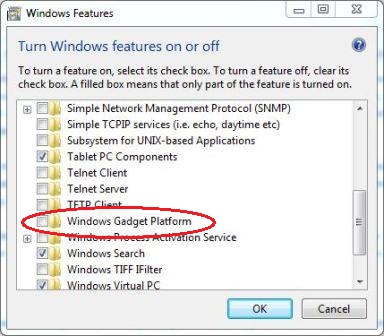
- Click OK.
By disabling Windows Gadget Platform, all attached gadgets will be removed, no new gadgets can be added, nor there is any more Gadget menu.
To re-install and re-enable Windows Gadget Platform, just tick and check back the “Windows Gadget Platform” option.
 Tip and Trick
- How To Download HBO Shows On iPhone, iPad Through Apple TV App
- Windows 10 Insider Preview Build 19025 (20H1) for PC Official Available for Insiders in Fast Ring – Here’s What’s News, Fixes, and Enhancement Changelog
- Kaspersky Total Security 2020 Free Download With License Serial Key
- Steganos Privacy Suite 19 Free Download With Genuine License Key
- Zemana AntiMalware Premium Free Download For Limited Time