
Occasionally when you are outstation without email access and are thinking to delegate the email access rights to third party that you trust so that they can continue to monitor and respond to any incoming emails, good news now that you will able to do so with a new feature release to all Gmail users.
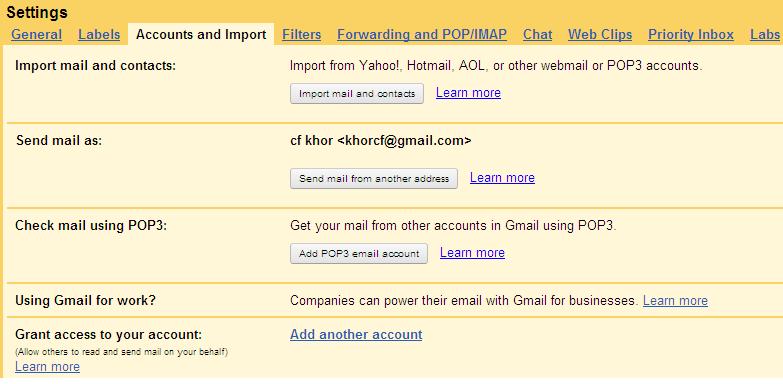
The setup is pretty straight forward, just follow below steps and you are set:
- Click on the Settings (located at the top right corner) and then choose Accounts and Import tab.
- Go to ‘Grant access to your account’ and click on ‘Add another account’ link.
- On the pop up window, enter the email address of the person that you would like to grant access and click on ‘Next Step’.
- A confirmation message will appear and just click on ‘Send email to grant access’. Not to worry that you will be able to rewoke the action at any time later.
- On the other end, the delegate will receive an invitation and once after he accepts the request, the delegation process is completed. Once after refreshed your browser, you should be able to find an additional email address that can be toggled at the top right window for such purpose.
While this is not something really new (which was previously only available for Google Apps account), but it has been released to all Gmail users now which is definitely a great move for them to organize, view and send email on behalf of others in shared account more effectively.
Update: Google Account multiple sign-in and grant access to login multiple Gmail on single login, and check out more ways to login to multiple accounts of same website simultaneously on single browser session.
 Tip and Trick
- How To Download HBO Shows On iPhone, iPad Through Apple TV App
- Windows 10 Insider Preview Build 19025 (20H1) for PC Official Available for Insiders in Fast Ring – Here’s What’s News, Fixes, and Enhancement Changelog
- Kaspersky Total Security 2020 Free Download With License Serial Key
- Steganos Privacy Suite 19 Free Download With Genuine License Key
- Zemana AntiMalware Premium Free Download For Limited Time