
Jul 17, 2008
My Digital Life Editorial Team

How to Deactivate and Reactivate Adobe Photoshop CS3 to Transfer or Move Activation License Key

Adobe Photoshop CS3 implements an activation system that similar to Windows XP and Windows Vista in order to full unrestricted and unlimited use. By default, Adobe Photoshop CS3 comes with 30 days free trial period. To use Photoshop CS3 beyond 30 days evaluation period, user must activate the software program online or over the phone.

According to license terms, Adobe Photoshop CS3 can only be installed on two computers at the same time. Anymore activation requests will fail and be rejected if user tries to activate Adobe Photoshop CS3 too many times. Luckily, unlike Microsoft, Adobe provides an easy way to deactivate existing installed copy of the Adobe Photoshop CS3 so that the serial number key can be used on another computer, or used to re-activate the same computer after reformatting and reinstalling operating system.

To deactivate Adobe Photoshop CS3, run Adobe Photoshop CS3 program. Then click on Help menu, and select Deactivate. The option to erase my serial number from this computer after deactivation completes is optional, and can be left unchecked. Click on Deactivate button when ready to unactivate the existing copy of Adobe Photoshop CS3.
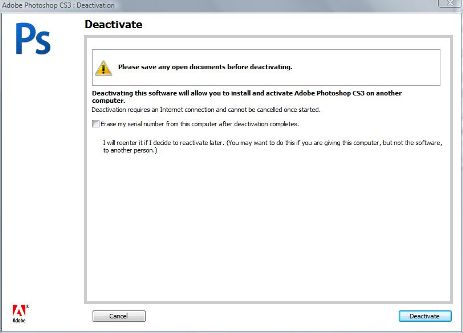
Deactivate Adobe PhotoShop CS3

Once deactivated, the serial number key can be used to activate another copy of Adobe PhotoShop CS3 on another computer, or used to reactivate the same application on current PC after reinstalling.

Related posts:

  1. Free License Key for Windows Vista SP1 Ultimate (Upgrade), Adobe PhotoShop CS3 or VMware Workstation 6 on Bastillwork.net
  2. Adobe PhotoShop (PSD) Preview Handler Free Download
  3. Adobe Photoshop Express For Free Online Photo Editing
  4. Remove Red Eye In Adobe Photoshop
  5. Internal Error 2739 Error in Vista (32 or 64-bit) When Install Adobe Photoshop CS3 and Reflector Related Programs

41 Comments

  • Anonymosity, I’m sure we all realize the value of the software developers’ work, however we have the simple problem that we paid good money for a creative suite that we now wish to (1) transfer to a newer computer or (2) reinstall on the original computer because of crashed hard drives or other reasons. What’s so wrong about that? Who can afford $1000+ per computer? Or worse, per crash?

  • Unfortunately,Michelle this no longer works due to security measures taken by Adobe. If you delete those files now, it will damage your adobe software and cause you to have to reinstall and reactivate. Stop trying to get around piracy people, pay money for people that work hard. (coming from a software developer, coder)

  • I've tried to deactivate but greeted with the same prompt that there's no connection when I was able to connect to other websites but adobe.com. My technical help removed all firewall blocks and did the necessary things but still cant connect. I need to deactivate in order to reinstall in a new pc, please help.

  • James – you must have a file open to "Deactivate"

  • You only get 20 times to reactivate the software. Then what? Useless. I must of reinstall my Windows XP 50 times and can still use it. I just have to activate on the phone. But so far no 20 times activating rule like greedy Adobe.

  • thank U so so much

    My problem with ps3 finish

  • can someone gives me have a serail number that can be activate on a other computer cause i have adobe photoshop cs3 but my serial number can't be activated.

  • (i -got- Adobe Photoshop CS2)

    it asks for my username, serial number and 'organization'(what does it mean by 'organization'?) to activate it but i dont really kno how to get the number or 'keygen' i cant find this 'CRACK' folder either. i downloaded it free from another website and i got Windows XP(laptop). Help me please i'm new to Photoshop..

  • If you did not deactivate previous installs due to any number of reasons (computer crash, virus, etc) and the software will not let you reactivate because you have exceeded your licenses – you can go to the Adobe website and chat with a tech live on the website (usually about a 5min wait). I chatted with a tech, explained the crashed motherboard, confirmed some serial number details and gave a list of the programs I have. They added the needed licenses to my account so that I could reactivate. It was easy, they were super helpful and it only took about 10 minutes total. They have great customer service.

  • Jackie, did you ever figure that out. we are having the same problem. Needing to reformat the computer due to a virus. Martyn is right, after paying for software we shouldn't be shut down because of licensing issues.

  • I have an issue .. I've only installed CS3 on this computer; but its the 3rd time doing so because the computer has needed a reformat twice and CS3 seems to be counting those. So its not like I can deactivate former installs. What can I do to get CS3 to detect those old installs as deactivated and reactivate it again?

  • I now refuse to buy any Adobe products after CS2. I made the mistake of buying CS4 only to run into activation/deactivation issues when my HD crashed. My experience with this licensing scheme and others like it has convinced me to start my migration back to Linux and away from these 'lock down' type of products.

  • This is fine for some people. However, my problem is that my previous PC's HDD crashed. I'm busy trying to reinstall all my software, so I can keep going. I spent some $2,000 for this software and think Adobe's approach to licensing needs to consider these very likely events in people's lives and not penalise users by making it difficult to reinstall the software they've paid for.

  • I've finally got it to work! I did a system restore to before I was getting the message and it's working fine now! To anyone who had Photoshop working before suddenly getting this message for no apparent reason, don't waste a whole day trying to sort it like I did. Do a system restore to before it stopped working. It may be unrelated but I heard someone mention it might have something to do with quicktime. It may be a coincidence but one of the programs deleted by the restore is iTunes which uses Quicktime. Will report back when confirmed

  • Old PC =XP, New one Win7. Photoshop has stopped working on new PC. I'm willing to uninstall the old Photoshop but the "Deactivate" in my Help options is greyed out! What the hell does that mean?!

    I've spent a whole day trying to sort this out and I've had enough!

  • 1-remove ps cs3

    2-delete 2 file on below path:

    C:Program FilesCommon FilesAdobeAdobe PCDcachecache.db

    C:Documents and Settings/All Users/Application Data/FLEXnet/adobe_00080000.tsf.data

    3-install new

    and fresh active

  • Thanks all!

    i will try, i will post again!

  • Notebook harddrive died – being replaced – i have my software to re-install once I have new pc – will I be able to active with my same code? help! wondering…..

  • I deleted those files, as told… but i still get the error message :s. I see you speak of a 'new code', but where do i get this new code? :s

  • Michelle,

    THANK YOU, that worked!!!

    I've spent 2 days doing everything under the sun to get this to work, and deleting those 2 files did the trick.

    Shame on Adobe for this. It will be the last time I pay $999 for one of their products.

  • Phoned for phone activation explained my problem with 2 machines crashing immediately helped and gave me activation code whole process took less than 3 minutes. Well done Adobe, easy easy easy to deal with. Perhaps people should follow what Adobe suggest.

  • windows seven

    c:/programdata/flexnet/

    or users/allusers/flexnet

    similar in vista i think

    i have just activated

    thanx michelle

  • This is why the warez community rulez. I will never buy the software again because, after spending $1,000, I find I'm better off finding and installing cracked software and being done with this mess.

  • Like everyone else I did not realize I had to deactivate my CS3 version on my old computer. That computer doesnt even work now and I have recently replaced it and downloaded CS3 on the new one. However I am now unable to register it on the current computer. I've read and read and am very tired of sitting in a holding pattern waiting for Adobe cs to pick up the line. Is there a way around this or did I miss something in the above statements? Thank you in advance.

  • Please HELP me I am using VISTA.

  • I have been baving major problems with CS3, it suddenly stopped working so I decided to uninstall and reinstall forgetting to deactivate. After trying different methods and 5 hours later I came accross this blog and thankfully the advice Michelle gave has worked.

    Delete:

    C:Program FilesCommon FilesAdobeAdobe PCDcachecache.db

    Thankgod I can do some work now!

  • Thank you Michelle for your professional answer

    in VISTA

    C:Documents and Settings/All Users/Application

    Data/FLEXnet/adobe_00080000.tsf.data

    not working because there is no Documents and Settings

    please help me to find a solution !!

  • I got that tragic error message. it said: The licensing subsystem has failed catastrophically. You must reinstall or call customer service. I can't reinstall. I can't access the photoshop help menu to get to the help menu to deactivate it so I can delete it. So, what am I to do? I just try to delete it as best I can. Can't uninstall, can't reinstall. If I had known this might happen, I never would have bought photoshop cs3. This is terrible. I'm not going to reformat my hard drive and lose all my data. This is so unfair. I hate photoshop. Photoshop is a real bitch.

    Leslie

  • I am running VISTA Home Version Service Pack 1; x64 Base PC; I didn't deactivate Adobe CS3 and need to re-activate with a different License. Adobe will not allow me to run Photo Shop… please help.

    Thank you,

  • this way created by Michelle

    is so good

    it make me reactivat my product as well

    thank you Michelle

    C:Program FilesCommon FilesAdobeAdobe PCDcachecache.db

    C:Documents and Settings/All Users/Application Data/FLEXnet/adobe_00080000.tsf.data

  • Recently an employee left, this employee had a activated copy of CS3 on their home machine (as well as at the office). This was overlook prior departure, former-employee has been unresponsive to requests to deactivate. What would be the proper path to have that copy deactivated if the former-employee continues to be unresponsive?

  • thanks michelle ,tht worked

  • There is no "deactivate" option in CS3 help.

    I used to love Photoshop. Now I hate it with the same intensity I hate all the licensing-crippled Adobe cr*p. I'll just use CS2 and will return CS3 for a refund.

    Disgusted,

    Steve

  • can someone help me..

    when i opened adobe photoshop cs3 on windows Vista. there is this message

    "Licensing for this product has stopped working" "you cannot use this product at this time. You must repair the problem by uninstalling and then reinstalling this product or contacting your IT administrator or adobe customer support for help."

    what should i do?

  • i had removed CS3 before relising i needed to deactivate ..

    i simply reinstalled it on the same machine

    it then allowed me to deactivate it .

  • i had removed CS3 before relising i needed to deactivate ..

    i simply reinstalled it on the same machine

    it then allowed me to deactiate it .

  • If you didn't deactivate Adobe before uninstall, and it's asking for you to re-activate, delete the following:

    C:Program FilesCommon FilesAdobeAdobe PCDcachecache.db

    C:Documents and Settings/All Users/Application Data/FLEXnet/adobe_00080000.tsf.data

    And you can Activate them from scratch again (Including new serial number)

    • Unfortunately,Michelle this no longer works due to security measures taken by Adobe. If you delete those files now, it will damage your adobe software and cause you to have to reinstall and reactivate. Stop trying to get around piracy people, pay money for people that work hard. (coming from a software developer, coder)

  • Im with tom!!!

    I had no idea I needed to deactivate!

  • After deactivating, where do i get the code?

  • i accidentally deleted half of my adobe programs before i realised i needed to deactivate,

    now the only programs i have left are device central and bridge,

    however these do no offer a deactivation service in the help bar like adobe says all applications do,

    how do i deactivate!

Leave a comment

Notify me of followup comments via e-mail. You can also subscribe without commenting.

Subscribe

Free email subscriptions
Get latest updates in email for free:

Translate This Page