
Jul 13, 2009
My Digital Life Editorial Team

How to Change or Re-Enter Product Key in Windows 7 and Vista

Windows 7 and Windows Vista or their server variants have a new graphical user interface (GUI) that allows user to easily change or re-enter the product key (aka serial key code number or cd-key). It’s possible to change product key installed into Windows Vista, Windows 7, Windows Server 2008 or Windows Server 2008 R2 via command prompt, although the GUI method to enter or change product key is much easier and straight forward.

Sometimes, users are required to change or re-enter the product keys in Windows 7, Windows Vista or Windows Server 2008 (R2) to solve and fix activation problems, or after buying a genuine license for Windows operating system, it’s necessary to reactivate Windows. To change or re-enter product key that already installed in the system, follow these steps:

  1. Click on Start button.
  2. Click on Computer to open Computer folder and then click on System Properties on the taskbar.

    Tip: Alternative way to access System Properties page is by right clicking on Computer and then select Properties, or via Control Panel -> System and Security -> System.

  3. In the “Windows activation” section, click on the Change product key link. If User Account Control (UAC) prompts for administrator password or confirmation, type your password, or click on the Continue.
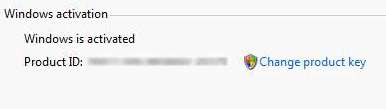
    Change and Re-Enter Product Key in Windows 7 and Vista

  4. In the “Product Key” text box, type in the new product key, and click on the Next button. If User Account Control (UAC) prompts for administrator password or confirmation, type your password, or click on the Continue.
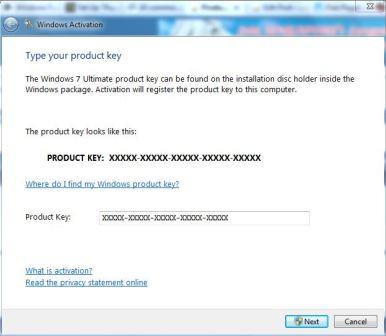
    Change Windows 7 and Windows Vista Product Keys

  5. Windows will attempt to activate online with the new product key, or display Windows Activation Wizard which user can follow to complete the activation process.

Related posts:

  1. How to Change Windows Vista Product Key
  2. How to Update and Change Windows XP Product Key Manually
  3. Easily Change Product Key with Windows Product Key Update Tool Free Download
  4. SLMgr Commands and Options with Windows Vista Product Key Activation
  5. View and Retrieve or Change Windows (XP, Vista, 2003, 2000 and more) and Office (XP, 2003, 92) Product Key or CD Key

12 Comments

  • I didn’t have the “activate windows” link either. But by typing “activate windows” in the search bar in control panel I was able to find it. However it did not let me enter a different key, it just said “activation successful”. To early to tell if it worked or not, just thought I should share.

  • does changing key changes win 7 version like installed version is homebasic & changed key is home premium.

    will it activate successfully & become home premium on reebooting

  • In the system properties window, type "activate windows" in the search bar within the window. It will be under System, Activate Windows. If you click that it shoud bring up the Activation dialogue box.

  • why in my win 7 there's no option to change product key?

    pls help me :(

    thanks

  • i don't have the "change product key" thingy.. plz help!!! my windows decided not to be geniune yesterday (bouught original with computer)… i'm confused

  • This helped me, thank you!

    I was searching for days on Microsoft homepage to find out what to do about my windows suddenly decided it wasn't a valid copy of windows anymore. Silly. :3

    But this helped, thank you ^^

  • I'm with CONFUSED up there.

    My W7Ultimate is already activated with a bogus key, but I have a genuine key and it doesn't have a link that says "change product key" for me.

  • Does this work on the trial version of Windows 7 Enterprise?

    I was wondering because I wanted to activate without reinstalling.

  • see mine doesnt let me do that

    it doesnt say change product key or anything its blank after the key

  • Thankoo thankoo :D

  • [...] production version, as it’s evaluation-only copy. But in Windows 7, it’s pretty easy to change product key to perform new activation, after purchasing a genuine VL MAK [...]

  • [...] If you don’t prefer to issue commands manually on command prompt, you can use the Vista GUI (graphical user interface) to change product key. [...]

Leave a comment

Notify me of followup comments via e-mail. You can also subscribe without commenting.

Subscribe

Free email subscriptions
Get latest updates in email for free:

Translate This Page