
Many people has more than one Gmail accounts with multiple email addresses to send and receive e-mail messages. Gmail has been providing various convenient method to retrieve and read emails from other mail accounts, such as check mails using POP3 and email forwarding support.
For Gmail users who prefer that the emails stay at their respective Inboxes or mailboxes, while they can seamlessly switch and jump between different Gmail accounts without having to logout and logon to each and every accounts, Gmail has just introduced a new feature which allows Gmail users to delegates and grant access to other Gmail users to the account.
The Gmail account delegation feature effectively allows a Gmail users to manage and access multiple Gmail accounts without logging out and in or manual switching between accounts. In fact, the user just need to grant and delegate access to one single primary Gmail account to allow the primary or master account to access all other Gmail accounts, as a workaround.
In order to use only one single primary Gmail accounts to access, manage, read, send and delete messages on all other Gmail accounts (such as personal, company, work, or professional emails), use the following trick:
- Log in to the Gmail accounts which wanted to be accessed from the master account.
- Click the Settings link, and select the Accounts and Import tab.
- Under ‘Grant access to your account,’ click the Add another account link.

- On the pop up window, enter the email address of the person you’d like to access your account (i.e. the email address primary master Gmail account) and click Next Step.
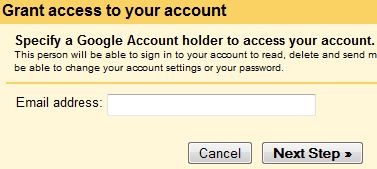
- You’ll see a confirmation message. Click Send email to grant access to send confirmation and verification email.
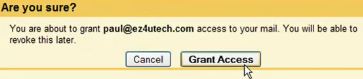
- The delegate (email address entered) will receive a verification email explaining that you’ve granted access to them.
- After the delegate confirms this request, it may take up to 30 minutes for the verification process to be completed.
Tip: To see if the delegate (primary account) has confirmed access to your account, look at the Accounts tab in Settings.
- Repeat the steps for all other Gmail accounts.
Once the setup completed, user can just login to the primary Google account, and then access all other Gmail accounts by clicking the down-arrow next to your email address in the upper-left corner, and select the delegate’s email address from the drop-down menu.
Note that any mail messages sent from main account on behalf of delegated account will have main account’s name listed in addition to the actual account name. For example, the sender will be shown as “Your Name (sent by Delegate)”. In addition, all contacts on the delegated accounts can be accessed by the delegate by clicking the Contacts link, including he To, Cc, or Bcc links in the mail compose window.
Update: Google Account multiple sign-in, and check out more ways to login to multiple accounts of same website simultaneously on single browser session.
 Tip and Trick
- How To Download HBO Shows On iPhone, iPad Through Apple TV App
- Windows 10 Insider Preview Build 19025 (20H1) for PC Official Available for Insiders in Fast Ring – Here’s What’s News, Fixes, and Enhancement Changelog
- Kaspersky Total Security 2020 Free Download With License Serial Key
- Steganos Privacy Suite 19 Free Download With Genuine License Key
- Zemana AntiMalware Premium Free Download For Limited Time