Nov 25, 2006
MDL Editorial Team

Hack to Log On to Windows XP and 2000 without Changing Existing Password with DreamPackPL

If you forget Windows XP or Windows 2000 account password, especially administrator password which once lost together with user account passwords, will make you unable to logon and access to Windows desktop, you can use crack program or crack bootable CD to retrieve and recover the user ids and passwords, or use third-party services to brute force guessing the password retrieval, or using workaround trick to reset the password, or some other methods. Another method to solve the forgotten or lost Windows login account password problem is by using DreamPackPL which allows users to login to a password protected Windows and have full access to Windows XP or Win2000 without the need of a valid password or the need to change or replace the existing (old) password.

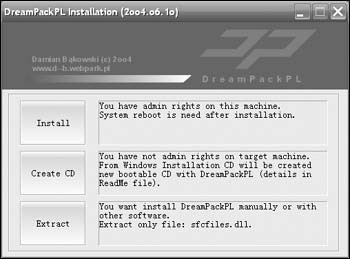
DreamPackPL allows any user to bypass Windows login security and logon to Windows XP or Windows 2000 computer even though the user have forgotten or lost the valid password, and without the need to reset or modify or change the existing passwords that are currently set with the accounts. DreamPackPL (version 2oo4.o6.1o) is actually built on DreamPack which consists only the hacked and patched sfcfiles.dll, but with graphical user interface (GUI) and built-in function to create an ISO image that can be burnt to CD. DreamPackPL v2004.06.10 is available as free download. When executing, DreamPackPL has 3 options:

DreamPackPL

The first option, Install (need administrative rights) will install DreamPack and automatically replace original sfcfiles.dll with patched version of sfcfiles.dll. After reboot, DreamPack will turn off Windows logon password check so that user can virtually access to every local account without knowing the password and modifying the password.

The second option, Create CD will create a new bootable CD with DreamPackPL by using original Windows (2000 or XP, both will work to get access to WinXP or Win2K) installation CD. The CD ISO image creation process with DremPackPL can only be done in Windows 2000/XP, and free space of at least 400-600MB is needed. After the ISO image file is created, it has to be burnt to CD by using any CD burning or writing program such as Ahead Nero. Alternatively, simply download the pre-created bootable dreampackpl_iso.zip which pre-loaded with patched sfcfiles.dll to bypass the Windows logon security check. Extract the zip file to get the ISO image and then burn the image to a CD.

Option 3 will extract SFCFILES.DLL file to selected path, which can be used to manually replace the original SFCFILES.DLL on the target system’s \Windows\System32 folder if user can boot the system using other software such as bootable DOS, BartPE, PE or XPE and the system uses FAT partition.

For the following hack into Windows XP and Windows 2000 machine without valid password yet not reset any password tutorial, we’ll follow option 2.

  1. Physical access to the target destination PC is a must.
  2. Download DreamPackPL and create a patched bootable CD or simply download directly the properly done and patched ISO image (unzip after downloaded).
  3. Burn or write the ISO image to CD.
  4. After the boot CD disc is created, restart the PC, and boot from the CD/DVD drive.
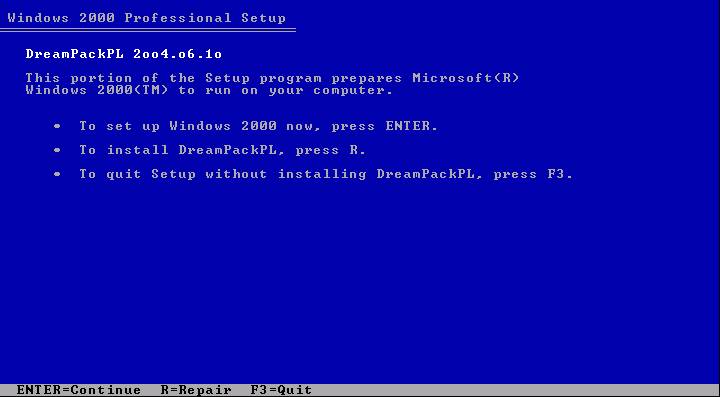
  5. User will come to Windows 2000 (or Windows XP) Setup screen.

    DreamPackPL hacking Windows tutorial

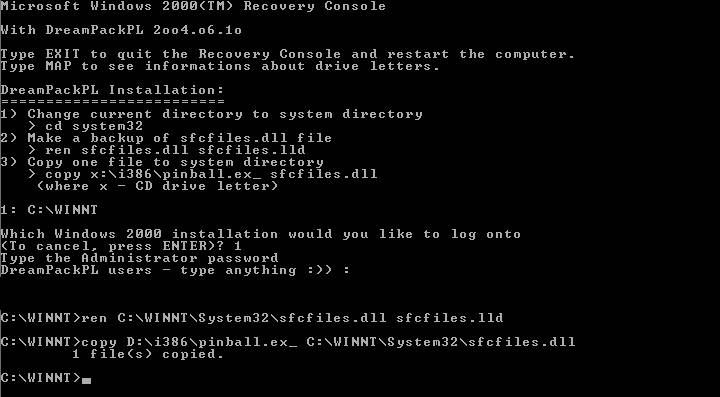
  6. User must load system in Recovery Console, so press R to continue and install DreamPackPL.
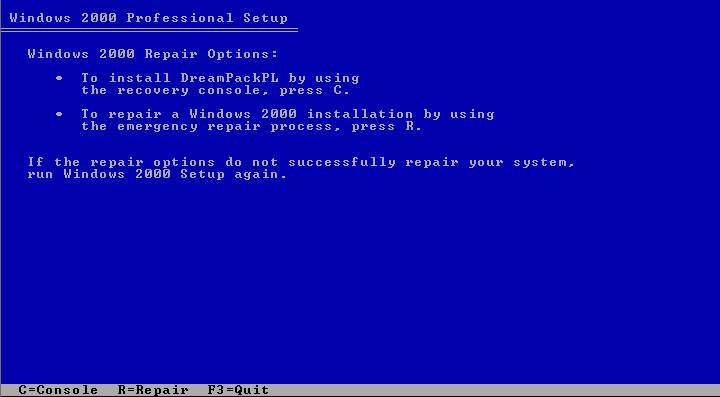
  7. Press C to install DreamPackPL by using Recovery Console.

    DreamPackPL logon to Windows administrator account without password tutorial

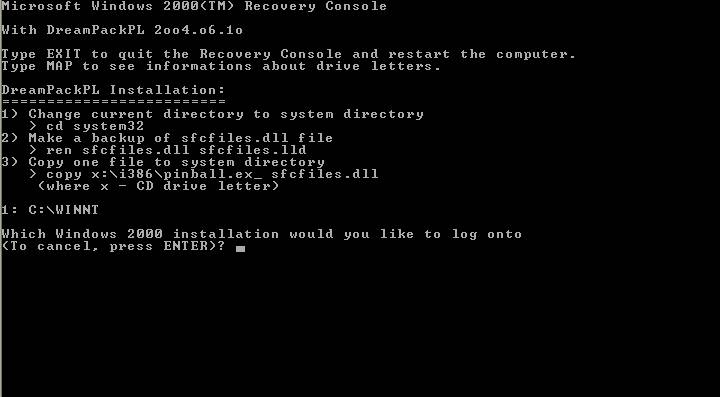
  8. Then select which Windows (XP/2000) installation that want to log onto by keying in appropriate number (normally 1 for system with only 1 Windows installation).

    DreamPackPL log in to Windows without modifying or changing password tutorial

  9. Key in any password when prompt for Administrator password.
  10. Make a backup of the original sfcfiles.dll by using the following command:

    ren C:\Windows\System32\sfcfiles.dll sfcfiles.lld (for Windows XP)

    or

    ren C:\Winnt\System32\sfcfiles.dll sfcfiles.lld (for Windows 2000)

  11. Copy the patched sfcfiles.dll file from the CD to \Windows\System32 (or \WinNT\System32 depending on your Windows installation) folder by using following command (CD drive in this example is D, change according to your CD drive letter. You can use “map” command to display all drive letters):

    copy D:\i386\pinball.ex_ C:\Windows\System32\sfcfiles.dll (for Windows XP)

    copy D:\i386\pinball.ex_ C:\Winnt\System32\sfcfiles.dll (for Windows 2000)

    Bypass Windows Logon password with DreamPackPL Tutorial

  12. Type “Exit” and press Enter to exit from Recovery Console, and restart the PC, and let the Windows boot normally.
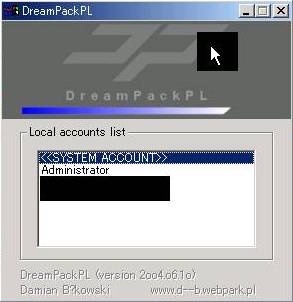
  13. Once Windows display Windows Logon prompt, key in “dreamon” DreamPackPL command (without quotes) in the user name or password field to display the DreamPackPL menu.

    DreamPackPL Tutorial

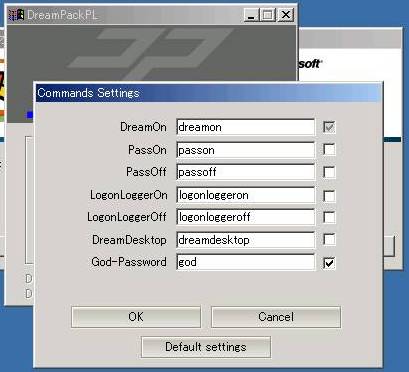
  14. Click on the top graphic on the DreamPackPL menu to display the commands options and configuration menu.
  15. Navigate to Command and click on Command Setting options.
  16. Enable the God-Password setting by selecting (check) the tick box at the end.

    Hack Logon to Windows with DreamPackPL Tutorial

  17. Exit from all DreamPackPL and type “god” in the user name or password field on Windows Logon screen to log on into Windows, bypassing all users or administrator account password.
  18. Another option is to navigate to Password at DreamPackPL commands settings menu and select (check) the “Logon with wrong password and hash” option, which allows user to log-in into Windows using any administrator or user account with any correct or wrong password.

DreamPack or DreamPackPL has the following features:

  • Configurable command interpreter in logon window (DreamOn, PassOn, PassOff, LogonLoggerOn, LogonLoggerOn, LogonLoggerOff, DreamDesktop, God-Password)
  • Three logon modes: standard with password, with wrong password and wrong hash (LM+NT), with given hash (LM+NT)
  • Hash Audit (show hashes of all users) and Hash Calculator
  • Executing programs at the logon desktop with system privileges
  • Loading Explorer shell at new desktop and work with system privileges
  • Logon Logger (date and time, user name, password, character codes in password)
  • Disabling Windows File Protection (always when using DreamPack).

Note: You may need to disable the anti-virus protection software in order to use DreamPackPL to bypass Windows password logon security check to login into Windows system without any password modification or reset to existing accounts’ passwords, nor leave any trace of logging on. DreamPackPL can be easily uninstall by choosing Uninstall from commands menu, and the original sfcfiles.dll will be automatically recovered from sfcfiles.lld backup file.

Other hacks available to either reset or recover your lost password too.

Related posts:

  1. Hack and Reset Windows NT 4.0 and Windows 2000 Administrator or Domain Admin Password with LOGON.SCR Trick
  2. Reveal and Recover Windows NT, 2000, XP, 2003 and Longhorn Login (including Administrator) Username and Password with Login Recovery
  3. Fast Shutdown Faster Windows 2000, Windows XP, Windows 2003 and Windows Vista
  4. Crack and Hack to Find, Reveal, Get, Recover and Retrieve All Windows Passwords with Ophcrack 2 and Rainbow Tables
  5. View and Retrieve or Change Windows (XP, Vista, 2003, 2000 and more) and Office (XP, 2003, 92) Product Key or CD Key

33 Comments

  • Hack to Log On to Windows without Changing Existing Password? this is a complex thing. But it is easy to Log On to Windows without password if you fogot windows password. Use password reset program is the simplest way. I recommend software Windows Password Seeker.

  • my brother samtime lock my computer thin i inestaling that computer
    how can i login in that computer he get passowrd for administrator
    mail me in my email ghafarghafar@yahoo.com

  • Hi

    I forgot my password and tried DreamPackPL to recover my lost data, but when I try to open the menu (by typing "dreamon") I get the following error message:

    Title = Rundll

    Message = "An error occurred while loading sfcfiles.dll

    Access denied"

    Does anyone no how to get this thing working?

    thanx

    Zedd

  • why the hell do you need admin? im doing this cause i forgot admin pass otherwise i would be able to cancel pass from another admin acc. =.=

  • I want a good one thats easy to HACK

  • hi buddy !!!!

    u rock up man …

    this is i call W!Ld XtReM…

    bt hav 1 prbm hw could i use that dreampackpl..

    hope u solve me !!!!!

  • Hello.

    I am stuck on step 9 since it still requires an admin password. Tried to type in anything but after three attempts it requires another reboot.

    It's a Dell computer with WinXP Pro my father got from an old company. The one who sold it had no idea what the password or admin password is either.

    Cheers

  • very good

  • Super article. Works perfectly, but after the recovery, do you have to be using the password all the time?

  • This is a great tool! But after I had logged off and was going to uninstall DreamPackPL, the password field was gone and I could just click the account and and it logged on. So how am I going to uninstall if I have nowhere to write the dreamon command? I have checked the settings and it says users have to use password when logging on. Is it possible it has somehow reset the password? Any knowledge, tips or/and ideas to spare, anyone? :) It would be nice to uninstall. Thank you in advance!

    Ruttan

  • EXCELLENT!!!

    I needed to access my ntfs hd disk on dell xp. ntfs dos read/write worked like a charm.

    Some mofo at ntfsdos even asks money for these cd's. This Dreampackpl is just the max, and it's free, super, that's all

  • i just got my computer fixed, for 250 dollars, because it wouldnt boot, but now i just got it back and the password i had on it before is not workingand i cant even get in on administrator because tht password is different also. what do i do??

  • Doesnt work on Dell Windows XP computers!

  • please tell me about that, I want just recover password don't reset it. Any solution?

  • When I put in the backup command ren C:WinntSystem32sfcfiles.dll sfcfiles.lld (for Windows 2000) it says "The system cannot find the file or directory specified" Please advise. Thank you

  • everything worked perfect.

    BUT I had it to expire the password so now after it logs me in it goes "you must change password" now it needs the original password in order to change it >.< what do i do??

  • hi….great article. My problem is, after I type 1, i am not prompted to do anything….i am running windows 2000.What can I do?

  • Was Kostet das..?

  • oh shit on a shingle

  • munyuki

    Octobre 25th, 2007 23:08 6

    j'ai suivi toutes les étapes, mais lorsqu'il s'agit de taper

    dreamon it didnt afficher le menu dreampackpl elle a donné lieu un mauvais message de connexion

    meme probleme merci de nous expliquer ou est l'erreur

  • no sirve para nada

  • I'm trying to instal the program but when it comes to point 8 (Then select which Windows (XP/2000) installation that want to log onto by keying in appropriate number (normally 1 for system with only 1 Windows installation) I typed "1" but it didn't answerer at all. I dont know why, May be after typing it I need to press enter or something like this

    Tell me something please

    Suhulemo

  • I use the same password to log in my labtop but I always show logging off and I cannot use it now because I cannot log in. I'm sure I do not forget my password. So could you please help me with this problem?

    I hope I will get help from you soon.

    My regards.

    Prum Sovan

  • May be you should disabled anti virus first?

  • I have download th file dreampackpl but Norton Antivirus detected it as virus and deleted. How can I do now? Please mail me more…

  • I have the same problem as Jurgen

    Can somebody help?

    jurgen

    November 17th, 2007 20:287i followed all the steps but when it came to type

    dreamon it didnt display the dreampackpl menu instead it gave a wrong logon message

    it

  • i followed all the steps but when it came to type

    dreamon it didnt display the dreampackpl menu instead it gave a wrong logon message

  • i followed all the steps but when it came to type

    dreamon it didnt display the dreampackpl menu instead it gave a wrong logon message

  • Nice guide. Did this to get into an ex-employee's computer that I didn't have contact info for anymore. Thanks a bunch.

  • i followed your method of using DreamPackpl but when it came to putting in a password when asked for admin password and you said to put in any password, i put in any password but it did not work and it asked me to put in the password again

    thanks

  • I tried all the steps and the computer keeps rebooting. What seems to be the problem? I can't seem to do anything now.

  • if there any methord to change user login as admin login by changing registry

  • [...] In password-protected Windows XP Home or Professional edition system, each user logs on to his or her own user name and password to have full access to the Windows computer. However, Windows user or administrator can still log in to the Windows XP machine without knowing the original password, if they have lost or forgotten the user ID or password, by using various bypass or crack method such as using DreamPackPL to bypass the need to logon using valid account or password, crack or brute force retrieve the Windows passwords for various user or administrator account with Ophcrack2, and using third party services such as Login Recovery to retrieval and recovery of Windows user name and passwords. However, there is one simpler method to hack into a Windows XP system, if the computer owner installed Windows XP, and forgot or not set the Administrator account password. By default installation, Windows XP has a built-in Administrator account which equivalent to root or superuser privilege account in Linux or Unix that contains no password. In other word, hacker or any people can simply key in Administrator as user name at the Windows Logon Welcome Screen prompt with blank password (no password) and get full administrative access as superuser to the Windows PC. Worse, most computer owners don’t even know such an Administrator account is actually existed, don’t even mentioned they will create or set a password for Administrator user account. [...]

Leave a comment

Notify me of followup comments via e-mail. You can also subscribe without commenting.

Subscribe

Free email subscriptions
Get latest updates in email for free:

Translate This Page