
Hack to Enable Hotmail POP3 and SMTP Support Instantly for All Countries
Hotmail (actual name Windows Live Hotmai which formerly knowns as Windows Live Hotmail) has officially added free POP3 and SMTP feature support which used to available to Hotmail Plus paid subscribers. With Hotmail POP3 support and turned on, users can download the mail messages to desktop or mobile email clients such as to Outlook without using Office Outlook Connector or iPhone, or consolidate all email messages into another email service provider’s mailbox, such as Gmail.
The POP3 and SMTP support for Hotmail will be rolled out gradually to all users. Initially, only users in United Kingdom, Canada, Australia, France, Japan, Spain, Germany, Italy, and the Netherlands will have the POP3 feature enabled on Hotmail account for free. Hotmail users from other countries will have to wait longer to enjoy the free POP3 and SMTP protocol access.
For user who can’t wait, and want to enable POP3 and SMTP access on Hotmail now, here’s the trick to force enable and turn on POP3 and SMTP support on all Hotmail account, regardless of location or country.
- Login to Hotmail.
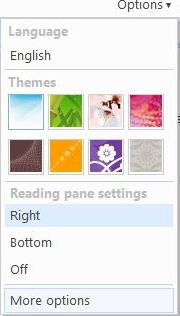
- Mouse over Options, and then click on More Options.
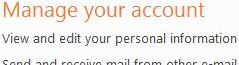
- Click on View and edit your personal information link under “Manger your account” section.
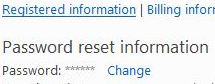
- Click on Registered Information link.
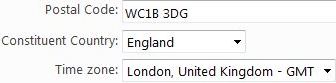
- For both Home Location and Work Location, change the following details to specified values:
Postal Code: WC1B 3DG
Constituent Country: England
Time zone: London, United Kingdom – GMT
- Click on Save when done.
- Go back to Hotmail, and ensure that the display language of Hotmail is set to English by mouse over the Options.
- Configure your email client or other webmail service (Gmail configuration to access Hotmail via POP3) to access and download Hotmail Inbox via POP3 protocol, using the Hotmail POP3 and SMTP configuration settings.
- The email client or another mail service provider should be able to access, login and download or send through Hotmail server without error.
- Once Hotmail POP3 and SMTP support is enable on the account, it’s possible to change and revert back to your original web interface language, home and work location.
Related posts:
- Hotmail Free POP3 and SMTP Access and Server Configuration Settings
- How to Configure Gmail to Download, Get and Transfer Mail from Hotmail via POP3
- Delay Sending of Email Message in Microsoft Outlook (Supports Gmail, Hotmail, Yahoo, AOL and all POP3/IMAP Mail)
- Access Hotmail in Outlook with Microsoft Office Outlook Connector
- Set Up and Add Hotmail Account in Microsoft Outlook 2007


For those who have issues, set it up as directed. Log out of the hotmail account, then try to do the Gmail downloading instructions. I was frustrated as it didn't work at first but after logging out of Hotmail, it seemed to allow my gmail access. Another hint: at the "Country" put United Kingdom. Took a while to find that for me to be able to input the constituent country as England. Good luck!
i still cant access my emails on my samsung wave helpppppp
dont be use your ken become a bad……….you understand friend……….God create you brain for gooding to all pepole……..
It doesn't work any more
for any problem on hacking just contact me at couragefandation@hotmail.com, thank you.
Hey, i have Nokia N95 8GB, and i am using GPRS for connecing to internet. Well i have set all the settings as given above, changing options in hotmail to configuring my setting in mobile. But when ever i connect it say "incoming mail box server not found". Plz help me. A million thanks
[...] but simple instructions for enabling your Hotmail to be forwarded to another email account: Hack to Enable Hotmail POP3 and SMTP Support Many thanks to the person(s) who figured this [...]
Hello. I am a hacker. I can get you a myspace, facebook, aol/aim,yahoo,hotmail,msn,gmail,hi5…basically any password. I do charge money to get a password. I'll show proof i have password though. are you interested? Please do email me at fordf202006@yahoo.com
**I CANNOT RECOVER A LOST/STOLEN/FORGOTTEN PASSWORD**
hi .i hope you get this. alistair . award@kol.co.nz
[...] to turn my hotmail account into a POP3 account, which in turn allowed me to access it via gmail: Hack to Enable Hotmail POP3 and SMTP Support Instantly for All Countries
Thanx! it's working like magic !you're a genius!
Thankx man, It did work and I had to logout and login. I got it through in my Vista Windows Mail.
I got the same error as others here (“user does not have POP3 access”) but after writing in England and London under Country and Cities it worked fine
TNX!! Works on swedish account
[...] hotmail pop3 funkar i iphonen provat och funkar! Hack to Enable Hotmail POP3 and SMTP Support Instantly for All Countries My Digital Life [...]
Working for sure, but cost a whole day of searches and trying. You need to log out and log in – this is the key. Then you'll see msn.com with all that fancy shit, instead of mailbox. And now you can go and change your data back.
Hi. I am a hacker. I can get you a password (aol, myspace, facebook, msn/hotmail,yahoo..etc). I do charge money to get a password. Once i get the password i’ll show you proof i have it. Are you interested? please email me at fordf202006@yahoo.com
**I CANNOT RECOVER A LOST/STOLEN/FORGOTTEN PASSWORD**
[...] cómo en unos pocos pasos podemos volver a leer correos de Hotmail en Gmail. Kudos para la gente de mydigitallife que publicó el “hack”: 1.- Entra a Hotmail. 2.- En el menú Opciones, Más opciones. [...]
[...] el tutorial en ingles | [mydigitallife.info] [...]
[...] Hotmail to reflect that you now live in one of those places. The site I used for these settings is Hack to Enable Hotmail POP3 and SMTP Support Instantly for All Countries
Works perfectly in Uruguay!
Great
its now working for me.
I am searching it for ages.
Thanks buddy for helping all of us.
Doesn't seem to work as of 2/4/09…
It didn't work for me either. Any one have a clue. Did microsoft find out the trick?
not working for me…anyone had the same problem??
what can I say,, you are a genius. it works on my US account too. I also switch back to US and it still works. you are the man.
First in Spanish
No mames K, funciona de a madre, nomás faltó incluir en la guía el truco de salirte y volver a entrar al correo para que funcione.
Now on English
Wow, it´s fucking amazing, the only thing missing in the tutorial was the Log out – Log in trick.
Thank you
Yeah, it finally worked
All I had to do was to sign out and sign back in!
Thanks
it did work for me!
I changed both work and home address to Canada, log out, log in again and it worked
THANKS!
This worked for me on my iPod touch with my Windows Live email address but I had to go into settings and change my Region to United Kingdom. If that doesn't work for you, try switching your timezone to London, England as well, but I found that I could switch the timezone back to a US city. Thanks!
So I tried this but it still doesn't work for me!
Gmail says: Server denied POP3 access for the given username and password.
Please contact Microsoft's support team for more information on POP access.
Server returned error: "user does not have POP3 access"
Any clue on why this is happening? How would I see if my email is linked to another email?
This doesnt work for me even after unlinking my accounts. Any ideas
The hack didn't work with my account which was linked with another account. After I unlinked them, this worked like a charm
Awesome! worked for my US account.
switched it back to US and it still works. Thanks,
Why not support SMTP. If I open some email, using pop it just open locally (exp it show open on my outlook but on http://www.hotmail.com it still close). Now is the time of mobile. Many tiny little hardware have internet access and can access internet. Using pop is complicate because you have to choose leave a copy or take all to HDD.