Google Docs & Spreadsheets is web-based word processor and spreadsheet application service that based on Writely and Spreadsheets, both merged into a single combined product on October 10, 2006. Google Docs & Spreadsheets allows users to create, upload and edit documents and spreadsheets online in a familiar Microsoft Office-like user interface, with ability of sharing the documents and spreadsheets with those you allow to access, and collaborating in real-time with other users. Google Docs & Spreadsheets also features secure online storage and ability to save and export the documents or spreadsheets to DOC, XLS, CSV, ODS, ODF, PDF, RTF and HTML formats, or publishes the works as a web page or post to the blog.
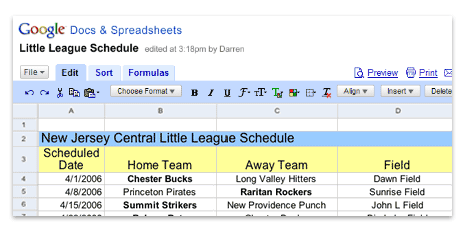
Editing a spreadsheet in Google Docs & Spreadsheets user interface.
ComputerWorld (dead link) reviews Google Docs & Spreadsheets and concludes that what both programs do have in their favor is that hey make it easy to share a document with multiple users. If you need a quick-and-dirty way to collaborate on a plain text document or review a spreadsheet with your colleagues, Docs & Spreadsheets offers a no-nonsense, easy-to-understand interface that makes it a snap. For everyday word processing or calculations, stick with Microsoft Word and Excel or one of the free, run-on-your-own machine options such as OpenOffice.
LK is a technology writer for Tech Journey with background of system and network administrator. He has be documenting his experiences in digital and technology world for over 15 years.Connect with LK through Tech Journey on Facebook, Twitter or Google+.