Apr 18, 2007
My Digital Life Editorial Team

Free (Simplified/Traditional) Chinese PinYin Input Method (IME) from Google

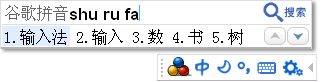
Windows XP and Windows Vista comes with built-in input method editor (IME, also known as input method environment) that allows computer users to type and enter characters and symbols not found on their keyboard, such as allows the user of a Western keyboard to input Chinese, Japanese, Korean and Indic language characters. If you’re Windows users who use the default Microsoft PinYin IME 3.0 text service input method as keyboard layout for Chinese language, the input speed or typing rate must be painfully slow, and will face difficulty to ‘spell’ the word when you’re not familiar with the Hanyu Pinyin phonetic pronunciation for the alphabet. As a result, Google has released an advanced Google PinYin phonetic input method to increase and speed up typing rate and input efficiency of Chinese language.

Google Chinese PinYin Input Method

Features of Google PinYin Input Method:

  1. Intelligent sentence building with smart high accuracy word interpreting and choice including support for long phrases or sentences.
  2. Integrate popular vocabularies and phrases from Internet and web searches for richer phrases database.
  3. Able to personalize the Chinese character input method where your usage habit and personal dictionary are linked with Google Account, and can be sync and used everywhere on other computer on the Internet.
  4. Input box for Chinese language is also the input box to search the web by simply clicking on a button.
  5. Intelligent error correction for commonly misspelled words.
  6. Support user defined short phrases for some special shorthands.
  7. Able to suggest English word based on the first few letters typed to ease the process to enter English input in Chinese input environment without the need to switch input language to English or Chinese by preceding the strokes with letter v. This function will also help users who have problem spell English words.
  8. Support Hanyu Pin Yin acronym and fuzzy phonetic for speakers from different areas that may pronounce a alphabet differently. When enabled, sounds in zh, sh, and ch can be represented by z, s, h.
  9. Google Chinese PinYin input method dynamically adjust the order of the Chinese words or phrases selection sequence based on the past usage frequency.
  10. Support input of traditional Chinese (Big5 or GBK character set).
  11. Provides GBK large font resources (extension of the GB2312 character set).
  12. The most frequently used words and phrases will always been shown first to speed up typing speed.
  13. Support also stroke input method for uncommon words that users may not aware of its phonetics. To enter stroke input mode, simply start it with the letter ‘u’.

Some useful tips when using Google Chinese PinYin Input Method:

  1. If you’ve already defined another Chinese input method for your Windows system, remember to switch to Google PinYin input method.
  2. To switch between Chinese and English input mode, press Shift key.
  3. In Chinese input mode, press Enter key instead of Space key will enter the text typed as English instead of Chinese characters. Useful to speedily enter one or two English words while typing Chinese article.
  4. Fuzzy spelling (PinYin acronym) is not activated by default. To enable it, check out here for instructions.
  5. All URLs (link locations) or email addresses will be identified automatically by Google PinYin IME, and need not to switch input language beforehand.
  6. By default, the Google PinYin IME will use simplified Chinese. To switch to traditional Chiense character set, right click on the IME’s toolbar, and select Traditional Chinese.

Download Google PinYin Input Method (direct download link)

Google PinYin IME supports Microsoft Windows 2000 SP4, XP, Vista and works on Internet Explorer 6.0, 6.5, 7.0 and above.

Related posts:

  1. Your Language Tutor – Franklin Speaking Global Translator
  2. Play Addicting Game of Google Image Labeler To Improve English And Helps Google Matches Images
  3. Check Future Page Rank Across Google Servers
  4. Free Download: Google Earth Final Release 4.0 with 3D Maps of Terrain and Buildings
  5. Internet Explorer 7 Pop-Up Blocker Blocks Script Generated Drop Down or On Page Input Dialog Boxes

36 Comments

  • Only blocks appear, and its beyond frustrating.
    Please tell me how on earth can I prevent that.
    I don’t know what im clicking on, because no characters is shown.

  • I finally can type mandarin…. yeeyyy…. luv it….. btw how to switch between traditional and simplified? thx

  • thank u !!

  • This is a difficult tool for a beginner. As it's user interface and setup process is all in Chinese. I don't think this tool was designed to be used by learners. As, most native Chinese users have a , comfortable way to type already, i don't see a long life for this application. However, i may be wrong considering the alternative, especially the vista options which are never stable.

  • wakaaka novi, nothing wrong with your xp…I onces succeded using this googlepinyin, now i have the same problem with you after I resetup my xp. I don't know your problem is in starting or after applying..but surely that you must have an EN box on your taskbar, and you have to see the CH box when you click on EN. If you already in this step, you must be able to see google bar containing various options…and when you type a letter WO you in address bar of google search, you have to see the pinyin little frame. Maybe your problem is here, all the contain of chinese letter of WO is all boxes…At this step, I try to fix on my IME files on C:WINDOWS and system32 because for some reason that I haven't knowing it yet, it's missing. Soon I want it get that files back and I am sure this is the sources of the matter you and I faces…Hope you can tell me more your troubles…

  • How to switch between traditional and simplify in MAC?

  • i have downloaded this pinyin installer, but when i installed it, i can't see the chinese character at the pinyin input application, there are only squares and symbols. What's wrong with my XP?

    Can anyone help?thanks..

  • works with our word, excel 2007 but it doesn't display the chinese character on powerpoint 2007. please help . have tried to repair and reinstall office but same thing.

  • ni hao wo shi danmairen

  • [...] switched to Google Pinyin Input on my own laptop a couple of weeks ago without much fanfare. If I hadn’t been forced to clunk [...]

  • there is a way to use german keyboard layout for pinyin ime 3.0 input!

    i had the idea of replacing the file kbdus.dll with kbdgr.dll

    1) for security reasons: make a copy of the file file windowssystem32kbdus.dll
    2) copy kbdgr.dll to your desktop
    3) rename the file to kbdus.dll
    4) copy the file to
    a) windowssystem32
    b) windowssystem32dllcache
    c) windowsi386
    5) reboot
    6) enjoy the german keyboard layout for pinyin ime 3.0 :clap

    i am not sure if the file has to be copied to each location. but i works!

  • how to change the setting into traditional chinese?

    thanks

  • Thanks to Google Pinyin, and all of you in the user group. Google Pinyin is by far the easiest Chinese IME.

  • Anyone can tell me what pinyin software for Mac

  • I installed the Google Pinyin tool and was able to switch to Traditional Chinese. Love the tool! Thanks!

    Christine

  • [...] Here’s a page describing how Google Pinyin IME works. Here is another one, from a user’s POV. [...]

  • To activate the Google toolbar, you have to activate language toolbars in Windows.

    1) Control Panel

    2) Date, Time, Language, and Regional Options–>Regional and Language Options

    4) Languages tab –> Details

    5) Installed Services section: Make sure Chinese (PRC) is added

    6) Preferences section: click Language Bar–>click "Show the Language bar on the desktop"

    7) Ok everything and you should be good to go.

    It took me forever to figure this out before I realized what the problem was. Hope this helps.

  • I already installed the google pinyin input but can't find the icon , how to get it & where to find it out ?? anyone can help me on this please !!

  • z and y still interchanged. How to switch to German language support…

  • Thank you!

    This helped me so much :)

  • you guys need to install East Asian language to see the toolbar.

    I had the same problem n fixed it

  • I installed it already but how to switch from English input into Chinese input. My computer OS is pure English, and it can not display any Chinese in the menu when I opened options.exe. Could anybody please tell me what the default switch between English and Chinese input? Thanks -min

  • i can't find the toolbar to input chinese word.. i already dl it.. can some1 pls tell me what 2 do?

  • please tell me do I need to update the programme or it will update by itself?

    What should I do to update

    Thanks

  • I downloaded the Google Pinyin. I can't find it to use it. There is no short cut or progam. I can see it in control panel "Add

    or remove programs ". How can I use it?

    Please help. Thanks!

  • I don't know how to use this sofeware. Please help me.

  • The default to switch between traditional and simplified is Control + Shift + T. You can change it from the options.exe in the installed folder.

  • Check it out before you install any additional software.

  • It sure would be nice if there was a version of the help in English, but oh well… I have used this before and I love it, but it's been a while, and I can't remember how to switch between Traditional and Simplified. I know how to do it with the menu (that is to say I know which menu item to click on) but I thought there was a way to do it with a keyboard shortcut. Any ideas?

    -mdb

  • If you need a tool that will help you get tone marks and even zhuyin (bopomofo) go to Mandarin Tools and download dimsum. It's free and it works on any platform. I can't use the google chinese input, because I'm on a Mac. I am using QIM instead of the built-in function on the Mac.

  • Hi,

    I've juz download the pinyn editor but i cannot inpt the chinese text. I do not hv the chinese language input keyboard as appear in my language bar settin….

    Pls enlighen me

    Thanks

  • i need the software for tone marks

  • 哦!怎么了?

  • thank you so much for this article, i only have windows vista basic and it does not come with chinese typing. i was so mad at microsoft for screwing me out of it and was so happy to find out that google is stepping it up. thanks again

  • Chinese PinYin Input Method (IME) Traditional is great! but default is Simpilfied

Leave a comment

Notify me of followup comments via e-mail. You can also subscribe without commenting.

Subscribe

Free email subscriptions
Get latest updates in email for free:

Translate This Page