Free RAMdisk for Windows 7, Vista, XP, 2000, Server 2003 & 2008 (Gavotte)
RAMisk or RAM-Disk (also known as RAM drive) is a virtual hard drive based on software abstraction that treats a segment of random access memory (RAM) as secondary storage which is similar to hard disks, except with advantage that RAMdisk is a lot faster and access time is greatly improved. As there is no mechanical moving parts involved, there won’t be question of wear and tear too. RAMdisk has one obvious downside, that it’s volatile and not solid state. Contents in RAMdisk is stored in computer RAM, which will be lost when the power of computer is switched off.
With these benefits and limit, RAMdisk can be used to store frequently accessed yet less important temporary data to speed up the system performance, such as swap space for virtual memory, temporary files used for programs such as Internet Explorer, BT client, P2P eMule, compression utility, translation software and etc, frequently accessed data from a database or used to hold uncompressed programs for short periods. From privacy point of view, ramdisk is also a working drive for decrypted version of encrypted document, as all trace of the data will be wiped and deleted once power off.
There are plenty of RAM-disk driver and software available, such as RamDisk9xME, RAMDiskXP, RAMDiskSE and RAMDiskVE from Cenatek (now becomes RAMDisk Extreme!, RAMDisk Pro and RAMDisk from Dataram), RamDisk and RamDisk Plus from SuperSpeed, RAMDisk Enterprise Lite, RAMDisk Enterprise Full and free version from WinRamTech, Ramdisk based on Microsoft Ramdisk below from QSoft (no longer available) and Ramdisk.sys driver for Windows 2000 from Microsoft published under KB257405. However, most of these RAMdisk drivers either is not free, or limit in its functionality especially on the size on RAM-disk. Some not even support Windows Vista, Windows 7 or later.
The following freeware RRamdisk.sys (or more commonly known as Gavotte RAMdisk), originally written by Gavotte based on Microsoft’s Ramdisk.sys, and later being added a GUI interface by lyh728 is not only free to use, it also stable, doesn’t have size limitation, supports popular FAT16,FAT32, NTFS filesystems, and supports Windows 2000 operating system and above including Windows XP, Windows Vista, and Windows 7.
Gavotte RAMdisk supports 32-bit (x86) Windows system, where the system has memory recognition limitation of up to 4GB only, which makes available free memory to application normally around or below 3GB. The Gavotte RAMdisk can make use of any additional RAM installed that is beyond 4GB to fully utilize the memory. 64-bit (x64) Windows system is not officially supported due to driver issue, though some reported success. Anyway, 64-bit Windows can recognize and use all available physical RAM installed, making the RAMdisk workaround to use all RAM memory unnecessary.
To use RAMdisk, the most important requirement is that the system has a lot of memory, much a lot than the size of RAMdisk that you intends to create. It works on system with minimum 256 MB RAM, where you’re recommended not to set RAMdisk with size more than 64 MB.
In Windows 7 and Windows Vista, enable Physical Address Extension (PAE), a memory management feature for allowing supported CPUs to enable NX bit (No-eXecute) and access a physical address space larger than 4 gigabytes. To enable PAE, run a Command Prompt as Administrator, and run the following command:
bcdedit /set pae ForceEnable
Restart the computer to make the change effective. Verify the PAE status by running bdcedit, and the PAE should have the status of ForceEnable.
After enabling PAE, execute the ram4g.reg registry registration file to tell Gavotte Ramdisk program to use RAM space beyond what Windows can use.The content of the REG file should look like this:
Windows Registry Editor Version 5.00

[HKEY_LOCAL_MACHINE\SYSTEM\CurrentControlSet\Services\RRamdisk\Parameters]
"UsePAE"=dword:00000001
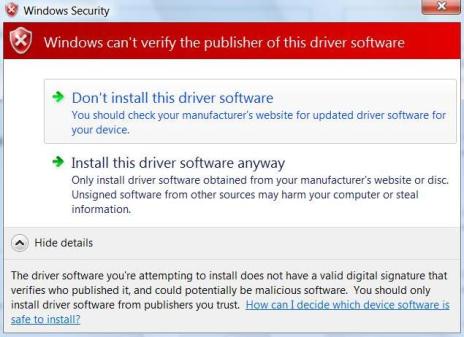
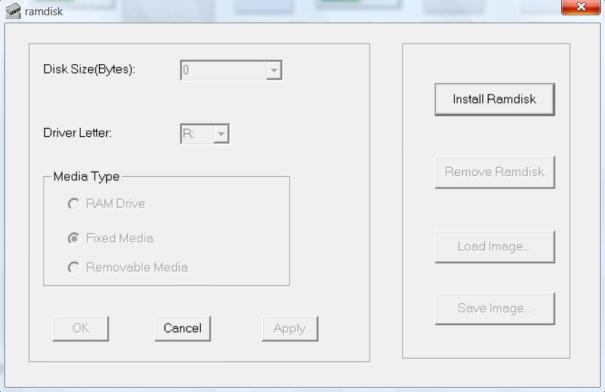
Installation and setup of RAM drive is pretty simple. Unpack the zip archive to a folder, and run ramdisk.exe. In Windows Vista and Windows 7, you need to right click on it and select “Run as Administrator”, if not you will get a Failed error message. Click on Install Ramdisk to install RRamdisk.sys driver. Answer Yes or Allow if prompted with driver not signed with valid digital signature or can’t verify the publisher of this driver software warning message. Once RAMdisk is installed, all buttons that previously grayed out inactive are now activated.
Now you can set the disk size in Bytes, configure the drive letter for the RAMdisk. You can also specify which media type is the drive – RAM Drive, Fixed Media or Removable Media (for simulating a floppy drive). The default choice, Fixed Media indicates that the RAMdisk is simulating a hard disk drive should work in most case. Click on OK when done with configuration. Note that if you modify the settings of the RAMdisk during the time when system process is accessing the RAMdisk, you will require to reboot the system. Caveat is that, if you put IE Temporary Internet files into the RAMdisk, you will always need to restart computer even though you’re not running IE.
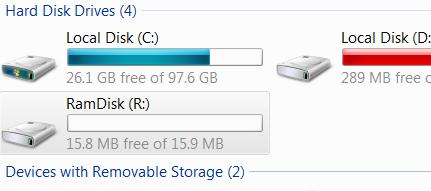
A additional drive, the RAMdisk with default drive letter R: (assuming you’re not changing it) will be created, and immediately accessible for usage.
Other buttons in the RAMdisk GUI are pretty obvious in usage. Use “Remove RAMdisk” to uninstall RAMdisk, or more specifically RRamdisk.sys driver from the system. Save Image… and Load Image… allows users to save or open an image file for the whole contents of RAMdisk, useful if you want to store data in RAMdisk in unaltered state to be open up later.
Ramdisk.exe accepts a image file as its argument so that the image file can be loaded automatically into the Ramdisk from command line. Potential usage include adding of “ramdisk imgfilename” to system boot up script such as autoexec.bat to load the data into memory disk.
There are more customization and other potential usage for Gavotte Ramdisk not included in the GUI. However, you need to manually edit the registry. These additional functions are maintained by addswap.exe and rdutil.exe which explained pretty well by the Readme, as shown below. In most case, you won’t need to come to this extent.
You can specify smaller cluster size, force pre-format as FAT32.
Parameter: Image
Maintained by rdutil utlilty, mainly for preload NTFS image. Eg:
Load ramdisk, don’t write anything.
Format the ramdisk
FORMAT /FS:NTFS /Q /V:RamDisk /A:512 R:
Adjust logfile to minimum size
CHKDSK /L:2048 R:
Reset access rights
CACLS R:\ /G: BUILTIN\Adminstrators:F
Create necessary structure
MKDIR R:\TEMP
Pack the disk image and save to registry
rdutil R: registry
Notes:
You should leave RamDisk as clean as possible before packing, the max packed image size is 64K.
The disk image only valid to same RamDisk size, you should re-create disk image when size changed.
The driver internal formater will disable if this registry present, corrupt/size-mismatch value leave an un-formated disk.
rdutil Utlility Usage:
Backup registry image
rdutil save filename
Restore registry image
rdutil load filename
Report packed image size
rdutil R: rdutil registry rdutil unpacked_file
Second command reading DriveLetter from registry, while the third is packing an unpacked image file.
Packing image & save to registry
rdutil R: registry
Packing image & save to file
rdutil R: packed_file
Unpacking image
rdutil unpack packed_file unpacked_file
Link NTFS junction to Ramdisk
rdutil link temp \
You can re-format RamDisk except RAMDrive media type. Eg:
FixedMedia type: FORMAT /FS:NTFS /FORCE /Q /V:RamDisk /A:512 R:
RemovableMedia type: ECHO Y | FORMAT /FS:NTFS /FORCE /Q /V:RamDisk /A:512 R:
You can place your format command to startup script. I don’t recommend re-format to FAT, the pre-formated RamDisk is more efficient than other format utililty.
Pagefile support – You can set pagefile to FixMedia type disk w/ pre-formated system. If you need other MediaType or re-format, use the addswap.exe utility:
addswap r:\pagefile.sys 16 32
Create pagefile r:\pagefile.sys with min=16M max=32M.
TEMP directory – You should set TEMP/TMP directory to TEMP sub-directory, don’t use the root directory.
NTFS junction point to RAMDrive – You can’t create NTFS junction point to RAMDrive media type, Fixed & Removable Media type should work.
Connectix VirtualPC compatibility – Someone report problem with VirtualPC+physical volume/disk. Please set MediaType to RAMDrive/Removable.
Mountpoint without DriveLetter
Clear DriveLetter registry value will not create Drive Letter for Ramdisk.
Attn. Don’t delete the DriveLetter registry, which fall to default R:. You can setup mountpoint/junction linking to this unnamed Ramdisk. Eg:
rdutil link C:\ramdisk link C:\ramdisk to root of Ramdisk
rdutil link C:\TEMP TEMP link C:\TEMP to \TEMP at Ramdisk
rmdir C:\ramdisk rmdir can remove the link without clear target content
NoDriveLetter configuration isn’t recommended, because most AntiVirus software cannot realtime scan Volume w/o Drive Letter.
LK is a technology writer for Tech Journey with background of system and network administrator. He has be documenting his experiences in digital and technology world for over 15 years.Connect with LK through Tech Journey on Facebook, Twitter or Google+.