Fix Vista Winodws Update Error Code 80004002
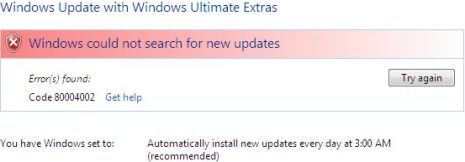
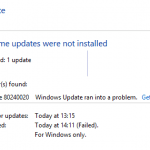
When running Windows Update in Vista to check for updates, Windows Update fails to check and search for any new updates or hotfixes available with the following error message:
Windows could not search for new updates
Error(s) found:
Code 80004002
Clicking on Try again button does not help, and the error page keeps coming back. Get help link meanwhile does not have much information regarding code 80004002 even from online help. Sometimes, error code 80004002 may also appear when Windows Update or Automatic Update detects new updates been released, and prompt to user notification about the new updates. However, user can or cannot download the updates, and updates will not install, with system generates error code 80004002.
Error 0×80040002 is a standard COM error that related to E_NOINTERFACE, which means some COM DLL components on the system is not correctly registered, or has become corrupted. It’s probably due to this reason that Windows Update process cannot find the interfaces that its dependencies DLL exports.
To solve and fix the 80040002 stop error on Windows Vista Update, try the following resolution to re-register the Windows Update related DLLs.
Open an elevated command prompt, and type the following commands. Press ‘ENTER’ key after each command:
regsvr32 wuapi.dll
regsvr32 wuaueng.dll
regsvr32 wuaueng1.dll
regsvr32 wucltui.dll
regsvr32 wups.dll
regsvr32 wups2.dll
regsvr32 wuweb.dll
There may be some errors on registering on the DLL, which can be ignored. Once re-registered, check for updates again. In most case, Automatic Update will work almost immediately. If trick does not work, try to disable UAC. You can always re-enable the UAC once the Windows Update gets working again.
If the WU 80004002 problem still persists, install Windows Vista Service Pack 1 (SP1) will probably solve all problems. Currently, Vista SP1 has RC version which is in near-complete stable stage. Users can download Vista SP1 RC via Windows Update or download Vista SP1 RC standalone setup package to install.
Related posts:
- The Call to DllRegisterServer Failed with Error Code 0×80004005 on Windows Vista
- Windows Update KB905474 and KB913446 Installation Failed with Error Code 0×80242006
- Internal Error 2739 Error in Vista (32 or 64-bit) When Install Adobe Photoshop CS3 and Reflector Related Programs
- Windows Update or Office Update Encounters 0×80070643 Failed Update Error
- Install Windows Server 2003 Administration Tools Pack (adminpak) on Windows Vista


I was having the same error and discovered that no updates had been installed for almost 3 years! I was not able to change my automatic update settings.
Yesterday, I decided to disable all my security settings, including Windows Defender and McAfee firewall, anti-virus and spyware and that was the answer!
I was able to install the latest Windows Update Agent and then everything flowed from there. It took almost 10 hours but over 100 important and recommended updates, including SP1 and SP2 installed.
I hope that helps someone else.
step 1.Okay i had the same issue,here is how i fixed it click "start" then select run and type in "msconfig" hit enter.here u will click on the services tab. and the bottom right u will see "enable all" simply hit that button,then check and make sure all are selected and then hit apply,you will be prompted to restart your computer,do so and all should be fixed .For those that do not wish for all services to start make sure these services are selected—>Windows Update ,Windows Module Installer, & Windows Installer than again hit apply.
step 2.Now if this still did not fix your problem you can try this,once again navigate to "start" and select "run" type in "services.msc"hit enter and here you need to check a few things firstly make sure "background Intelligent Transfer Service is set to Automatic Startup.If not select and right click this service and select the "properties"option.Now you should have the BITS Menu up and u will see located near the center "startup type"make sure it says "automatic"then hit apply at the bottom of menu.You will do the same for Windows Installer and Windows update.
i did all of the above and restarted my machine and all was well .. hope it helped
WHEN I TYPE IN REGSVR 32 WUAUENT1.DLL AND THE FOLLOWING ONE AFTER THAT I RECEIVE A MESSAGE FAILED TO LOAD, SPECIFIC MODEL COULD NOT BE FOUND
UPGRADE TO WINDOWS 7 NOW & SAVE YOURSELF MONTHS OF ENDLESS HELL!
I just wanted to post a quick note on here to try to help some of the many people that, like me, have been living in the hellish underworld of Windows Updates. I suffered immense problems over the whole of the last year due to ******* ******* Vista Updates which would not install, ultimately resulting in my operating system becoming completely screwed up and me being unable to work. I tried everything on these boards and many others, I tried everything…. in the end, a friend of mine, who has less technical knowledge than me, suggested I upgrade to Windows 7. Now while I was reluctant to admit defeat – and that I had to PAY my way out the problems caused by Microsoft, by giving more money to THEM, my time is worth more than the hell I was experiencing….. so I'm here to tell you that upgrading Vista to Windows 7 was the best thing I ever did. All my problems are resolved. Computer (AND WINDOWS UPDATES) now all working perfectly and UP TO DATE. I paid about £80 (UK POUNDS) – which i think is about 40-50 US Dollars – and it was worth every penny (or cent for you).
Just go to Microsoft site and navigate to the Windows 7 upgrade link (they've got it plastered everywhere of course). One word of warning – after downloading the 3 large files, when you start to install them there are several preliminary steps you have to go through – do them all very carefully – including compatibility checks and system status etc etc…. You have to plug in all your regular USB devices to make sure everything compatible – DO NOT UNPLUG THEM DURING ANY PART OF THE PROCESS OR YOU WILL HAVE TO START OVER. Oh and do a backup of your files and settings first to an external hard-drive. Then it checks your system to make sure all software and hardware is compatible. Now these processes were painfully slow for me (perhaps not helped by the fact that I appeared to be downloading from US servers to the UK), and it took the whole evening, I had to uninstall certain software too on the advice of the Windows 7 software installer (including Dell Support Centre and Dell Modem something or other – which took a LONG time itself)…. BUT, once I'd got the actual programme – Windows 7 – installing, it ran like a dream. It took a long time and in the end I just left it doing its thing and went to bed (having nightmares of another day of hell and lost earnings). In the morning – I could not believe it – it was all perfectly installed and ready to go. Just had to install the latest updates (which terrified the hell out of me of course!!!!! – but thankfully all went ok!) and then restarted and it is beautiful. Not only that, but Windows 7 absolutely ****** all over Vista, which is littered with bugs and errors and problems and will never work perfectly for long. And Windows 7 is about 2-3 times faster than Vista, apparently because it cuts out a lot of the unecessary running procedures (or something like that!). I'd recommend doing this if you're having problems – If i'd done it a few months back i could have saved days and days of hell and $$$$$$$$ of earnings! Good luck and if you need any pointers for this process drop me a line – simac73@yahoo.co.uk
Cheers
Simon
thanks it worked!!! in first try
hi Folks !
i've the same problem with my MSN when i wanna run it , i get a report like that (error code:80004002) even i updated my MSN for some times ,
sum1 can help ?
thanx
hi everyone.
(I am using XP).
just wanna share with those who have difficulties in signing in new windows live messenger 2009 with error 80004002.
there is no need to download new file, update things, clear cache (as suggested by many websites)
to get rid of error 80004002 when signing in WLM 2009.
simply go to control panel, remove/uninstall windows live essential. after clicking on it, there will be option whether to repair or uninstall.
click repair. after that, restart and try to sign in.
for me this works well. =)
thank you so much. my computer crashed two days ago and i have been going nuts trying to fix it. i erased everything and reloaded vista. i am stuck to a wire because i need the updates for my wireless driver and i could not get update to run. it is currently checking for updates (im sure it will take forever because i am missing over a years worth). hopefully this will work.
oh yeah, and have you heard of any issues with trend micro antivirus. every time i reload it, update it, then restart my computer, it crashes again.
HELLO, YOU SHOULD INSTALL
Malwarebytes' Anti-Malware
THIS SOFTEARE CHECK IF THERE IS A VIRUS IN YOUR SYSTEM THAT EVEN THE STRONGEST ANTIVIRUS CAN'T DETECT.
AFTER INSTALLING IT JUST GO TO (SERIALS.WS) TO GET A (FREE REGISTER KEY)
I HAD THIS PROBLEM TWO DAYS AGO, AND I COULDN'T UPDATE ANY OF MY SOFTWARE AND NOW I CAN!!!
[...] here are some info pages for you to look at.http://www.eggheadcafe.com/software/aspn…http://www.mydigitallife.info/2007/12/19… [...]
[...] e dai qui uno sguardo! ERRORE: Errore 80.004.002, Microsoft Transaction Server, di report Fix Vista Winodws Update Error Code 80004002 My Digital Life Errore 80004002 Web Cam – Hardware Upgrade Forum Windows Update Error Code 80004002 – Windows [...]
In vista RTM, Moving the "Program Files" to another partition destroyes the critical update installations via Windows Update
Do you know if SP1 also fixes this ?
The fix is the "HardLink" that exists between WU and "C:Program Files" which no Junction point can prevent
Or