
There are many software utilities that can be used to safeguard your confidential folders and data such as previously mentioned Safehouse Explorer, My Lockbox, Hide Folders and 1 Second Folder Encrypt , but in case you are still looking around for alternatives, you may want to get a quick try on this freeware. Named as Easy File Locker, it enables files and folders locking in different security levels so that all the sensitive data can be kept securely in Windows system without the need to worry about being accessed by third party especially in shared PC systems.
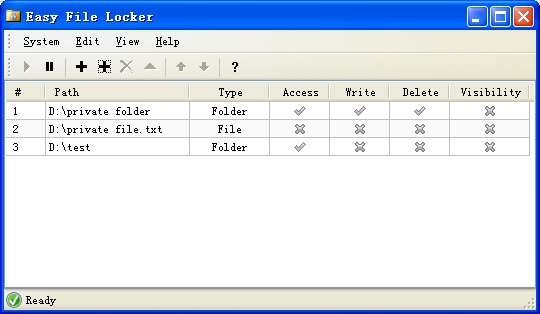
Once installed and launched the software utility, you will be brought to a simple GUI. Over here, users have option to either add files or folders by simply browse and add into them into the list. To be more user friendly, users can tick the files/folders restriction to be ‘Accessible’, ‘Writable’, ‘Deletable’ or ‘Visible’ so that they can be refrained from different level of accessibility. For instances, you may want to restrict certain files to be read only, or don’t want them to be deleted intentionally, or even better is ability to hide them from others’ visibility. After all have been defined, users can set a master password to lock the lists from being accessed by anyone else, so that no change can be made without your authority.
Compatible to run with any Windows system, the tiny utility consumes only 230kB and is free for download here for immediate use.
 Tip and Trick
- How To Download HBO Shows On iPhone, iPad Through Apple TV App
- Windows 10 Insider Preview Build 19025 (20H1) for PC Official Available for Insiders in Fast Ring – Here’s What’s News, Fixes, and Enhancement Changelog
- Kaspersky Total Security 2020 Free Download With License Serial Key
- Steganos Privacy Suite 19 Free Download With Genuine License Key
- Zemana AntiMalware Premium Free Download For Limited Time