Easily Login to Windows XP with No Password Administrator Account Backdoor Trick
In password-protected Windows XP Home or Professional edition system, each user logs on to his or her own user name and password to have full access to the Windows computer. However, Windows user or administrator can still log in to the Windows XP machine without knowing the original password, if they have lost or forgotten the user ID or password, by using various bypass or crack method such as using DreamPackPL to bypass the need to logon using valid account or password, crack or brute force retrieve the Windows passwords for various user or administrator account with Ophcrack2, and using third party services such as Login Recovery to retrieval and recovery of Windows user name and passwords. However, there is one simpler method to hack into a Windows XP system, if the computer owner installed Windows XP, and forgot or not set the Administrator account password.
By default installation, Windows XP has a built-in Administrator account which equivalent to root or superuser privilege account in Linux or Unix that contains no password. In other word, hacker or any people can simply key in Administrator as user name at the Windows Logon Welcome Screen prompt with blank password (no password) and get full administrative access as superuser to the Windows PC. Worse, most computer owners don’t even know such an Administrator account is actually existed, don’t even mentioned they will create or set a password for Administrator user account.

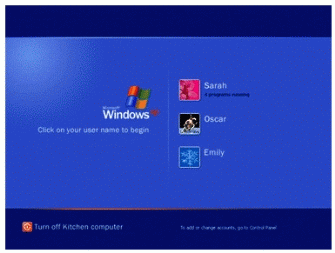
So this security vulnerability flaw provides an easy way to hack into any Windows XP computer that the user forgets or simply does not set a password for the Administrator user ID. The problem is that in normal Windows XP Welcome Screen where you choose which user name you want to log onto, the Administrator user name is not displayed and is not shown. If you can’t choose or select the Administrator from the login screen, then how are you going to log-in with the Administrator account? The following video clip provides a simple hack and trick.
Basically, at Windows XP Welcom Screen, simply press Ctrl-Alt-Del keys sequence together twice, and you will be shown a Log On to Windows menu which you can specify User Name and Password. In the User Name text box, key in “Administrator” (without quote) and leave the Password field blank. Then press Enter or click on OK. If there is not password protects the Administrator account, or blank password is set, then you will be able to access the Windows with full administrative privileges as Administrator.
Note: You can unhide or show the Administrator account on the Welcome screen.
Check out more ways to recover from forgotten Windows password.
Related posts:
- Unhide the Administrator Account in Windows XP
- Reveal and Recover Windows NT, 2000, XP, 2003 and Longhorn Login (including Administrator) Username and Password with Login Recovery
- Hack and Reset Windows NT 4.0 and Windows 2000 Administrator or Domain Admin Password with LOGON.SCR Trick
- Hack to Log On to Windows XP and 2000 without Changing Existing Password with DreamPackPL
- ATM Hacking and Cracking to Steal Money with ATM Backdoor Default Master Password
76 Comments
Pages: « Previous 1 2


I am a user but I want log in to the Administrator’s account
call me i wil tel u. 8233031525
i need to get on to password protected windows login without using any software..
can u tell me how to do this?
Thank you, problem solved!
You can log on as administrator on safe mode.Press F8 when you start the computer and choose Safe Mode to get in.If you can not log in safe mode, try the tool bellow,it is the best method without lose anything.
In consideration of remaining all programs and data of the computer,I know a passowrd tool:Windows Password Rescuer.It supports all versions of windows operation system.Recover Windows password without lose anything.
Thank u sooo much!!! This worked!! Control alt delete twice and I could get in and remove the password!!
I suggest that u just setting up a back door in window through using a hiren boot disk, with this copy a file from system32 known as sethc.exe to yah pwd desktop.After rename cmd.exe to sethc.exe. Shutdown and try to push shift key five times at the welcome screen. What will happen will look real coooool!
Lost windows password is not a big problem. I realize an easy method to reset lost windows password, just need to create a bootable CD/DVD or USB flash drive to reset forgotten windows password, I have made a bootable CD/DVD with the tool Windows Password Seeker and reset my administrator password successfully. Hope it helps you. Good luck!
There’s an easy and safe method to reset windows password required no reinstalling Windows and no computer skills. The software is Windows Password Seeker which has been recommend at about.com. It can remove all windows passwords in seconds on any Windows versions. You can get back into Windows just within five minutes. It’s worth a try.
i have same problem here… i can't log on to my computer because if forgot my administrator password…
how can i reset my password without using cd….?
hello im using microsoft window ep when i opened it …it opens wid log into windows which has username and password but i have a problem after writing Administrator and press enter it does not open can u help me ………
dear,i use hp notebook.forget my password.but when start already write administrator.so no need to write.but dont open new account .if i press ctrl+alt+del twice it not come any new box.all time same.help me
Well snap this seems to have worked just fine on my system thanks a ton your one smart cookie.
HEY what do i do if when i try to use the hidden administrator it says its restricted???????!!!!
HI, this is simple, Win7 disabled the default administrator account, you can search Windows Login recovery in google and it will help you to solve your problem. i have tried, it works..Good luck!
Hi Sir/Madam,
We had a hacker get into our windows XP and set up unknown passwords for access when we previously had no set passwords. Please advise how we can reaccess or rectify problem. Thanks very much. Richard
man this didnt work for me.is there any better idea
i forgot logon user name and password,and the logon message keep on showing the system could not log on
thank you it helped me a lot
is this method applicable for window vista or window 7???
omg i have a administrator password lock on my comp and it controls every thing i cant download anything with out that password can someone tell me how to unlock it so i can download adobe flash player?!
can I know can I create a new user without login to any user?..
That is only possible after u access any account out side the windows logon screen. Once accessed cmd.exe then it means u have accessed system account. So from there u can now make yah magic happen. Soooo sweet.
Once i receive amsg from yah i shall show u how to move around the welcome screen. Great time.
That wont work on XP Home. (admin cant login in normal boot mode). In XP Pro it only works if the minimal charcount of password is set to 0 and the Administrator-Account is activated
Ok….my problem is that i do have a password for my administrative account and an extra user account and we were just using it last night. I have had these passwords for 8 months on this laptop for windows xp but all of a sudden this morning it is saying wrong passwords for both. I dont understand this at all!! does windows automatically reset them after so long or something. ive tried the cont alt del and that does nothing. Oh yeah, and this is a mini laptop so cant use disk of any type just usb.
That means that the password has an expirely date set in the system. SO i recommend u try using hiren boot disk to look up yah the backdoor at the bot disk from passwords menu. And set in Windowsgate. Am sure it will help u outta yah mystery.