
Video sharing sites has gaining increasing popularity every new day, with a lot of fresh and unique contents, videos and movies been uploaded into Youtube, Google Video, Metacafe, DailyMotion, Grinvi and other video hosting websites by individual user every minutes. You may want to download, grab and keep some of these videos or movies, and then burn them to CD or DVD for offline viewing. Previously, to do so, you have to firstly, download the flash video (the default video format that most video social sites are using) from online video host into your local hard disk, or download using video bookmarklet, and then convert the flash video in .flv extension and format to other popular media format such as .avi and .mpg format.
Now, with VDownload, or Web Video Downloader, you can download the flash video from Youtube, Google Video, Grinvi and DailyMotion, and then convert the flash video automatically into easily portable video format .avi, .mpg (mpeg video format) or .psp (Sony PlayStation Portable compatible format), with just 1 click. With Web Video Downloader (VDownloader), you will download videos in .avi or .mpg format that instantly playable in player such as Windows Media Player, instead of in flash video .flv format.
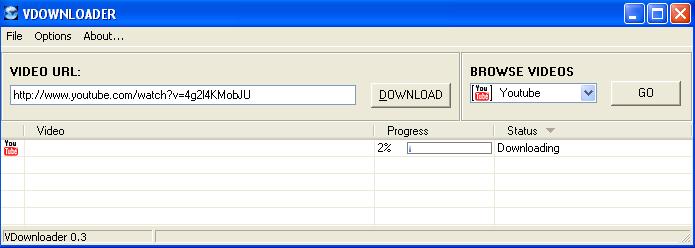
VDownloader is free (freeware) by www.enriquepuertas.com. It monitors and scans Windows clipboard for video links to Youtube, Google Video, Grinvi and DailyMotion, and once any video link is detected, the video or movie will be automatically downloaded and converted to the format that you specified in the setting or preference. VDownloader is able to convert and save the video as avi, mpg (mpeg) or psp format. You can also change the video output size (width and length) and audio bitrate. Other features of VDownloader are proxy support and ability to batch downloading multiple video streams from multiple video sharing sites.
To use VDownloader, simply extract or unzip the all files contained in the archive to a folder in your hard disk. No installation is needed. However, make sure that both vdownloader.exe and ffmpeg.exe are in the same directory, or else videos won’t be properly converted during conversion process. To use it, start the program from any folder, and then simply copy and paste the web page URL (or link URI) that contains the video on supported sites to VDownloader. In most case, once you copy the video link, VDownloader will auto-detect it and start the downloading process.
Download VDownloader version 0.3b. VDownloader has been upgraded to VDownloader version 0.61.
Note: There is also an online video downloader and converter that does the job online at service server by download video to its own server, convert the video, and only prompt you to download the final version of video after conversion. It’s little different from VDownloader that download raw flash video to your local PC and does the conversion locally, using your system resources.
 Tip and Trick
- How To Download HBO Shows On iPhone, iPad Through Apple TV App
- Windows 10 Insider Preview Build 19025 (20H1) for PC Official Available for Insiders in Fast Ring – Here’s What’s News, Fixes, and Enhancement Changelog
- Kaspersky Total Security 2020 Free Download With License Serial Key
- Steganos Privacy Suite 19 Free Download With Genuine License Key
- Zemana AntiMalware Premium Free Download For Limited Time