
Microsoft has released MUI (Multilingual User Interface) language packs for Windows 7 RTM. The Windows 7 language packs is available via Windows Update as optional update for Windows 7 Ultimate and Enterprise editions only.
According to Springboard Series blog, all language packs, except Traditional Chinese for Taiwan for Windows 7, for both 32-bit (x86) and 64-bit (x64) versions is now available for free download.
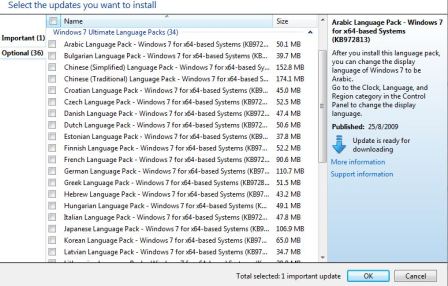
Windows 7 RTM x86 and x65 MUI language packs in DVD ISO format were leaked earlier from MSDN and TechNet Subscriber Downloads. User who prefers to download all language packs for Windows 7 via BitTorrent (BT), torrent is available for the MSND or TechNet DVD ISO versions.
Do take note that if too many additional language packs are installed, the disk space and system performance can be affected. In particular, disk space and system performance are affected during servicing operations, such as Service Pack installations, according to KB972813. Therefore, it’s recommended to only add a language pack to computer only if the language will be used.
Windows Update will always display all language packs that are available. Any unwanted language packs can be made hidden in Windows Update. To hide unwanted language packs in Windows Update, click on the Windows 7 Ultimate Language Packs category (to highlight and hide all remaining language packs) or click on and highlight individual language pack (to hide language packs one by one) in the Select the updates you want to install page, and then right-click the highlighted updates, and then select Hide update.
User who wants to download the MUI language packs for Windows 7 only from official source, here’s the direct download links for both 32-bit (x86) and 64-bit (x64) Windows 7 MUI language packs from Microsoft’s Windows Update server.
Download Official 32-bit (x86) Windows 7 RTM MUI Language Packs
Arabic: windows6.1-kb972813-x86-ar-sa_210ccc96338a1ff683803eb4034e5f53d6d54c97.exe
Bulgarian: windows6.1-kb972813-x86-bg-bg_2e5d91b00775e0f974d4ec213fc20d470ff6850e.exe
Chinese (Simplified): windows6.1-kb972813-x86-zh-cn_ab024143b556395e6638e26712b1e0f3bc031fcf.exe
Chinese (Traditional): windows6.1-kb972813-x86-zh-hk_90617b75cfaab716a43e7c082b00490a6d475376.exe
Croatian: windows6.1-kb972813-x86-hr-hr_d8a4131aee5d5de039a3a0dc517ca0c07ebc3472.exe
Czech: windows6.1-kb972813-x86-cs-cz_2759680ec6e2f4a7629c7d02b1fbce0a0d410a4e.exe
Danish: windows6.1-kb972813-x86-da-dk_e1c57a4dcbd336ac73e349a9bb9d30de17ac093f.exe
Dutch: windows6.1-kb972813-x86-nl-nl_194a2ca7b589e77b0be73b822f77760823183c51.exe
English: windows6.1-kb972813-x86-en-us_22ee3397a02372681b375ddabf6ffa33662fd500.exe
Estonia: windows6.1-kb972813-x86-et-ee_3a99769fac5d6a11e6616297f842a9074c045699.exe
Finnish: windows6.1-kb972813-x86-fi-fi_dd1973cc63ab7dea0e5d660af06869a8beefe36a.exe
French: windows6.1-kb972813-x86-fr-fr_1878fd391b990054787a14b0db4a5db00b793bf1.exe
German: windows6.1-kb972813-x86-de-de_1b86ff9b8f4c517dd341d76f24c74399278b05fc.exe
Greek: windows6.1-kb972813-x86-el-gr_1f366d5e4fbde7df89b106821236fc1d3b3c9230.exe
Hebrew: windows6.1-kb972813-x86-he-il_a3d6a6ae858f33ffa11a14c2a966e6603c134ef9.exe
Hungarian: windows6.1-kb972813-x86-hu-hu_12feb47da4bb28f60b6a30d379044356581c20f8.exe
Italian: windows6.1-kb972813-x86-it-it_079a3afeb88f14d24a3b4204812225e78c2e0bb8.exe
Japanese: windows6.1-kb972813-x86-ja-jp_08758c23cc64a53949072d53dd7bf6bbc8b45420.exe
Korean: windows6.1-kb972813-x86-ko-kr_bb2de1652c37394be4de87438661b129f8b56908.exe
Latvian: windows6.1-kb972813-x86-lv-lv_8b7a0b361dd37f7cd3926f798a79a90d378b18b2.exe
Lithuanian: windows6.1-kb972813-x86-lt-lt_7aee9ce232cb46701f479fafdb0aea369ce1ad6a.exe
Norwegian: windows6.1-kb972813-x86-nb-no_d65ea89195cf5f7d3170ccb1db7bae3c157f5b24.exe
Polish: windows6.1-kb972813-x86-pl-pl_9199018040692bc732a590e9b092a18120d326b2.exe
Portuguese (Brazil): windows6.1-kb972813-x86-pt-br_0a3fe79820d6d199dd43495d4efa5c40f270e45a.exe
Portuguese (Portugal): windows6.1-kb972813-x86-pt-pt_4165bd9cd083abd8ddd81986e18b1fd86aab5ce9.exe
Romanian: windows6.1-kb972813-x86-ro-ro_e1c324236046eb608e478570cf4396776ff02a72.exe
Russian: windows6.1-kb972813-x86-ru-ru_f4df4bcb8d3194323f17a086a17f46dd0c9c492a.exe
Serbian (Latin): windows6.1-kb972813-x86-sr-latn-cs_6e049bae4d75b82405b28455e2def0a0d0055a9c.exe
Slovak: windows6.1-kb972813-x86-sk-sk_dd2ce36a7e94fceff650cb892b8c954b8af6025a.exe
Slovenian: windows6.1-kb972813-x86-sl-si_17786270766d556ba9bf3693762cb98805df9f50.exe
Spanish: windows6.1-kb972813-x86-es-es_1943a073d8f00e387301deb22cd177bf77319ee8.exe
Swedish: windows6.1-kb972813-x86-sv-se_687085e8bbdf9c17a668b801f28f7f9c74e7a86a.exe
Thai: windows6.1-kb972813-x86-th-th_780885dd42c039d9926ac004c76ba3ba9c30c6d0.exe
Turkish: windows6.1-kb972813-x86-tr-tr_13015cb75811f874c83fdd679beb4c22c930a57c.exe
Ukrainian: windows6.1-kb972813-x86-uk-ua_0a467bf14bc4f524c18877f570a20c58e91ceba9.exe
Download Official 64-bit (x64) Windows 7 RTM MUI Language Packs
Arabic: windows6.1-kb972813-x64-ar-sa_aaac936bd625c12b607dffea19fab8be9cfa28f6.exe
Bulgarian: windows6.1-kb972813-x64-bg-bg_155634f17868659db4b65cfeff57059b2436515f.exe
Chinese (Simplified): windows6.1-kb972813-x64-zh-cn_a649e9af1e28514d48bdc51f7956be08060e54bc.exe
Chinese (Traditional): windows6.1-kb972813-x64-zh-hk_d428bc1cca4aea20163936e6687221c0e6b99ec4.exe
Croatian: windows6.1-kb972813-x64-hr-hr_06468f799a1c1f295bc3abbc85c14116e2645122.exe
Czech: windows6.1-kb972813-x64-cs-cz_f136df3188c54ff234ca77253fee2cf3e91966b7.exe
Danish: windows6.1-kb972813-x64-da-dk_2b7590d389ca96af6f367408150cb6bc9aa8f4b4.exe
Dutch: windows6.1-kb972813-x64-nl-nl_2ac14543f6e46c61ae226d7f0f5aee7f4d500e9f.exe
English: windows6.1-kb972813-x64-en-us_483a3e51038f1a369bc5b5cdf5fc32df3ea4ad27.exe
Estonian: windows6.1-kb972813-x64-et-ee_3c0479d7049109bcb42fd9ec59d1c65449704687.exe
Finnish: windows6.1-kb972813-x64-fi-fi_4378f72d1233b00e2bdfc680a13f62ae11ab0fcb.exe
French: windows6.1-kb972813-x64-fr-fr_0e50cd2ea794e4cdfac861b194d2e996b7bbc8d8.exe
German: windows6.1-kb972813-x64-de-de_399ac15b2d55fd5dea0770d98825d7e75f4ad533.exe
Greek: windows6.1-kb972813-x64-el-gr_9ae588ba70896f9100a10cb8ed68a79678d6fc32.exe
Hebrew: windows6.1-kb972813-x64-he-il_86c22105bb32269c9c0deaf2710fcb1531a29817.exe
Hungarian: windows6.1-kb972813-x64-hu-hu_e5c47bffe398b9ace42d4326de2646a6172d39b5.exe
Italian: windows6.1-kb972813-x64-it-it_3f0f5d78202e074e17a495beec821e1d326a8e2a.exe
Japanese: windows6.1-kb972813-x64-ja-jp_9d73b1c1270deacbe7a2329559476a94daddb848.exe
Korean: windows6.1-kb972813-x64-ko-kr_e6b3322c3865cfd328d84376e192c4f9d41aa0e6.exe
Latvian: windows6.1-kb972813-x64-lv-lv_70c1f8bda213f20aea07e46a6c9ed976f0d151ce.exe
Lithuanian: windows6.1-kb972813-x64-lt-lt_ede5a878aae2b0d64e81ff739e950b6f105df580.exe
Norwegian: windows6.1-kb972813-x64-nb-no_1b7f93a0906a62eecd6b200979f8df986a7556f1.exe
Polish: windows6.1-kb972813-x64-pl-pl_6b228326c2f7ef6406242671600b499746ff3454.exe
Portuguese (Brazil): windows6.1-kb972813-x64-pt-br_276b65f3b6b2657c8fe936f9841dc1243e02dc7b.exe
Portuguese (Portugal): windows6.1-kb972813-x64-pt-pt_f8310aa4a73841aec29b3f4e74ecaece56b695e9.exe
Romanian: windows6.1-kb972813-x64-ro-ro_810f2d590dd5aac92561eea5884ed1c70f34dbd9.exe
Russian: windows6.1-kb972813-x64-ru-ru_f0acfc688d609ee45d43cc60c6412a3071a665bd.exe
Serbian (Latin): windows6.1-kb972813-x64-sr-latn-cs_275e0a17cbec543aa1bd7eebc883a1d21c11b514.exe
Slovak: windows6.1-kb972813-x64-sk-sk_15f397de2ceaaff8dbfe670bcc6c013791a297c3.exe
Slovenian: windows6.1-kb972813-x64-sl-si_8cfc82e0d15ed94634d3da69674008dc56755b93.exe
Spanish: windows6.1-kb972813-x64-es-es_2e593c26d9e23ad8176224a53c68a04f996ee014.exe
Swedish: windows6.1-kb972813-x64-sv-se_1f4c415e0f4ca77064d597975f6ac7a9e0b8af63.exe
Thai: windows6.1-kb972813-x64-th-th_080c8631d44a53c34ffdab8fd73820572dd87be4.exe
Turkish: windows6.1-kb972813-x64-tr-tr_6bd6660158289e0b5d4b5a7f7fded6e3528a9a04.exe
Ukrainian: windows6.1-kb972813-x64-uk-ua_c6c4e44c9d903049a4c60fed9d42effa18f345bd.exe
After downloading the Windows 7 language packs, run the .EXE executable file to extract the .CAB language pack (LP) cabinet file. Then, follow the guide to install language pack in Windows 7, and guide to change display language on Windows 7 user interface and welcome screen.
 Tip and Trick
- How To Download HBO Shows On iPhone, iPad Through Apple TV App
- Windows 10 Insider Preview Build 19025 (20H1) for PC Official Available for Insiders in Fast Ring – Here’s What’s News, Fixes, and Enhancement Changelog
- Kaspersky Total Security 2020 Free Download With License Serial Key
- Steganos Privacy Suite 19 Free Download With Genuine License Key
- Zemana AntiMalware Premium Free Download For Limited Time