Disable, Uninstall and Remove Skype Add-On Call This Phone Number on Web Page and Toolbar Plugin Menu in IE
When browse web pages with phone number on it, you may notice that the phone number has been highlighted and embedded in Skype code as colorful option-selectable button, preceding with country flag. If you hover the mouse pointer over the phone number button, you will read that the button allows you to call this phone number in the country with Skype, while the flag allows you to change country code. The change to phone number on webpages, together with a Skype drop-down menu on the menu toolbar or command bar is a feature of Skype.
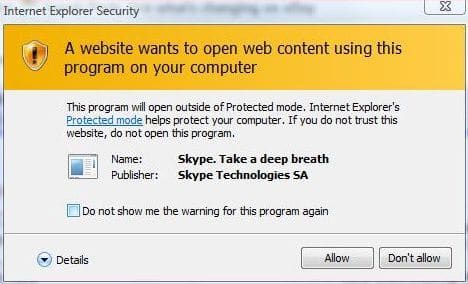
Other than above changes, when visiting a web page with phone number on Windows Vista, users may prompt with a Internet Explorer Warning dialog window saying “A website wants to open web content using this program on your computer” with the program name identified as “Skype, Take a deep breath” and publisher as “Skype Technologies SA”. The warning appear due to the program will have to be opened outside Protected Mode, a security feature of IE7 in Vista, and users must specifically allows the act to continue by clicking on “Allow” button or stop the Skype integration with IE by pressing “Don’t Allow”.

Skype bundles the Skype add-in for Internet Explorer with the Skype client in order provides users with convenient way to initiate phone calls directly from the web pages by clicking on the highlighted phone number itself, which will launch Skype to dial the number. This shortcut to dial saves users from having to copy and paste or remember the telephone number and type the number in Skype interface.
You may not like this feature and want to see the phone number in its ordinary normal form instead of highlighted by Skype, especially for users who seldom use Skype to make outgoing SkypeOut call to ordinary phone. (Note that your IE crashes due to Skype add-in, which applicable to both IE7 on Vista and IE6/IE7 on XP, you should upgrade to latest version of Skype, which comes with latest version of Skype IE plugin). If you want to disable the highlight of phone number of web pages when viewed in Internet Explorer browser, you can uninstall and remove the Skype IE plugin.
How to Remove and Uninstall Skype Add-On for IE
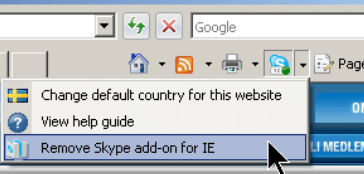
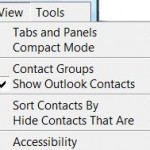
Uninstall the Skype IE add-in by clicking on Remove Skype add-on for IE from the Skype plugin menu located on IE command bar or toolbar as shown in the figure below:

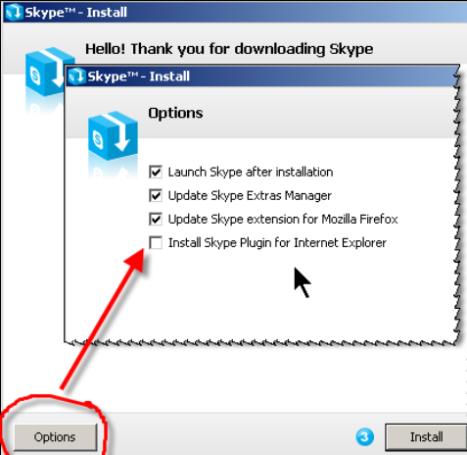
Sometimes the IE’s Skype add-on menu may be hidden due to space constraint. If you cannot find button with Skype logo, try to click on the rightmost arrow to expand the menu. If you choose to un-install the the add-in plugin, Skype will remember the preference and will not try to install the IE add-on again on future install or upgrade. To install the Skype IE plugin or add-on again, you will need to specifically tell the Skype installer to include Install Skype Plugin for Internet Explorer option as shown in the figure below:

Apparently the built-in Skype IE Plugin remover is little buggy, as on some system, performing step above to uninstall and remove Skype IE plugin is not enough to get rid of the add-on and/or the menu button in the IE’s menu bar or toolbar. If there is still trace of Skype add-on still has hooks into Internet Explorer, try to use the following command to completely remove all references and hooks of Skype in IE by unregistering Skype IE Plug-in from the IE toolbar. In Vista, use an elevated command prompt. Close all IE windows before running the command.
regsvr32 /u “c:\Program Files\Skype\Toolbars\Internet Explorer\SkypeIEPlugin.dll
Still the Skype IE Plugin still persistent on your system, go to Internet Explorer, click on Tools -> Manage Add-ons -> Enable or Disable Add-ons”. In the Manage Add-ons diaglo, disable all Skype items found, namely Skype and Skype add-in (mastermind).
One last step is to search for SkypeIEPlugin.dll file (normally located in c:\Program Files\Skype\Toolbars\Internet Explorer\ folder) on your computer and delete the file. Again, close all Internet Explorer windows before deleting the file otherwise the file will be locked.
Once the Skype IE Plugin is unhooked from IE and uninstalled, the phone number on web pages will appear as normal text again, and the Skype menu on Command Bar or toolbar is removed.


Thank you!
I use Chrome, but there is also a turning off (and even remove) possibility in Tools/Add-ons for removing/blocking/stopping that stupid thing (for me, not only telephone numbers were converted to CallToSkype numbers, but also normal numbers, and made it really-really hard to do actually WORK on my computer). Now I hope that it won't happen again
Has anyone found a way to disable this at the html level? …without having to enter spaces or anything between the numbers?
Arggggh!
I was able to do an ad hoc fix. It took me an hour to work it out, but finally got all the phone numbers formatted like: (720) 814 2500. That's (720), space, Prefix, space, 4 digit number.
I'd get one to work, but the others wouldn't. Spent awhile copying the format and pasting (in FrontPage), but got 'em all done.
Not very elegant but worked.
Has anyone tried to sue skype over their intrusive alteration of some beautiful works of art displayed on the internet?
It's like vandalizing an oil painting, or smearing crap on a statue by Michael Angelo. OK, I'm not an artist, but I've chanced upon some lovely web sites in my time.
Cheers
Skype's add on is real pain for designers.
Like It is good for users and I want it there BUT size of telephone no. changes with skype addon enabled.
So, Is it possible to know that user has skype enabled or adjustments in HTML so size doesn't change. ???
Thanks. This was driving me crazy.
A big fat thank you for the information. The skype Add-on altered numbers in the text in my CMS with Skype highlight blablabla… impossible to get rid off. Now it works fine. Thanks!
I can not disable the applicatioin. It says disabled in the app add on in IE,
A very good idea gone totally wrong.
Completely screwed up my formatting on several sites.
When will the bean counters learn that this type of ad on should be an opt in, not a default.
I like Skype but do not use for every phone number.
The design team should have gone to school and learned to code before putting out such a terrible product.
The idea behind this is ok…
…but the Skype dev team got the implementation completely wrong. In fact, it's so utterly wrong a high-school intern could have done a better job designing and building it.
Fundamentally, there is no way for Skype's current implementation to reliably detect which phone numbers are safe to replace and which ones aren't. Got a "td" tag with an onclick() that replaces the cell with an "input" box containing the phone number? Guess what, Skype spews its extra-special HTML all over your input box, because it replaces the contents of the "td" tag before your JavaScript even gets a chance to execute. There are literally thousands of ways to create situations like this, and there's no way for Skype's add-on to catch them all.
Of course, if you don't like that behavior you can add Skype-specific "meta" tags to the top of every single page you don't want munged by Skype – yet another short-sighted error. Even if you assume that what the toolbar does is a GOOD thing (which, given the above, it's not), the correct behavior is opt-in, not opt-out: meaning, I should be adding the "meta" tag to the header if I want to *enable* Skype – it should be *disabled* by default.
So, to any Skype developers that might read this: if you have any shred of integrity, kill the stupid add-on that you've created or fix it so it doesn't intercept anything unless you tell it to, explicitly.
This skype "feature" stinks. All very well to offer a fix for web users but what can a webmaster do to prevent Skype hiding numbers? I've found customer web-pages where the number is simply not visible. Try this code in Firefox on a Skyped (Windows7) machine: <code>07793 114</code>
je veus supprimer mon skype
[...] http://www.mydigitallife.info/2007/10/10/disable-uninstall-and-remove-skype-add-on-call-this-phone-n…References : [...]
Skype totally corrupted the HTML on a web site including a page of contact phone numbers that I was updating via a web-browser HTML editor (on sites.google.com/site ).
Now all the phone numbers are only visible if one over hangs the mouse over what's left of the phone numbers. And that visbility lasts only a few seconds. So I had to retype the whole address list ….
What a piece of crapware.
This does not seem to be a recoverable error. My HTML code is now full of junk like:
<img name="skype_tb_img_a0" …. …. <span title="Call this phone number in United States of America with Skype: + ….
To disable number highlighting in Firefox, just go to:
Tools > Add-ons
You will see 'Skype extension for Firefox'
Disable it and you're done.
What an annoying piece of crap. Skype is becoming like adobe. I had 100 tabs open in FF and skype plugin was causing it to hang a lot. ("A script is taking too long to respond.. skype_ff_toolbar"). Finally I found the culprit.
Now when I wanted to uninstall, it asked me to (1) restart firefox (goodbye tabs!)
(2) restart windows (goodbye all open windows!)
What an intrusive piece of worthless crapware!!!
I have had it with skype. I am going to officially stop using skype from now on just because of this worthless toolbar.
Thanks for this info.
Thankyou so much that stupid skype addon was a total pest and hinderance. Thx again
Perfect! Just the amswer I was looking for!
Thanks!
This was great help, couldn’t do anything without calling people randomly
Thank you for being so clear!
THANK YOU VERY MUCH for posting this – I have installed and uninstalled Skype several times because I couldn't get this to "go away". THANK YOU!!!!
Thank you for posting above info. The add-on made me swear a lot when editing a joomla-site; it kept altering the html in my text.
For FireFox users, I would recommend that they uninstall a similar skype phone number highlighting add-on/plugin for FireFox. I found that I was not able to access PDF files with FireFox after I got this plugin. The plugin clearly gets confused by the PDF format and somehow forces the browser to repeatedly reconnect and download the PDF and thus basically cause the browser to hang.
I have just spent all afternoon trying to understand why IE hangs when I try to run MS Update and eventualy arrived at the same conclusion — Skype Add-ons. I am running the latest 3.6.0.248 on XP with all the latest patches and still getting the same problem. The only solution I can find is to disable the Skype add-ons.
izvenite no nam nado sdelat test
vi ved ne bydete protiv admini