Disable PDF from Opening in Web Browser (IE, Firefox, Opera, Safari)
When you click on a PDF download link in a web browser such as Internet Explorer (IE6 and IE7 both included), Firefox, Opera, Safari and etc, the Acrobat PDF (Adobe Portable Document Format) file will automatically open within the web browser itself, occupying a tab or a window. If you don’t like this auto open in browser behavior, and would like the PDF file to open in Adobe Reader instead, you can configurate to launch Adobe Reader to open the PDF file once a link is clicked to be the default action.
To set Adobe Reader as default program for PDF download link when clicked in web browser, follow this trick:
- Run the installed Adobe Reader.
- Click on Edit in the menu bar.
- Then click on Preferences in the drop down menu list.
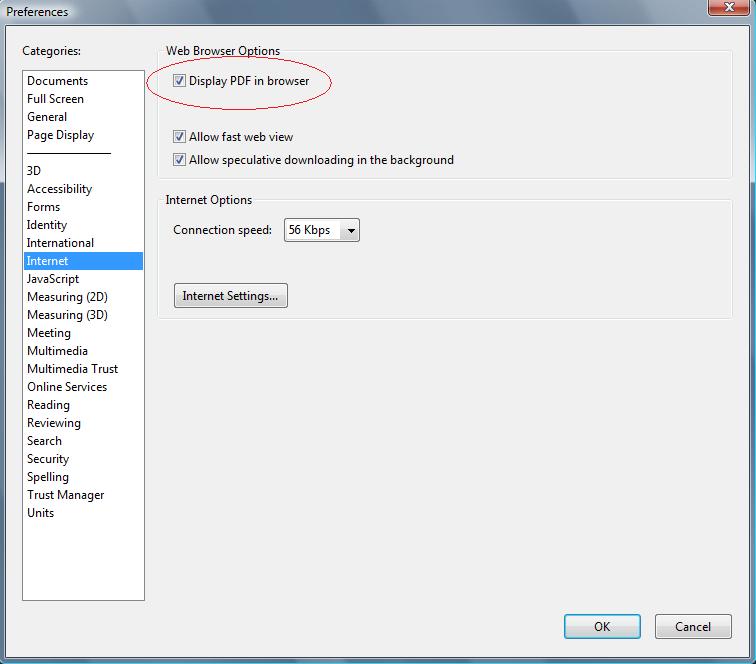
- Click on the Internet category on the left pane.
- Uncheck and untick the check box for Display PDF in Browser.
- Click OK when done.
- Restart the computer.
The next time you download a PDF file, it will auto open in Adobe Reader instead of IE, Firefox, Opera, Safari or other web browser.
Related posts:
- Disable Automatic Opening or Saving of Downloads (Re-enable Always Ask Before Check Box)
- Adobe Acrobat Reader 7 Standalone Installer Full Download
- Disable FireFox Tabbed Browsing Scroll Arrows and Scrolling Tabs Feature
- Recover and Reopen Accidentally Closed Tab on FireFox Web Browser
- Adobe Reader 8.1 Full Version Installer Free Download for Vista and Office 2007


I switched it off (adobe preferences -> internet -> untick display pdf in browser)
Now I want to enable it again, but when I close and restart Adobe Reader, the setting is not persistent!
Thank you. This fix still works in IE8 and is just what I needed.
You can Google "Disable PDF viewing in Firefox" with the quote marks, to find an article to make PDFs be saved in Firefox. I think disabling the plugin from Adobe does the same thing?
Thank you…I was so sick of pdf opening up anytime I clicked on something..
Adobe Acrobat has become such a crappy piece of bloatware. I can never figure out why companies automatically think making programs bigger is a good thing.
And what I need to set, when I want to save pdf instead of immediately opening in adobe reader? What to configure – windows7, IE8 or Adobe 9.2 ?
THANK YOU! That was driving me crazy!
I had previously disabled all PDF related add-ons before I read your advice and solved my problem. I had to re-enable them because having them disabled was causing IE to lock up.
MUST Do this to Disable PDF from Opening in Web Browser on IE7 (windows Vista):
-Open web browser IE7 > Tools >Internet Option >
Programs > Manage ADD-ons
-Then select Disable Adobe-PDF
-Restart IE7
-Done!
It still display "Adobe-PDF" on Menu bar of browser IE7.
(my is Vista, IE7 and Adobe 8 Pro)
[...] hatte, googelte ich nach der Lösung und fand sie dann auch – wie sollte es anders sein – auf einem Blog. In englisch steht dort geschrieben, dass man diese Eigenart nicht im Internet Explorer abstellen [...]
Ik gebruik Internet Explorer 7 en laat mijn pdf's ook in Adobe Reader openen wanneer in op internet een link naar een pdf-file aanklik.
Alleen opent er dan een leeg venster danwel tabblad (ligt aan hoe de instellingen bij tabbladen staan), dat ik daarna weer moet sluiten. Dit is erg irritant.
Gebeurt dat ook bij u?
thank you. this was very helpful