Feb 8, 2007
My Digital Life Editorial Team

Disable or Turn Off Windows XP Security Center Permanently

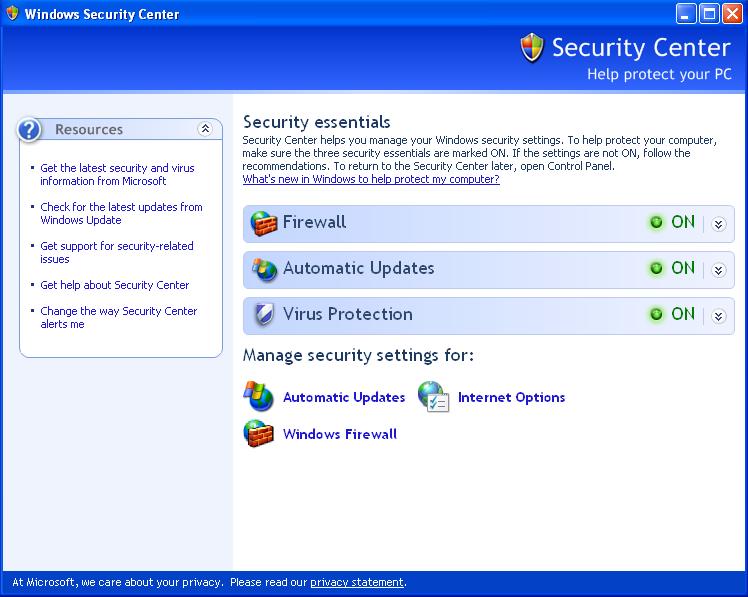
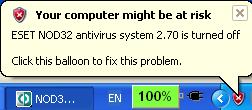
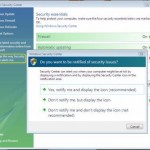
Windows XP has a built in security center that monitors the activities or existence of Automatic Updates, Windows Firewall and virus protection provided by third party anti virus software. When one or more security component do not been installed, or been disabled or turned off, or not working, Windows Security Center will highlight the section in yellow or red for warning and critical attention. Security Center service will also pop up a warning message with red or yellow icon that your computer might be at risk at notification area (system tray).

Windows XP Security Center

Your computer might be at riskSecurity Center in Windows XP can be disabled or turned off so that the system will not monitor or check whether or not the antivirus software existed, properly installed and running, or whether the firewall and Automatic Updates been disabled or bypassed.
  1. Click on Start button, then select Control Panel.
  2. Select “Administrator Tools” (if you don’t see it, double click on “Performance and Maintenance” first).
  3. Double click “Services”.
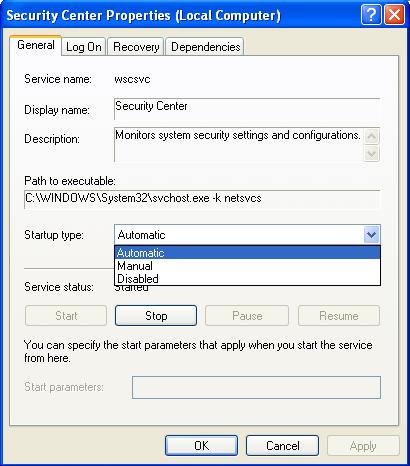
  4. Find and double click on the service named “Security Center”. Alternatively right click on “Security Center”, and select “Properties” on right click menu.
  5. In the “General” tab, beside the “Startup type:”, change the setting from Automatic to “Disabled”. This will permanently disable Security Center forever, even after you reboot and restart the computer system.

    Disable Security Center Service

  6. The click on “Stop” button at the bottom of the dialog window to stop Security Center immediately during current log on session.

After disable the Security Center, you won’t be any security warning (Your computer might be at risk, and etc) nag again. By turning it off, your system may be expose to virus, malware and spyware threat too if your anti virus program is not functioning unknowingly or accidentally.

To enable or turn Security Center back on, simply select “Automatic” at step 5 above. If you want to run Security Center for a while or immediately after set to “Automatic” as Startup type, click on “Start” button.

Related posts:

  1. Turn Off or Disable User Account Control (UAC) in Windows Vista
  2. Disable or Turn Off (Or Enable and Turn On) Windows Vista Internet Explorer 7 (IE7) Protected Mode
  3. Disable and Turn Off (or Enable or Turn On) Data Execution Prevention (DEP) in Windows Vista
  4. Protects and Check PC for Vulnerabilities with Windows Live Safety Center
  5. Windows Live Safety Center Review Redmondmag

33 Comments

  • thanks a lot for the info

  • thanks a lot for the info very useful

  • Thanks

    My computer start very slow due to this problem.

  • Thank you so much! Your information is clear and easy to understand and extremely helpful! There's nothing more frustrating than trying to download third-party software and you get the message saying you need to disable, or uninstall windows antivirus or firewall software before continuing and then not knowing what to do. I was beginning to think it was impossible to do, but you have proved me wrong. Thanks, again, for all your help!!! Good times to you!

  • THANK YOU!!!!! That was SOOO easy I really thought my computer was F#@*ED. THANKS AGAIN!!!!

  • Thank you for the easy to follow instructions. I’m looking to build a computer and write a program just for controlling my A/V equipment and wanted it to run with no keyboard or mouse just with a remote control. So this will work great for not having to install an antivirus that would require interaction at times.

  • THANKS SO FUCKING MUCH!!!! it wasnt even letting me use the internet

  • thanks for the info on turning off the security center.

  • thanks for info but that side bar is soo buggy fuck atleast give option to disable it its just like windows security alert

    its soo annoying i cant even read properly put it in buttom atleast damn i am burning

  • Hey guys, a lot of problems you are having with Security Center may not actually be Security Center, but a virus that is masking itself as Security Center. Very common indeed. You can usually get rid of it by starting your computer in 'safe mode' with networking, go on line to http://www.malwarebytes.org and download and install this software. Once you clean up your system, download Fire Fox and stop using Internet Explorer. I got so many viruses before doing this, even though I had updated virus protection. I haven't had one in over a year since dropping IE.

  • @Banderdragon:

    The reason is very simple. Unchecking the boxes did not help. After a reboot the "ballons" re-appeared.

    The described solution is great. Thanks a lot!

    Cheers

  • Thanks for this post. This information was greatly helpful.

  • I realy dont know if my computer is ok or not but anyway thank form ALBANIA

  • Brilliant!!! Thanks for the info!

  • Thanks a lot! It really helped.

  • I'm also having problems turning off Security Center. I've performed the steps and it is still coming up and preventing me from using Internet Explorer. I had to create a separate user just to get on the internet to look for answers. Security Center properties says disabled, but it is still plaguing my taskbar. I have Norton and it is up to date. I think Security Center is detecting all the files Norton has in quarantine. Does anyone know how to fix this? Is there a process that can be manually turned off from the task manager? I would actually like to use the internet I pay for every month.

  • A big thanks!

  • my services don't have security center …

    what shuld i do plz rpl…

  • Bravo

  • My windows security alert was stopped. This web site help me to turn on security alert. Thanks.

  • tried what u said but still getting the alerts.i'm trying to instal norton antivirus but security centre is blocking it.i had mcaffee antivirus but security centre wont recognise it and its constantly showing those annoying alerts! considering just taking a hammer to my pc lol

  • Hello,

    I performed the steps as mentioned above, but it did not work. Please advice.

    Regards,

    Raj

  • vielen dank hat geholfen.

  • [...] is called "Security Center" Here are two links that should help you… The first one Disable or Turn Off Windows XP Security Center Permanently

  • I installed Nortorn Antivirus 2008 and it fixed my issue:)

    so try that guys.

  • Thanks for your straight forward instructions, I wanted to do the opposite, and came across this in a google search. Has been the best straight forward help, i have found to date.

  • I hope this works- SP2 has been screwing up my MMORPG play and it's the Windows firewall that continues to turn it itself back on that appears to have been the culprit. Thank you for the tip.

  • Mas, em fazendo essa alteração de automatico para desativado, o pc não ficará exposto a todo tipo de invasão???

  • Excellent fix! the one i was looking for. thanks alot for the simple & correct step by step process.

  • Hey thanks alot. I looked all over the web to try to disable security center and no one had it but you. And your method worked EXTREMELY well. Thanks alot i wouldnt have got it with this explanation.

  • [...] NAGGING, [...]

  • Great fix, but why not just go into the security center properties from the control panal and just "change the way Security center notifies me" and turn off all prompts? You can set it that it does not show any prompts.

  • I have tried the permanent method of patching and it worked quite nicely. However, when I tried to use it on another PC but wga-fix.exe did not change the host file. I discovered hosts wa s hidden and read only. I manually made it read write and ran host fix it again became read only and hidden and did not change. I tried to change -h -s -r attribute from command line it worked but again I tried to manually edit it with notepad. But when I try to save it gives error and hosts again becomes read only and hidden and creates a backup file. I tried to discover what utilty is protecting it i could not also i am logged in as administrator. There was spyware blaster on the system which I know protects the hosts file but even after removing it it does not help. I also disabled AVG anti-virus and zone alarm but the file still is protected and cannot be changed. How do I remove this protection. I am sure the protection is in the XP itself and not some hidden program do you have an idea how I can unprotect it?

Leave a comment

Notify me of followup comments via e-mail. You can also subscribe without commenting.

Subscribe

Free email subscriptions
Get latest updates in email for free:

Translate This Page