Disable Allow This Webpage to Access Your Clipboard Pop-Up Warning Message in IE7
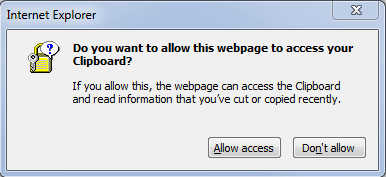
In you’re using Internet Explorer 7, there are several enhanced and tighten security features that have been incorporated into IE7. One of them been restricted Clipboard data access by websites and web pages. In Internet Explorer 7, both IE 7 installed on Windows XP or IE7 that comes together with Windows Vista, the behaviour occurs when you visit a website or webpage that tries to access the information stored in Clipboard’s memory, as Clipboard’s memory stored data can be sensitive and private. For security purpose, IE7 will pop-up a warning alert message as below:
Do you want to allow this webpage to access your Clipboard?
If you allow this, the webpage can access the Clipboard and read information that you’ve cut or copied recently.
You will then need to press or click “Don’t Allow” or “Allow” button to get pass the popup message.
This security feature can be disabled. To disable the pop up warning message about possible harmful or unauthorized Clipboard access, follow the steps below:
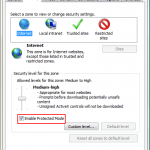
- Go to Tools -> Internet Options.
- Go to Security tab.
- Select “Internet” zone, then click on “Custom level…” button.
- Scroll down to “Scripting” section (at the bottom few).
- Under “Allow Programmatic clipboard access” option, check or select (tick) Enable. Default action for this option is Prompt, which cause the pop-up message whenever there is any attempt to access the Clipboard.
- Click Ok twice to exit from Internet Options.
Changing the preference to Enable for “Allow Programmatic clipboard access” option can increase security risk. You can set it to Disable to disallow all website’s access to Clipboard’s resident data. However, the better and more secure alternative is to edit the “Allow Programmatic clipboard access” setting for “Trusted sites” zone (steps same as above, only that you select “Trusted sites” in step 3 instead of “Internet”), and add the websites that you trusted and selected into Trusted sites zone.
Related posts:
- Gmail Email Message Corrupted Error
- Internet Explorer 7 Pop-Up Blocker Blocks Script Generated Drop Down or On Page Input Dialog Boxes
- Access and Stream Your Videos, Musics, Photos, TV and Other Medias Remotely with Orb
- Disable and Remove Windows Genuine Advantage Notifications Nag Screen
- Disable and Bypass MegaUpload Country Download Slots Limit


This also work with IE8, saved a bunch of time.
thank you so much.
You have a mistake in your article: "Trusted sites" zone is only for sites that start with "https". Therefore this cannot be used for sites like msn.com etc. Please advise.
I unchecked the box saying "Require Server Verification for all sites in this zone" while making additions to trusted sites. Is there another way?
You've just saved me thousands of clicks – thanks so much!
Works like a charm! thanks dude
If this didn't work, don't forget to check in your 'Trusted Sites' or 'Intranet'.
Thanks a lot..
also applies to IE8!
kind regards
Thanks
That helped me to fix it
Thank's !!!
Peace my man!
Thanks dude…
Thank you
worked 4 me!!!!! great…thnx
I've just spent half an hour trying to figure out what that little prompt was that I accidentally dismissed with a keystroke. It must have been the prompt to disallow access to the clipboard.
Now I can't re-enable it on this page, and all the work I've done to get to this page (setting up a specific search in order to send a message to a subset of people on an internal list) is lost. Plus the time spent trying to figure it out.
A string of expletives to whoever designed this irreversible "feature".
Thank you so much, I am using a campus computer and they have alot of security features enabled. I was having trouble getting to a homework page that is due in 20 minutes, so you definately saved me.
Thank you. Spent an hour looking for this.
Working fine, Thanx allot.
great!! thanks for the tip.
I was not able to update my wiki page on my work PC because this pop-up kept coming up even after I clicked yes. This fixed the problem, thanks!
Thanks a lot for your advice……….
Thanks so much
worked like a charm, thank you for the advice
Thanks for letting me know! I accidently clicked to disable it.
re: IE7
Hello,
I downloaded IE7 and since so cannot access a certain website, I am not sure yet of all websites that require allow programmatic clipboard access. I have done the instructions on this site http://www.mydigitallife.info/2006/09/25/disable-… and it did not work. I have rebooted, etc… so please if you can help me ;0) here is the site that I am trying to access <a href="http:// wwww.reflectionscafe.ca/” target=”_blank”>http:// <a href="http://wwww.reflectionscafe.ca/” target=”_blank”>wwww.reflectionscafe.ca/
Thank you, Andrea ;0)