
Firefox 4 is the newest version of web browser from Mozilla Firefox open source browser series, which features support for GPU hardware acceleration and various enhancements. As Firefox 4 is a major version upgrade, add-ons, plug-ins or extensions that have not been updated to support Firefox 4 will not be compatible with Firefox 4.
Firefox 4 has built-in plugins and add-ons compatibility check which automatically prevents and stops incompatible add-ons, plug-ins or extensions from been installed onto the browser.
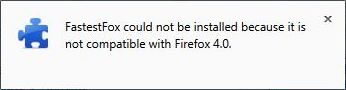
By default Firefox shall reject and will not allowed any incompatible extension, addon or plugin to be installed or enabled and turned on. Despite been labeled as incompatible with Firefox 4, some plugins, addons or extensions may be able to continue to work properly in Firefox 4.
If you want to try out, download and install incompatible add-ons, plugins or extensions into Firefox 4, here’s the trick to completely disable and turn off Firefox 4 extensions compatibility check so that incompatible or unsupported extensions can be installed or enabled (and turned active).
- In Firefox 4, type about:config into the address bar, and hit Enter or Go.
- If promoted with a “This might void your warranty!” warning, click on I’ll be careful, I promise! button.
- Right click on the window, and select New -> Boolean.
- Enter extensions.checkCompatibility.4.0 as the preference name.
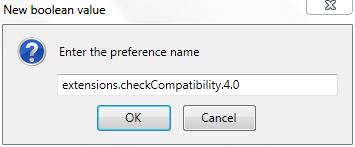
- Set the value of “extensions.checkCompatibility.4.0” to False.
- User can now install or re-enable incompatible extensions. Firefox 4 will allow end-user to select the option to install any for incompatible extensions, plugins or add-ons.

It’s important to understand that not all extension will work perfectly in new version of Firefox, especially when it’s been tagged as incompatible. Incompatible extensions, plugins or add-ins may cause crashes immediately after installing or enabling, or after a future application upgrade.
Note: The hack to disable compatibility check on Firefox 4 works on both final RTM and pre-release RC (Release Candidate version), as the RC effectively replace any existing Firefox installation.
 Tip and Trick
- How To Download HBO Shows On iPhone, iPad Through Apple TV App
- Windows 10 Insider Preview Build 19025 (20H1) for PC Official Available for Insiders in Fast Ring – Here’s What’s News, Fixes, and Enhancement Changelog
- Kaspersky Total Security 2020 Free Download With License Serial Key
- Steganos Privacy Suite 19 Free Download With Genuine License Key
- Zemana AntiMalware Premium Free Download For Limited Time