
Does your data and files are important to you? Most likely very important, but how often do you backup? Backup is useful when the files or data have been accidentally deleted, loss or corrupted. EASEUS Todo Backup is a free backup software which able to perform backup, restore and disk cloning or imaging to a file. It allows the users to back up whole PC including operating system, data, applications as well as settings.
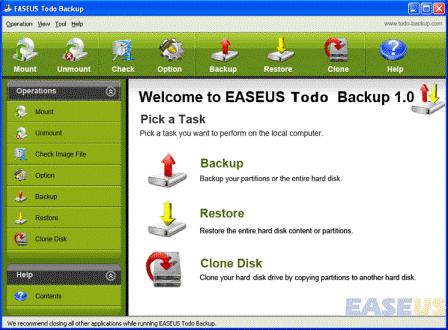
EASEUS Todo Backup includes the following features:
- Backup entire system partition including the system state and all files to an image file.
- Backup whole disk including the operating system and all data to an image file.
- Restore backup up image within minutes.
- Create a Bootable CD and restore when there is a boot failure.
- Restore system partition from Bootable CD/DVD.
- Clone disk to another one with fast file-by-file clone method.
- Mount the backup image file as a virtual physical partition to explore or copy files in it.
- Unmount the virtual partition.
- Check backup image file to make sure the system state, disk or partition can be restored successfully.
The EASEUS Todo Backup is able to run on Windows 2000 Professional, Windows XP, Windows Vista, Windows 7 and Windows Server.
Download EASEUS Todo Backup.
Update: EASEUS Todo Backup 2.0
 Tip and Trick
- How To Download HBO Shows On iPhone, iPad Through Apple TV App
- Windows 10 Insider Preview Build 19025 (20H1) for PC Official Available for Insiders in Fast Ring – Here’s What’s News, Fixes, and Enhancement Changelog
- Kaspersky Total Security 2020 Free Download With License Serial Key
- Steganos Privacy Suite 19 Free Download With Genuine License Key
- Zemana AntiMalware Premium Free Download For Limited Time