Login / Logon to Windows Automatically Without Entering Password
When Windows boots up, users may be prompted with a welcome page with a button list of all available user accounts’ name, where computer users are expected to click on his or her username, and then key in the correct password in order to log into Windows desktop system. Or you may simply required to enter a user name and password to enter Windows environment. The log on screen is good from security perspective, however it’s kind of nonsense when you’re the lone user of the computer.
If you’re the only single user who access the computer and does not share with other users, it’s possible to configure to set Windows XP, Windows Vista, Windows 7, Windows 8, Windows 8.1, Windows 10 or later to logon automatically on every system startup through User Accounts “netplwiz” applet, without even having to enter the password. Just follow the following guide to disable the requirement to enter username and password.
In Windows XP, click on Start -> Run, and enter control userpasswords2 in the “Run” box, then hit Enter.
In Windows Vista and Windows 7, click on Start button, and type netplwiz into the Instant Search box, then press Enter.
In Windows 8, Windows 8.1, Windows 10 or later, press Windows + R keyboard combination, and enter netplwiz in the “Run” box, then hit Enter.
If User Access Control (UAC) confirmation dialog box pops up to ask for permission, click Continue or enter user name and password for an administrator account.
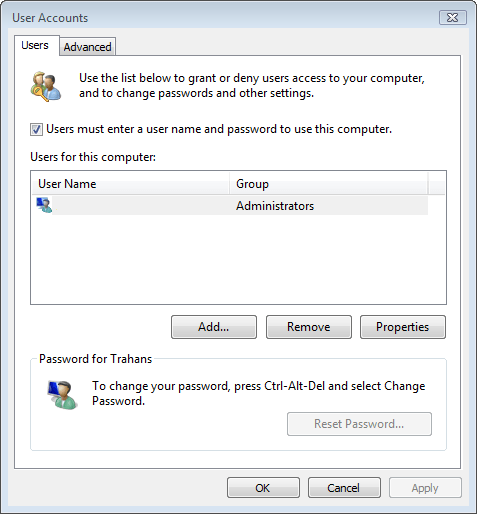
At the User Accounts dialog window, select the user account which you want Windows to automatically log into among the list of all the users on your computer displayed.
Uncheck and clear the Users must enter a username and password to use this computer” option, and click OK or Apply button.
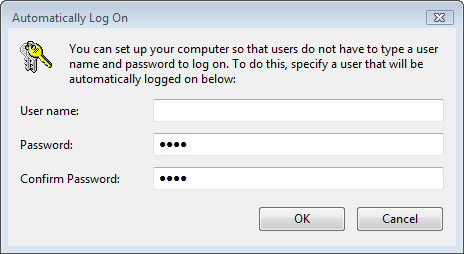
In the Automatically Log On dialog window, input the user ID and password for the user account that you want to Vista to automatically login when starting up, and click OK when done.
Click OK again to exit.
Restart computer if necessary.
The next time your computer boots up, it will automatically logon to the Windows with the user account selected.
LK is a technology writer for Tech Journey with background of system and network administrator. He has be documenting his experiences in digital and technology world for over 15 years.Connect with LK through Tech Journey on Facebook, Twitter or Google+.