
Feb 20, 2009
My Digital Life Editorial Team

AuthenTec Fingerprint Sensor Driver (32-bit and 64-bit) for Windows 7

AuthenTec fingerprint sensor is one of the few devices that Windows 7 does not automatically provide compatible driver for immediate recognition and use upon installation, or after searching via Windows Update. Instead, the AuthenTec fingerprint sensor will appear with other devices with exclamation mark in Device Manager.
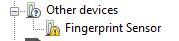
AuthenTec FingerPrint Reader Driver

AuthenTec fingerprint sensor is used by many OEM notebook and desktop PC manufacturers as biometric authentication module, including Lenovo (IBM ThinkPad), HP, ASUS, Acer, Dell, Fujitsu, Fujitsu Siemens, LG, Samsung, Toshiba and many others. In Windows 7, an all new Windows Biometric Framework has been introduced to make integration easier and more consistent to help deliver enhanced reliability, compatibility and usability of fingerprint-based solutions.

For computer owner with AuthenTec fingerprint sensor (including AES1610, single chip match-on AES2810, and new AES2550), AuthenTec has released that beta driver that supports and compatible with Windows 7 for the fingerprint sensor.

Download AuthenTec Fingerprint Reader Driver for 32-bit (x86) Windows 7: w7wbf32.exe

Download AuthenTec Fingerprint Reader Driver for 64-bit (x64) Windows 7: w7wbf64.exe

After installed, restart the computer. The TrueSuite management user interface to enroll or manager your fingerprint authentication is located at C:\Program Files\WIN7TS\TrueSuiteApplication.exe.
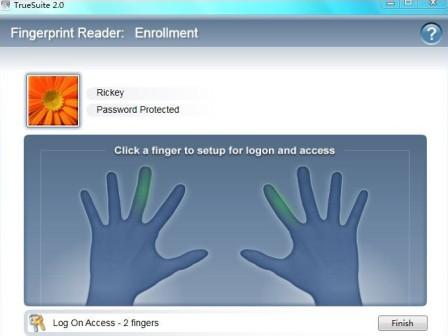
AuthenTec Fingerprint Sensor TrueSuite

Related posts:

  1. UPEK TouchStrip TCS5 Fingerprint Sensor Improves Netbook Security and Accessibility
  2. How to Rollback Driver Update in Windows Vista
  3. New Lenovo P960 Handset Using Atrua’s Fingerprint Solution
  4. DriverAgent Free 3-Day Driver’s License with Username and Password
  5. BioLock Fingerprint Deadbolt Lock

41 Comments

  • thanks alot

  • thanks

  • Why post links that are useless? No one here has gotten any help from this merry go round. If your not going to support your product, why not say so?

  • the security is the most tight here

  • i cant download these softwares, why??

    can u forward the correct link to my mail??

    any help???

  • Sorry my igles! : D

  • http://www.suporte-semptoshiba.com.br/downloads/i

    Fingerprit for toshiba 32 e 64 bits in this site.

  • i can't use fingerprint for LG

  • My HP Compaq 6510b is running with Windows 7 with all necessary drivers but this biometric thing works only when i lock my machine and unlock again. But after a clean boot this authentication never shows up !!! :(

  • Drivers are available on the Fujitsu website. Go to http://www.fujitsu.com/us/ and follow the support tab until you get to the downloads. You will need to choose a device family and model number.

    I do not have the ..WIN7TSTrueSuiteApplication.exe directory or files. Can they be downloaded somewhere?

  • new link is broken, please fix for win 7 32bit!

  • Yes, it's really frustrating that these links are dead.

    If anyone can find an alternate source it would be greatly appreciated.

  • The links are dead for this, and I really need it ASAP.

    Anyone know any other location for this freeware?

  • THE LINK IS BROKEN

  • tha link is broken

  • I have Win 7 Pro (64bit), I cannot get access to the link to download. The link is broken

  • This works, and I have registerd my fingerprints. But how to change the settings to use the fingerprint sensor to log on to windows. This was automatic on XP. Help?

  • the link is not working!

  • i have a problem with my lenovo it dose not see the senor tht is wht it says so how do i fix or wht do i need to load i already tryed gettin de fringer print sensor drivers but it didnt work

  • Hardware: AES2501A

    Software: Windows 7 x64

    Hi, Worked for me but I had to delete the device / drivers for the AES2501a completely from the PC & then reinstall them from w7wbf64.exe – hope this helps.

  • This is wonderful, worked for my Dell studio 1536 Finger Print Reader.

    Note that you must first uninstall the current drivers provided by Dell before installing the new software.

    Install the program from the Authentec directory created after driver install in Program Files then restart your system.

  • Hi… i am using a dell 17(new) laptop with fingerprint reader… it is managed througt DIGITAL PERSONA. software… it was fine on win vista but i cant use it on win7… it asys there are no drivers for fingerprint reader whin i tried installing digital persona software… I hav installed all the drivers n i can log on wo indows wit my fingerprint… but cant use it to manage anything else like web accounts personal files etc… I cud do all this before on vista but now i cant… please hepl me reguarding this matter…

  • yes ! its me again.

    on my hp8510p with authentec 2501a previous beta drivers were succesfully updated by ms update optional update and after reboot there are no saved fingerprints – you have to log in on your passowrd and than in biometric devices chcange the fingerprints details and after a password for user a new applicaction authentec truesuite starer is launched – you register new fingerprints and it works fine. for now on authentec www there are no DL links so you have to check your ms update panel for driver (over 30MB update).

  • today i found optional update driver on ms update list for authentec 2501a on win7 32bit… installing now… maybe its official already ?

  • i tried also. but nothing happens when i double click on the C:Program FilesWIN7TSTrueSuiteApplication.exe.

    Any other alternative?

  • Awesome! Works with my fingerprint sensor AES1610 on Windows 7 64-bit. HP laptop tx1119us.

    Be sure to take note that TrueSuite is in 'Program FilesWIN7TS…', it tripped me up a little having to search for the exe.

  • This (64-bit version) worked fine for my AES2501A installed on a HP laptop, however when i put the PC to sleep and my fingerprint is asked it wont read, it'll just work in the startup.

  • Hi,

    according to AuthenTec's TrueSuite FAQ, only AES2550, AES1610 and "future PC sensors from AuthenTec" are supported. Bad enough, as I own a Compaq 6710b with AuthenTec AES2501A.

  • I think Ive got a Validty Fingerprint reader in my notebook. When I want to install the new driver for Win7 I also have to remove the prior one. The problem is that I cant find this prior version, so I cant delete it and install the new driver. Anyone got a solution?

  • Good Program.

    Help me a lot.

    Cheers.

  • I installed it but when I go C:Program FilesWIN7TSTrueSuiteApplication.exe. and try to open the file it will not load nothing pops up onto the screen at all

  • Thank you, thats work perfect

  • drivers from windowsupdate keep crashing TrueSuite, using 64 bit drivers solves this

    but the sensor cant read shit, trying to save some fingerprints doesnt work

  • I installed first and the fingerprint sensor does'nt work for the enrollment, then installed windows 7 from scratch and tried again, second time goes to runtime erros, uninstalled, installed again and same than first time: no success to enroll fingerprint. Searched again on google and found Protector Suite 2009 Preview by UPEK, installed, its driver doesn't work on mine (authentec aes2501a), then used the 7 driver only of this provided by authentec or windows update then worked! I enrolled 3 fingerprints and working awesome.

  • I installed the driver and run the program but it kept crashing everytime I tried to open it. Does somebody else have this problem. Or is it me that's doing something wrong.

    Thanks

  • [...] My Digital Life Besoin d’aide ?  Rendez-vous sur Forum-Seven [...]

  • works but have to remove prior driver first

    also get this error msg:

    the ordinary 345 could not be located in the dynamic link library comctl32.dll

    just have to hit OK about 4-5 times to get it to enroll my fingerprints

    any thoughts on this error?

Leave a comment

Notify me of followup comments via e-mail. You can also subscribe without commenting.

Subscribe

Free email subscriptions
Get latest updates in email for free:

Translate This Page