
Since Windows Vista, and in Windows 7, Microsoft has added Windows Aero support which among its features is Flip 3D, an application window switcher that switches between running programs in live streaming 3D view. With Flip3D, a shortcut to activate Flip 3D task switching process is also been added to Quick Launch Bar in Windows Vista, providing alternative to Win + Tab keyboard accelerator to activate Flip 3D.
If for some reason, the “Switch between windows” shortcut is lost from Quick Launch bar, or you want the Flip 3D shortcut to be placed on Desktop or other folder location, it’s always possible to retrieve and copy the Windows Switcher shortcut from %systemdrive%\Users\Default\AppData\Roaming\Microsoft\Internet Explorer\Quick Launch folder, as detailed in restore Flip 3D switch between windows shortcut tutorial.
For Windows 7 Taskbar who doesn’t want to add back Quick Launch bar, and want to pin Flip 3D icon to Taskbar instead, or user who lost all instances of “Switch between windows” shortcut in all user profiles, use the following trick to create a shortcut to activate and trigger Flip 3D windows switching (normal Alt-Tab program switching if Windows Aero is disabled).
- Right-click on any empty space on the desktop, and then select New -> Shortcut.

- In the “Type the location of the item” text box, enter the following:
%WinDir%\System32\rundll32.exe dwmapi #105
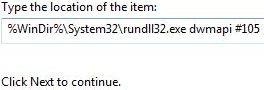
- Click on Next button.
- Enter a name for the shortcut, such as Flip 3D or Switches between windows.
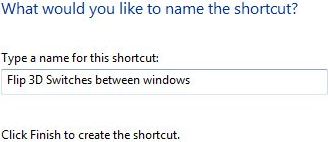
- Click on Finish button when done.
- A Flip 3D will be created on the desktop. Note that the icon for the shortcut created is the default file icon, which is pretty much very ugly. To change the icon, right click on the icon, and then select Properties. Click on the Change Icon button in Shortcut tab. Click Browse button, and then paste the following into File name text box:
%SystemRoot%\explorer.exe
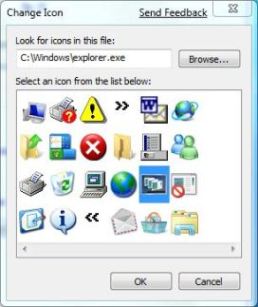
The windows switching icon is listed as one of the selection available. Highlight the icon and click OK to change the icon.
- Drag and drop the Flip 3D shortcut to anywhere you like, including Windows 7 Taskbar or Quick Launch Bar.
Alternatively, to pin the Flip 3D (Windows Switching) shortcut to Windows 7 Taskbar, right click on the shortcut and select Pin to Taskbar.
 Tip and Trick
- How To Download HBO Shows On iPhone, iPad Through Apple TV App
- Windows 10 Insider Preview Build 19025 (20H1) for PC Official Available for Insiders in Fast Ring – Here’s What’s News, Fixes, and Enhancement Changelog
- Kaspersky Total Security 2020 Free Download With License Serial Key
- Steganos Privacy Suite 19 Free Download With Genuine License Key
- Zemana AntiMalware Premium Free Download For Limited Time